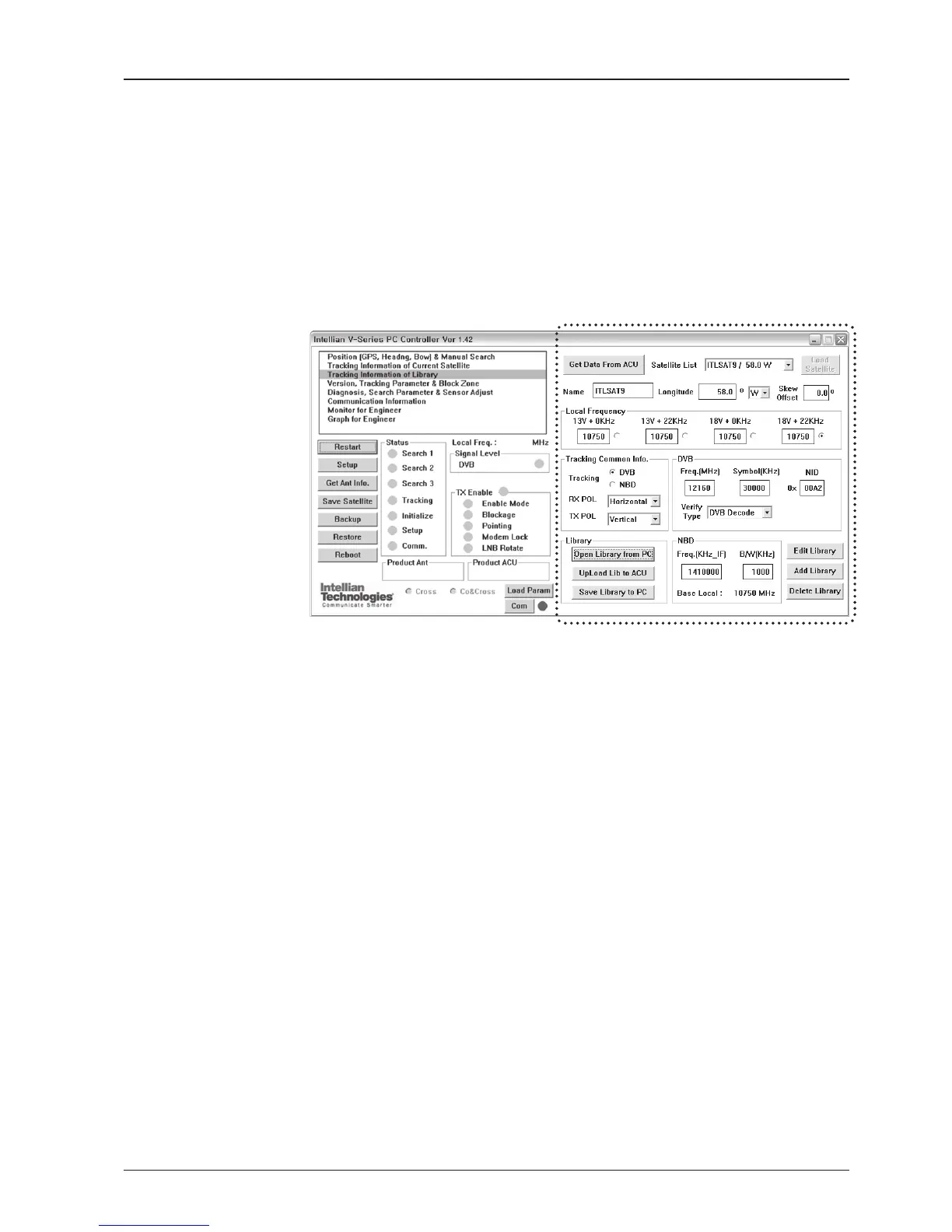
Tracking Information of Library
Open the pre-programmed satellite library le and upload it to the ACU.
Build your own custom library and save it to an external hard drive/PC.
Get data from ACU
- Get data from ACU: Obtain the pre-programmed satellite library le from the ACU
while the antenna is in SETUP mode.
Load Satellite
- Load satellite: Upload the pre-programmed satellite information in the library.
Library
- Open library from PC: Open the satellite library le from the supplied Intellian CD
or from the external hard drive/PC. (File format: *.ilf)
- Upload library to ACU: Upload the satellite library le to ACU.
- Save library to PC: Save the current library setting to the PC.
- Edit Library: Edit the satellite information of the selected satellite.
- Add Library: Add the satellite information as dened in the current settings.
- Delete Library: Delete the selected satellite from the library settings.
NOTE: It is required to click the “Save Library to PC” button after “Edit Library”, “Add Library “, or “Delete
Library” button is clicked. These functions are only available for ACU Version 1.07 or later.
Library information



 To Next Page
 Loading...










