FX-1/FX-1R Maintenance Manual
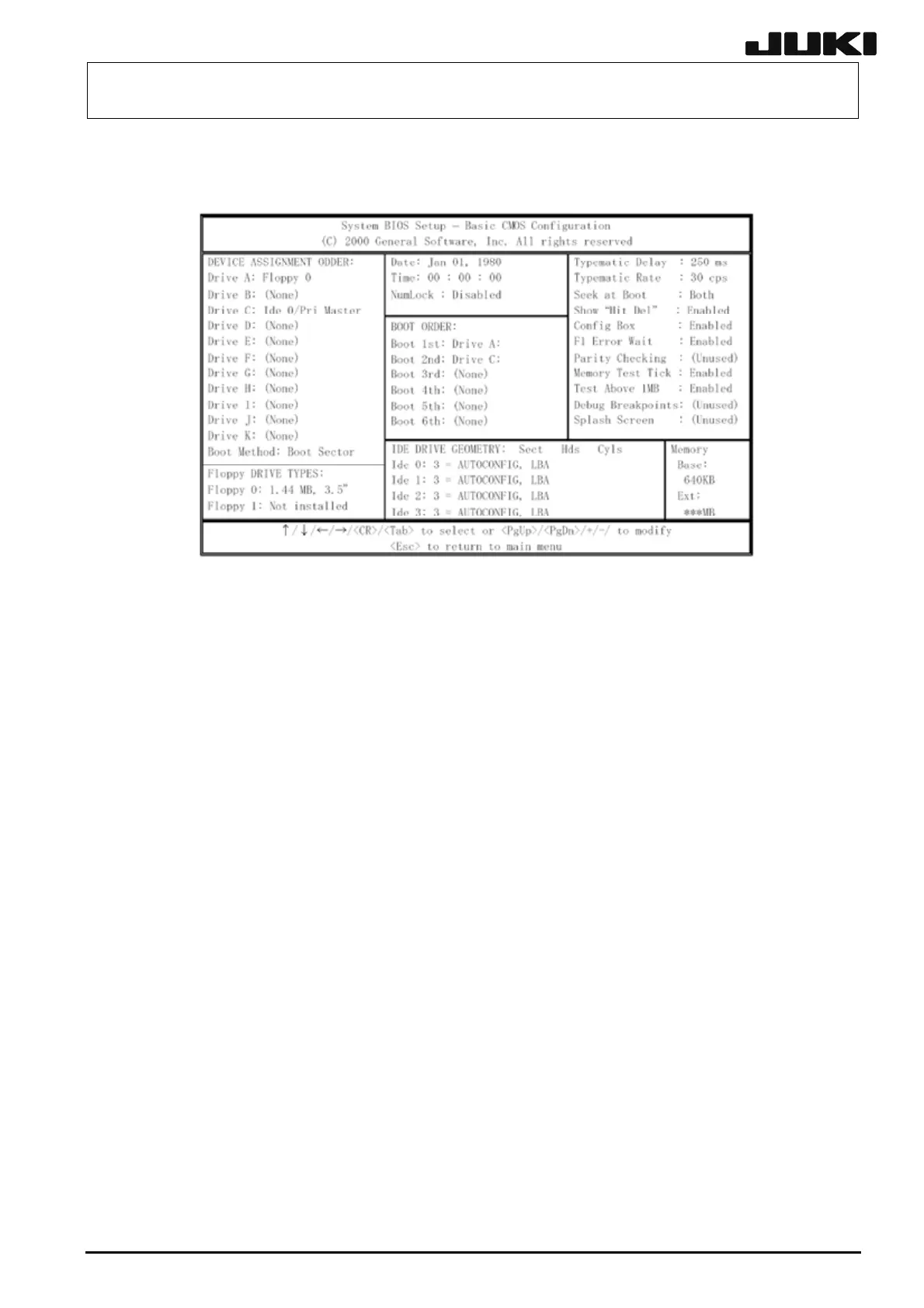
(2) "Basic CMOS Configuration" screen
The following shows the "Basic CMOS Configuration" screen.
The contents displayed on the screen show the default values.
(3) Changing the "BOOT ORDER:" field
Specify a search order of the boot drive.
Boot 1st: Drive A: →Boot 1ST: Drive C:
Boot 2nd: Drive C: →Boot 1ST: Drive A:
Change the settings as described above.
(4) Changing "Memory Test Tick"
Using the arrow key, move the cursor to "Enabled" of "Memory Test Tick" in the right portion of
the BIOS screen.
Change the setting as follows.
Enabled → Disabled
(5) Returning to the Main screen
Pressing <Esc> will return to the Main screen.
12-11
Rev. 2.00



 To Next Page
 Loading...