FX-1/FX-1R Maintenance Manual
3-3-6. Adjusting the HMS Height
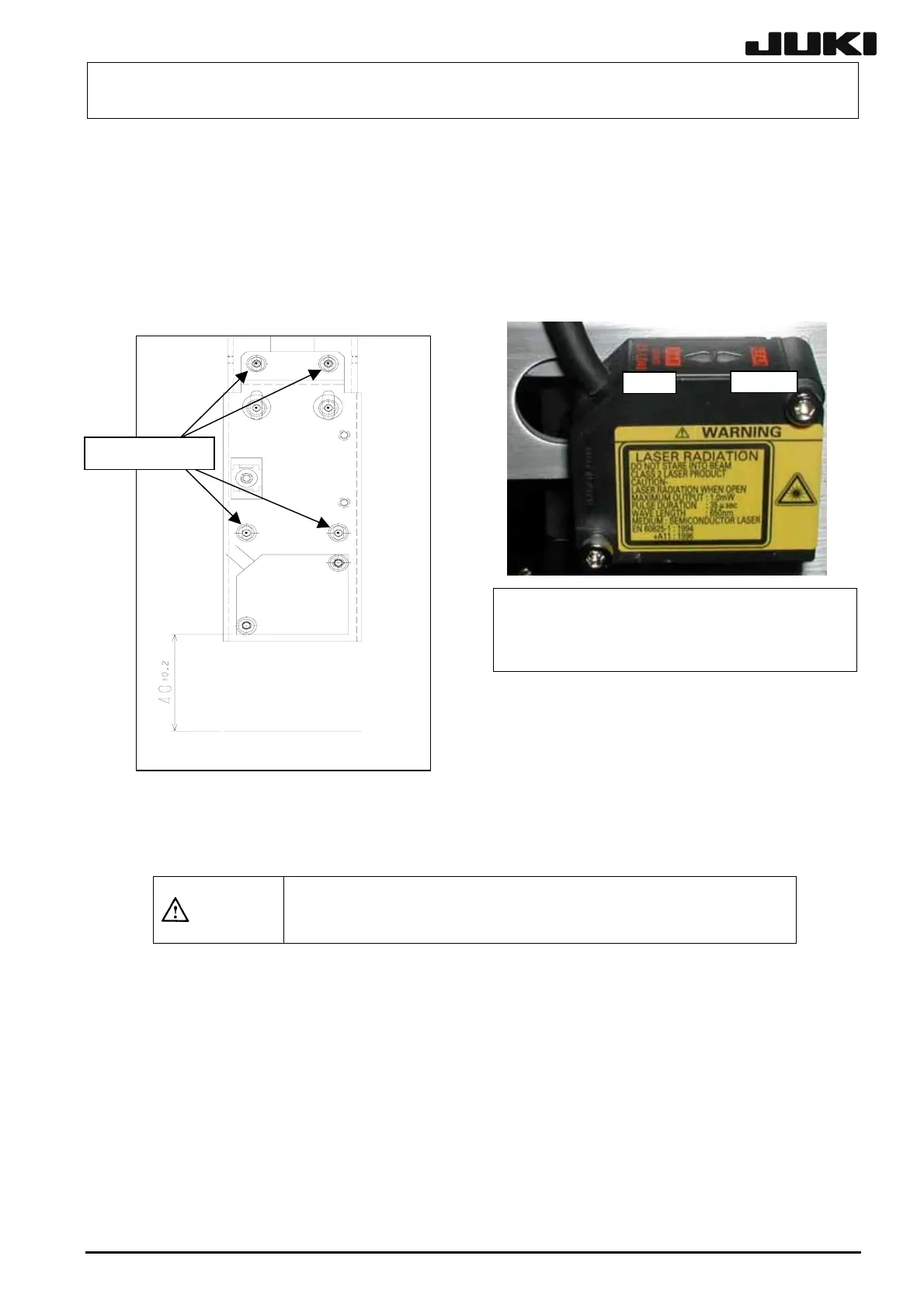
Move the HMS sensor to a point above the calibration block. Loosen the SEMS cap bolts at four
places so that the distance between the bottom surface of the height sensor and the top surface of
the calibration block becomes 40 ± 0.2 mm. At this time, check that both the FAR and NEAR
indicators are lit. When the specified distance is reached, secure the bad mark sensor with SEMS
cap bolts at four places.
NEAR
FAR
3-9
SEMS cap bolts
To
surface of the calibration block
Range indicator: lighting status
NEAR/FAR Both are lit.: Measurement center distance ± 1 mm
NEAR Lit.: Near distance side within measurement range
FAR Lit.: Far distance side within measurement range
NEAR/FAR Both are flashing.: Beyond measurement range
After the sensor height has been adjusted, input the MS parameters related to the bad mark sensor
offset. For details about how to input MS parameters, see “MS Parameters”.
CAUTION
To prevent personal injury, do not put your hand inside the machine
or your face or head close to the machine during operation of the
HOD.
Rev. 2.00



 To Next Page