Basic Operations 2 51
Moving the text to the
next line
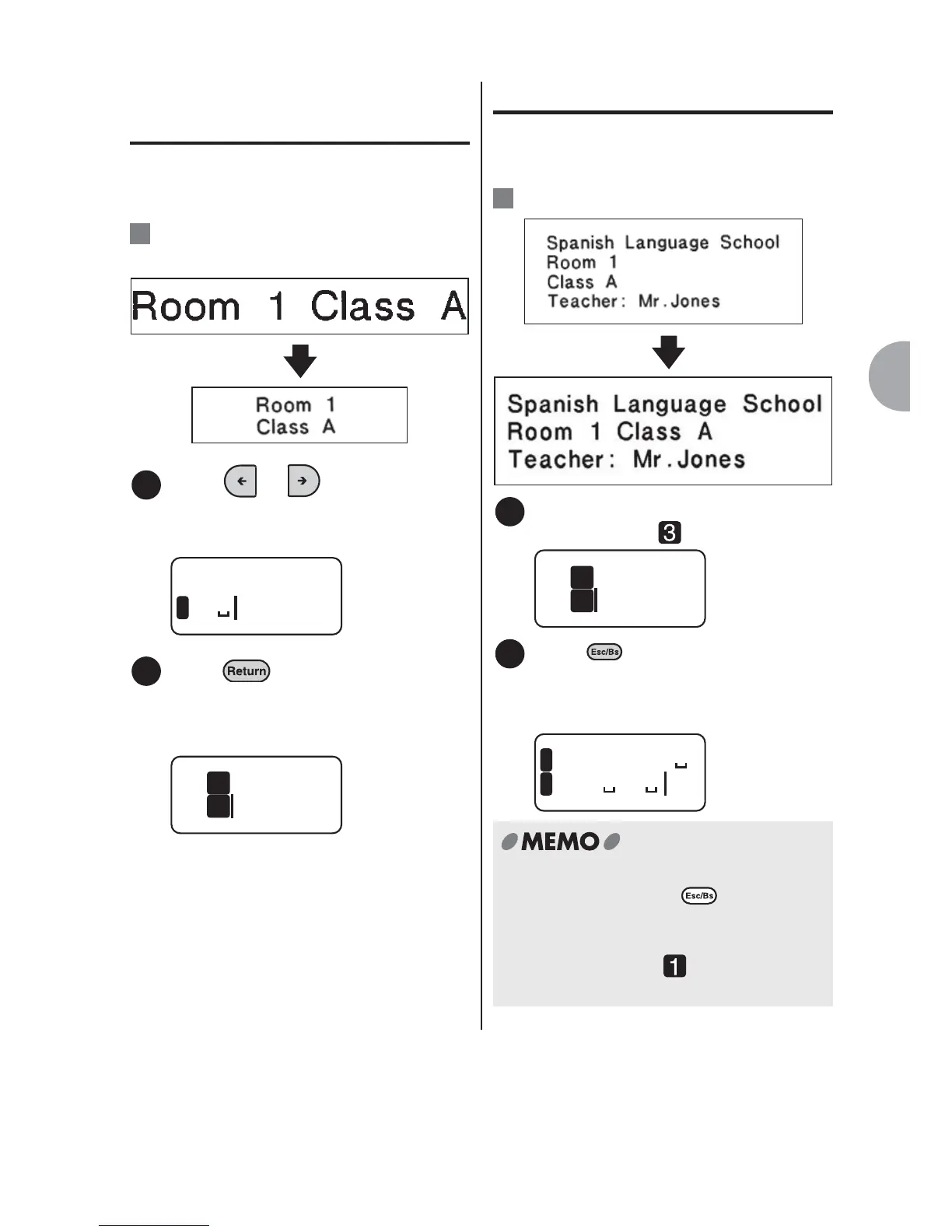
When you insert a line break in the middle
of the text, the characters to the right of
the cursor move to the next line.
:Dividing "Room 1 Class A" in two
lines.
Insert a line break.
Press or to move the
cursor to the right of the space
next to "1".
Press .
The line head icon appears at the
beginning of the second line, and
"Class A" moves to the second line.
Joining the two lines
Move the cursor to the right of the line
head icon to move the text to the upper
line.
:Joining the two lines.
Move the cursor to the right of the
line head icon .
Press .
"Class A" in the third line joins the text in
the second line. "Teacher: Mr. Jones" in
the fourth line moves to the third line.
Ex.
1
Clas1
1
2
Room
Clas
1
2
Ex.
Remove the
line break.
1
Room
Clas
2
3
2
om
anish
1C
2
1
x Place the cursor at the beginning of the
fourth line and press to move the
text in the line to the third line. The fourth
line will automatically be deleted.
x The line head icon on the first line of
the first paragraph will not be removed.



 To Next Page