54 Basic Operations 2
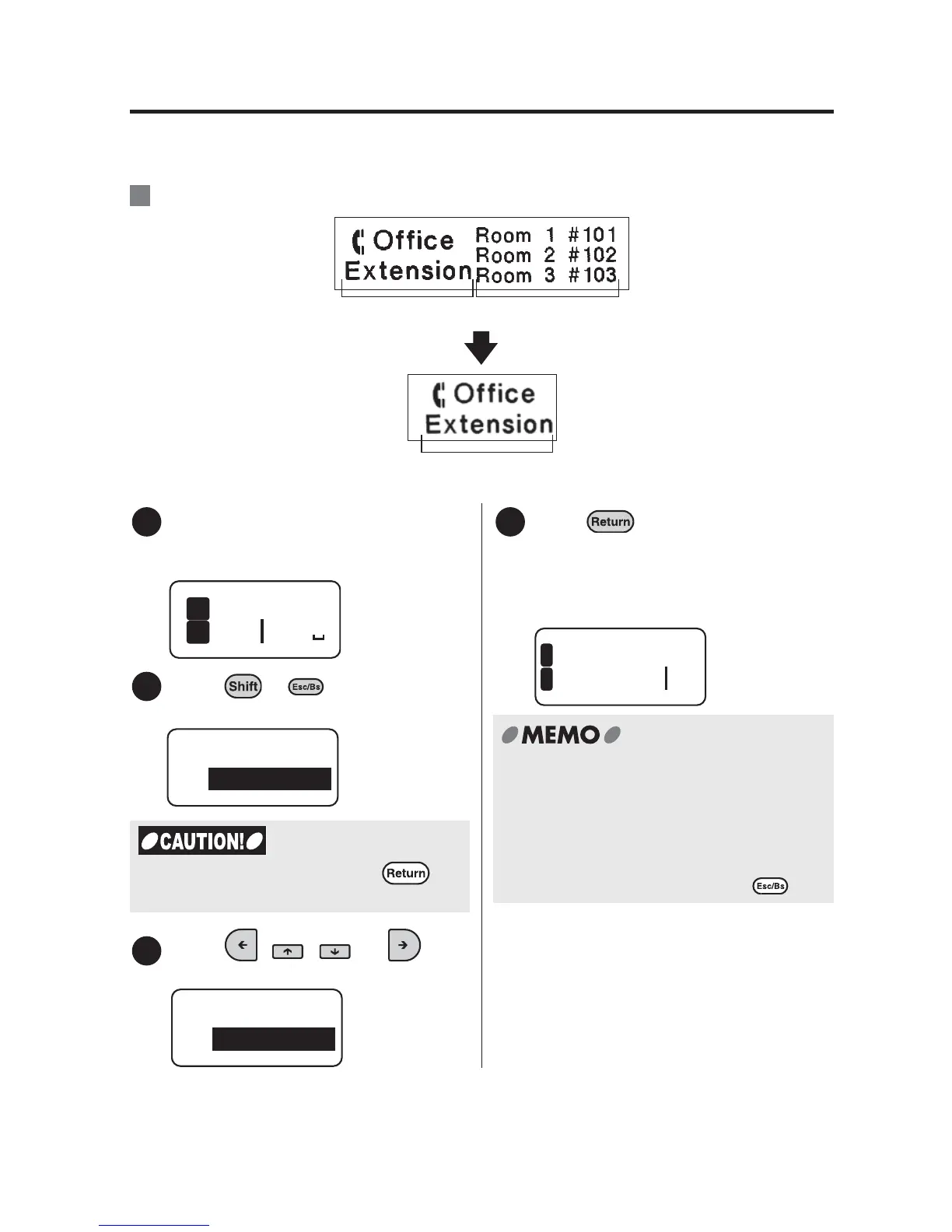
Deleting specific paragraphs
When you delete the unnecessary paragraphs, not only the text but also the attribute
such as the style and the text mode specified to the paragraph will also be removed.
:Deleting paragraph 1.
Move the cursor to paragraph 1.
Put the cursor in anywhere within the
paragraph you want to delete.
Press + (= Delete).
"Delete" menu appears.
Press , , , or to
select "Paragraph".
Press .
The display goes out for a moment, and
the paragraph will be deleted.
The display then returns to the text
enter screen.
Ex.
Paragraph 1 Paragraph 2
Delete paragraph 1.
Paragraph 1
1
Room
2
1
Exten
2
Delete
All
When you select "All" and press , all
the text you entered will be deleted.
3
Delete
Paragraph
4
ice
1
nsion
2
x Please note that when you select
"Paragraph" from the "Delete" menu, all
the text included within the paragraph
will be deleted.
x To cancel deleting the paragraph in the
middle of the operation, press .



 To Next Page