52 Basic Operations 2
Adding New Paragraphs
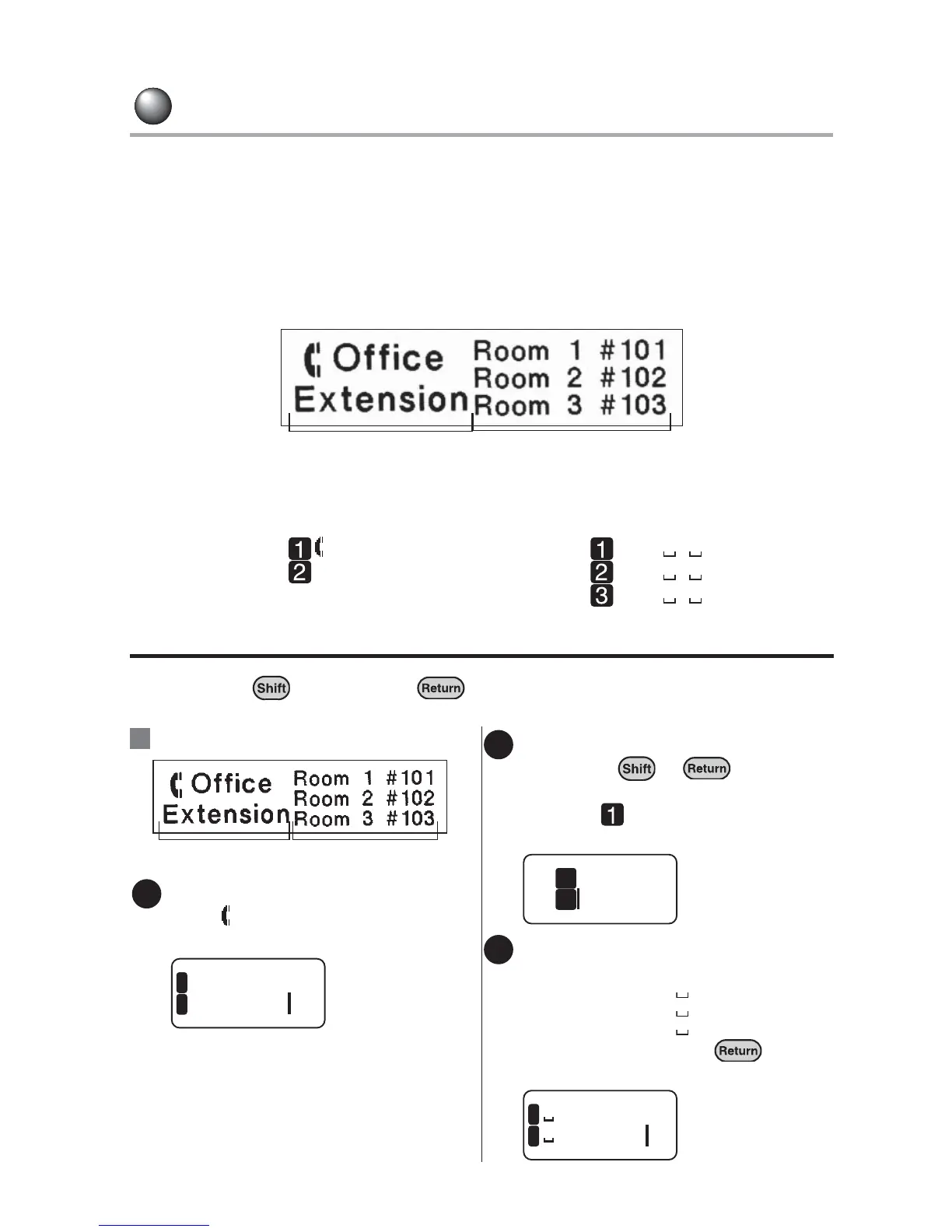
The label below consists of two blocks. Each block is called paragraph in this manual,
and each paragraph is made with a group of lines or a single line. By dividing a text
into several paragraphs, you can change the number of lines or the style of the text on
a paragraph-by-paragraph basis.
You can divide a text into two paragraphs at a maximum within one label.
A label with two paragraphs
The paragraphs are placed horizontally when printed, however, they are aligned vertically on
the display.
[On the display]
Starting a new paragraph/column
Hold down the key and press at the end of the paragraph to start a new
paragraph.
Paragraph 1 Office
Extension
Paragraph 2 Room 1 #101
Room 2 #102
Room 3 #103
:Inserting a text in two paragraphs.
Enter the text in paragraph 1.
Enter " Office" in the first line and
"Extension" in the second line.
Place the cursor at the end of the
text, press + .
A new paragraph is created. The line
head icon will appear at the
beginning of the new paragraph.
Enter the text in paragraph 2.
Enter the text as follows:
First line: Room 1 #101
Second line: Room 2 #102
Third line: Room 3 #103
To start a new line, press at the
end of the line.
Paragraph 1 Paragraph 2
Ex.
Paragraph 1 Paragraph 2
1
ice
1
nsion
2
2
Exte
2
1
3
#102
#103
2
3



 To Next Page