18 Getting Started
LABELShop
£
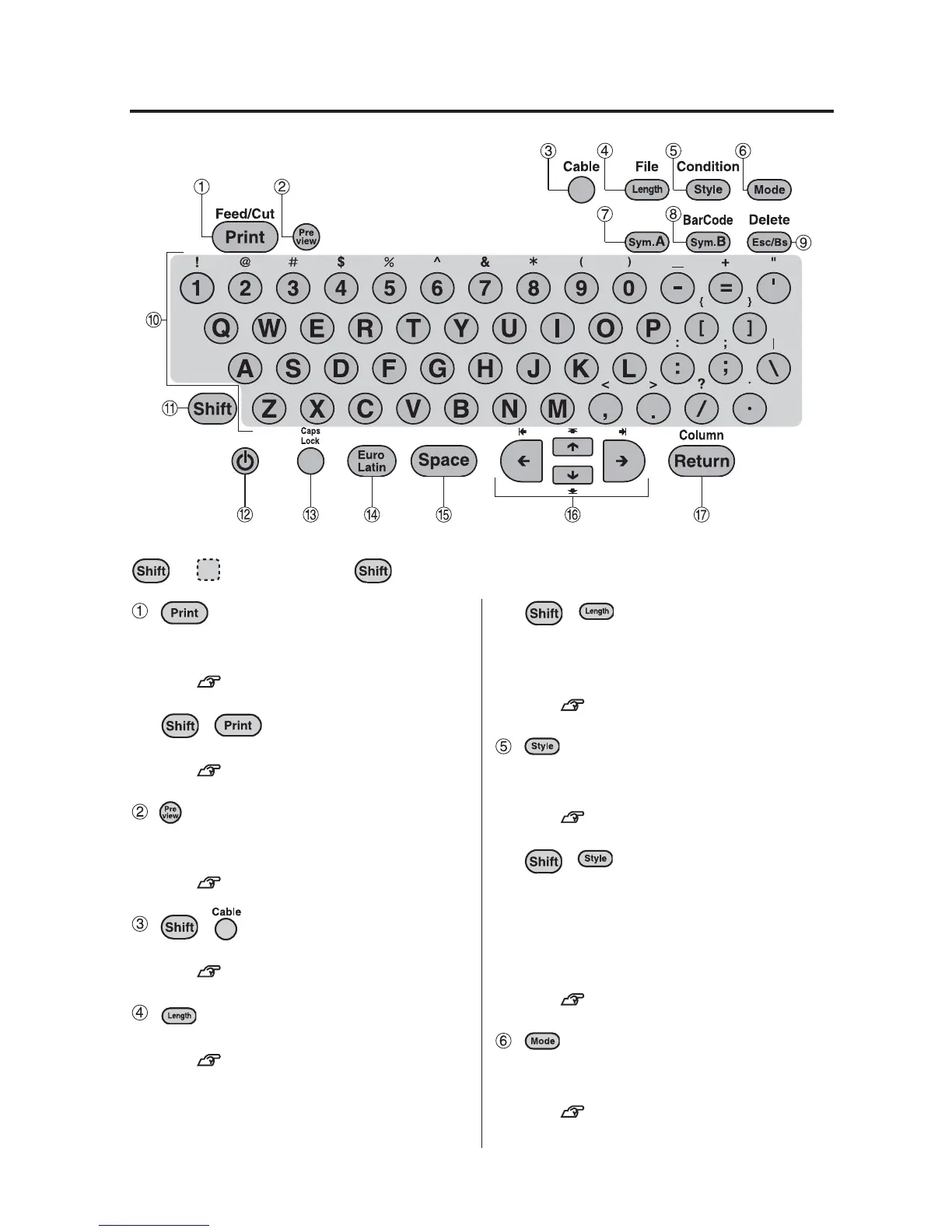
BEE3 Keys
(Print)
Prints the text you entered on the tape,
and cuts the tape automatically.
See p.13, 40.
+ (= Feed/Cut)
Feeds the tape 0.7", or cuts the tape.
See p.11, 31.
(Preview)
Shows the preview of the label by
scrolling the whole image.
See p.39.
+ (= Cable)
Enters the Cable print mode.
See p.56.
(Length)
Sets the length of the label.
See p.63, 72.
+ (= File)
Stores text you created.
Calls up or deletes the text you
stored.
See p.87.
(=Style)
Specifies font size, print direction, text
format, frame, or table format.
See p.64, 73.
+ (= Condition)
Specifies the units and the language to
be used for the display, and density of the
display and printing. Auto cut can be
enabled or disabled. Changes the stored
settings.
See p.82.
(Mode)
Specifies font, decorate, and space.
These items are called "Mode".
See p.70, 78.
The functions of each key are described below. To perform the operation indicated by
+ , hold down the key and press the specified key.



 To Next Page