20 Getting Started
Display Indicators
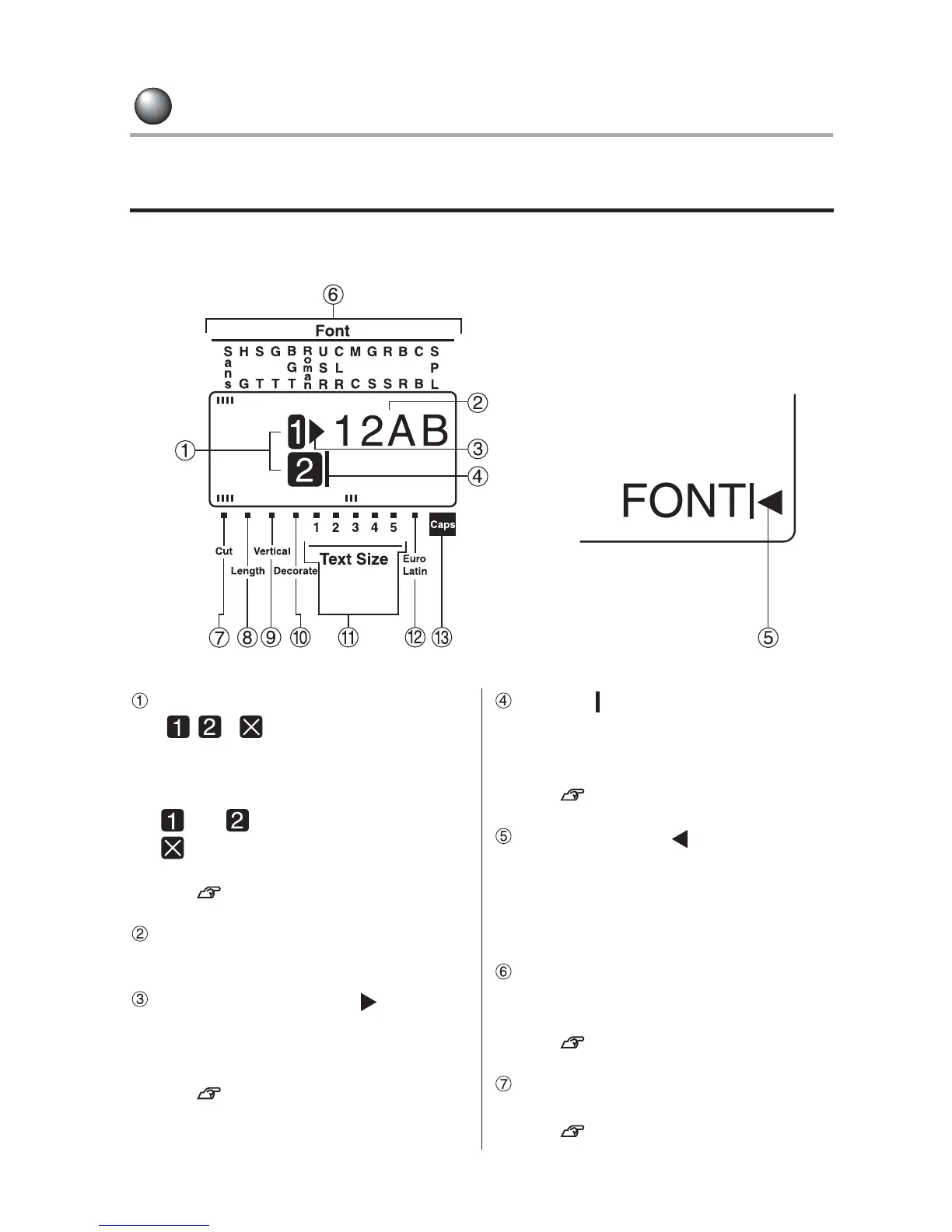
Display indicators
<Text enter screen>
Line head icon
( ... )
Appears on the line head to show the
current line number. When there is a
text(s) to be printed on the label,
and appear on the line head.
means that you cannot print the
line.
See p.35, 49, 52.
Confirmed texts (Example: 12AB)
Texts to be printed on the label.
Text mode change icon ( )
Displayed when changing the character
mode such as font and decorate in the
line or paragraph.
See p.78.
Cursor ( )
A movable indicator on a display,
marking the position at which a character
can be entered, corrected, or deleted.
See p.46.
Memory full icon ( )
Appears when the maximum number of
letters (approx. 90 letters) are entered.
You cannot enter any letters until you
delete a part of or whole of the text.
Font indicator
Indicates the font name of the character
at the cursor position.
See p.78.
Auto cut indicator
Lights when "Auto Cut" is set to "On".
See p.91.



 To Next Page