28 Getting Started
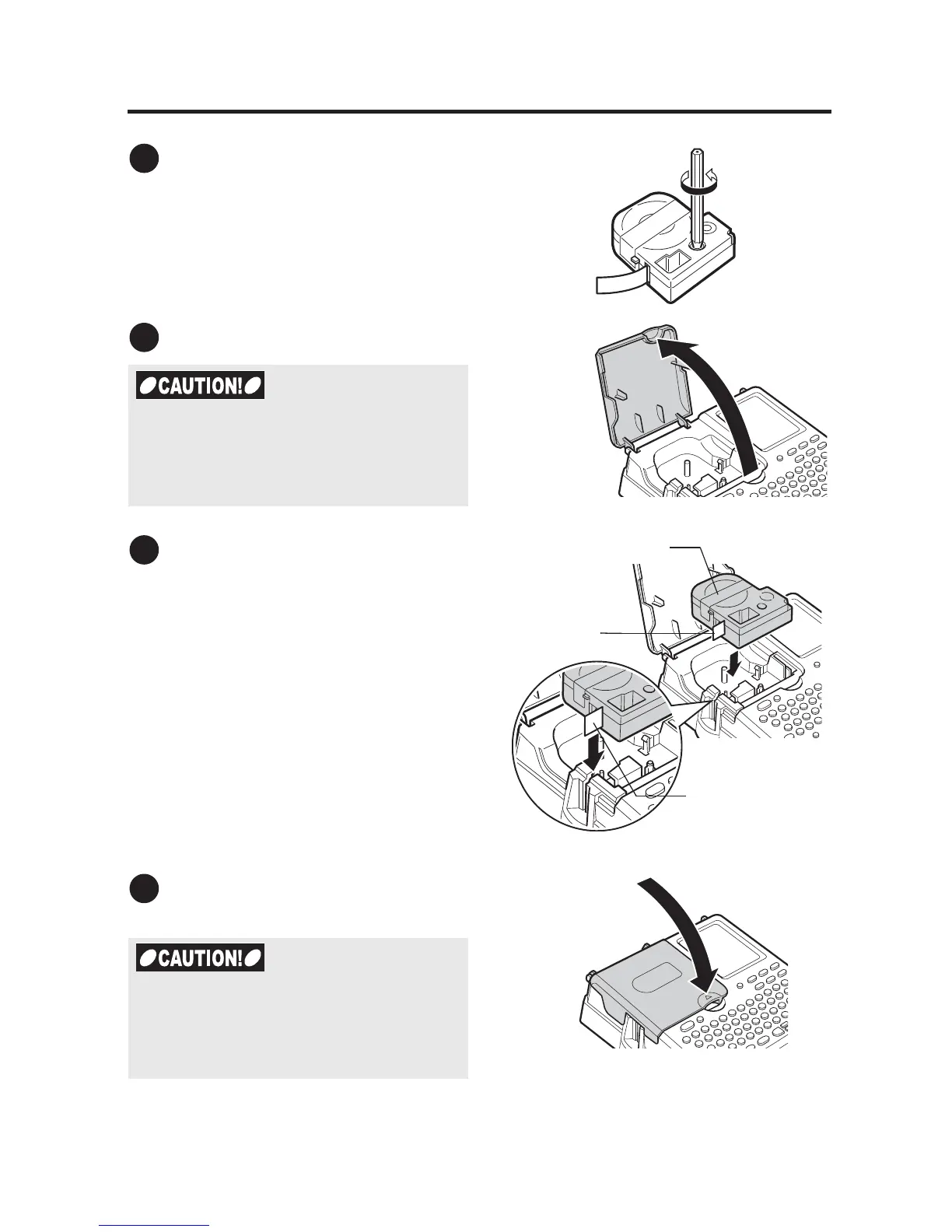
3. Installing tape cartridges
Tighten the ink ribbon
Insert a pencil or a similar tool into the
hole of the tape cartridge and turn it
slightly toward the direction of the arrow.
Open the top cover
Install the tape cartridge
Insert the tape cartridge fully with its
label side up until the cartridge is
secured by the fixing tab of the main
unit. When installing a new tape
cartridge or one with an extended tape
end, straighten the tape end and pass it
through the tape guide.
Close the top cover.
Hold down the cover gently to close.
1
2
x Make sure that the power is turned off
beforehand.
x Do not lift up the device by holding the
top cover.
3
Straighten the
tape end.
Insert the cartridge with its
label side up.
Pass the tape end
through the tape guide.
4
If you close the top cover without inserting
the tape cartridge, your LABELShop
£
BEE3 or the tape cartridge may be
damaged.



 To Next Page