43/59
Handset Interface
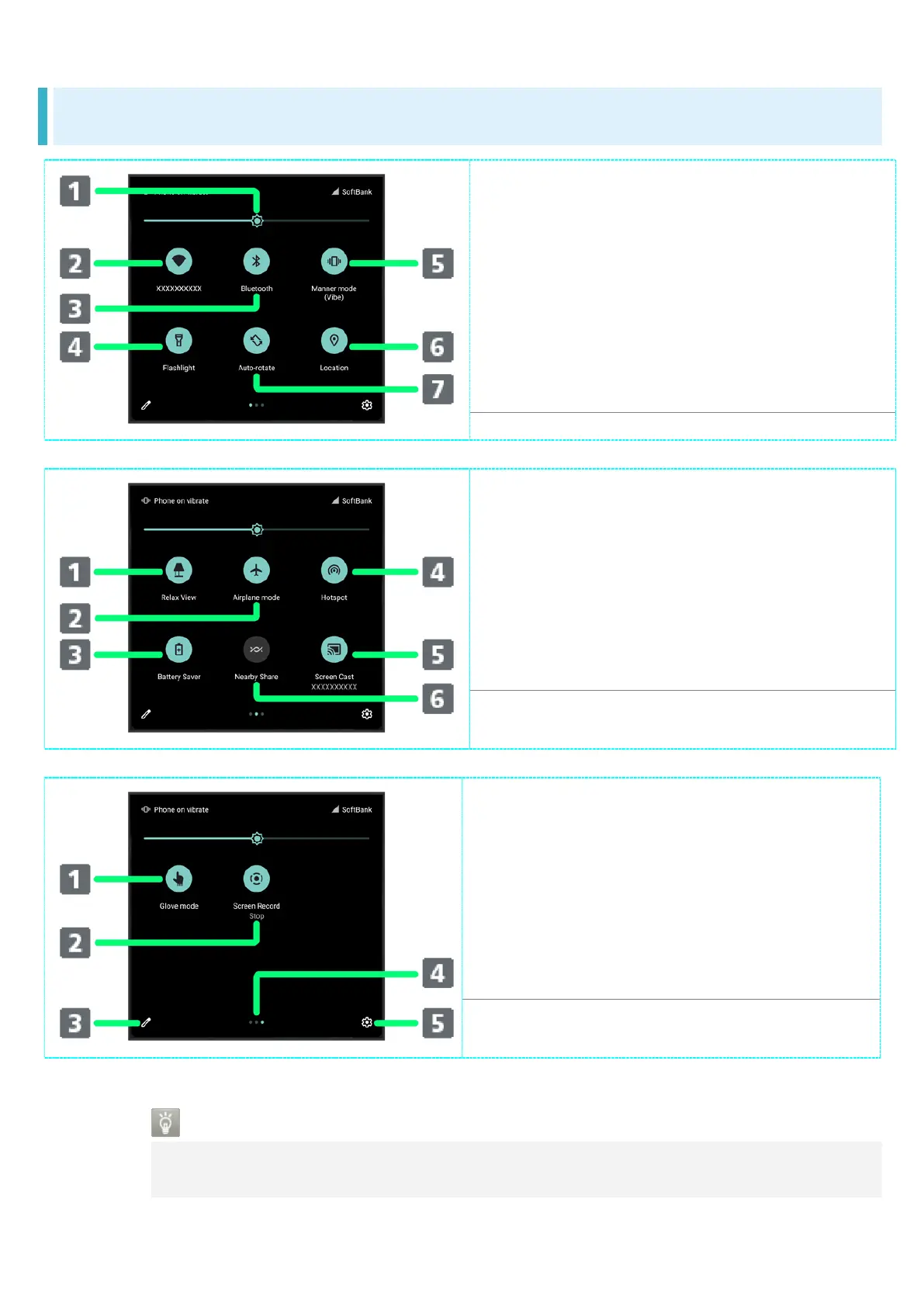
Quick Settings Window Layout
Adjust Display brightness.
Toggle Wi-Fi on/off.
Toggle Bluetooth
®
function on/off.
Toggle Mobile Light on/off.
Toggle Manner mode (OFF / Vibe /
Mute).
Toggle Location on/off.
Toggle Auto-rotate screen on/off.
Toggle RelaxView on/off.
Toggle Airplane mode on/off.
Toggle Battery Saver on/off.
Toggle Wi-Fi hotspot tethering
on/off.
Show cast screen.
Show Nearby Share.
Toggle glove mode on/off.
Toggle Screen Record start/stop.
Open Edit screen for Quick
Settings Window.
Indicate position of Setting key
sheet.
1
Open Settings.
1 Flick Setting key area left/right to toggle sheets.
Display during Music Playback
Operation panel opens in Quick Settings Window and enables operations such as
play/pause.


 To Next Page