15/64
Phone
Call Window Layout/In-Call Operation
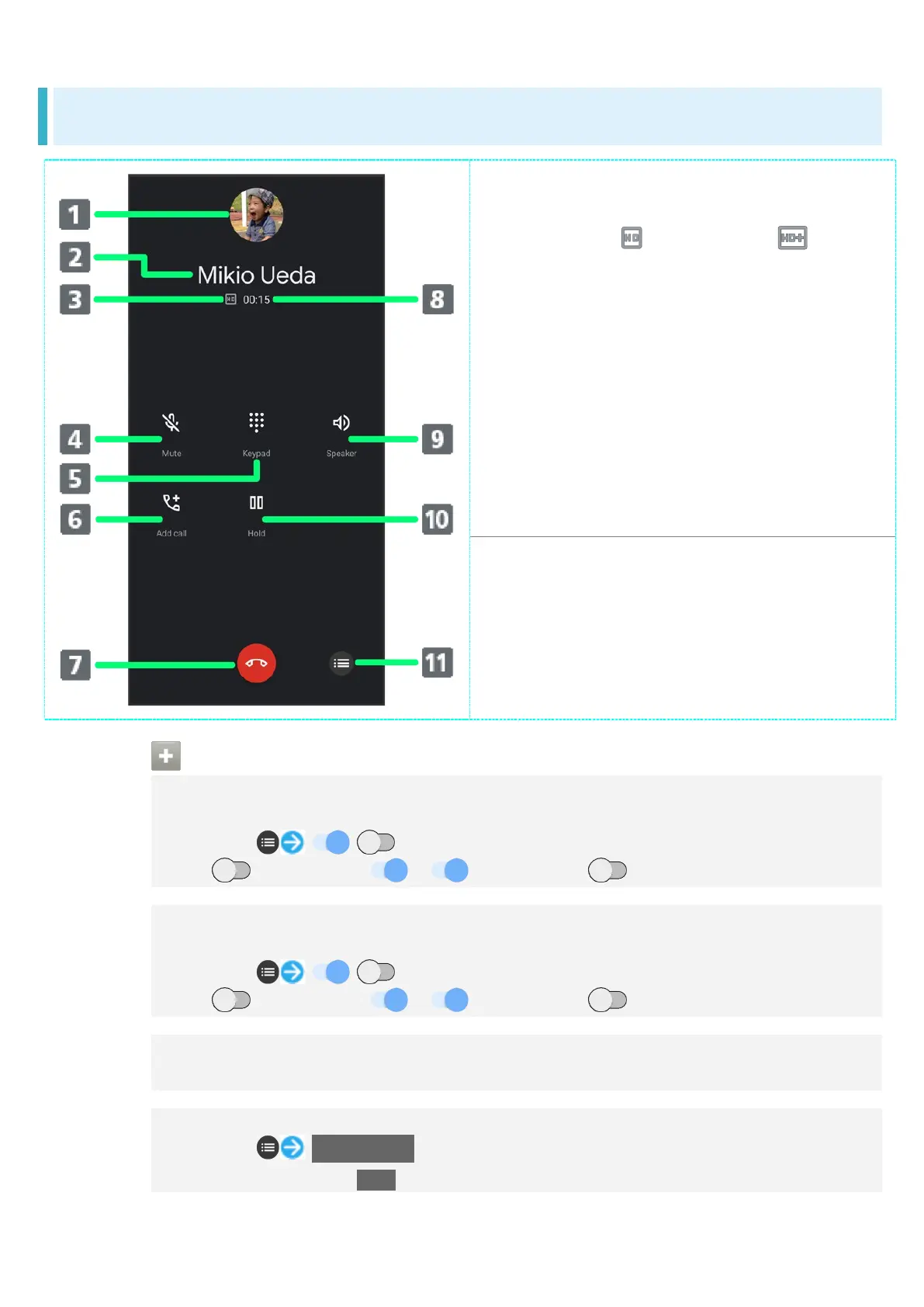
Other party photo.
Other party name/number.
HD Voice ( )/HD+ Voice ( ) call in
progress.
Mute own voice.
Show dialpad.
Add call.
End call.
Call time.
Use Speakerphone.
Place call on hold.
Open menu.
In-Call/Voice Memo Operations
Setting Whether to Use Clear Talk
Enable Clear Talk for clearer other-party voice.
During call, / for "Clear talk"
Tap to toggle on ( ), to toggle off ( ).
Setting Whether to Use Slow Talk
Enable Slow Talk for slower other-party voice.
During call, / for "Slow talk"
Tap to toggle on ( ), to toggle off ( ).
Adjusting Call Volume
During call, Volume Up/Down Key
Recording Call (Voice Memo)
During call, Voice Memo
To end recording, Tap Stop.



 To Next Page