8/14
Camera
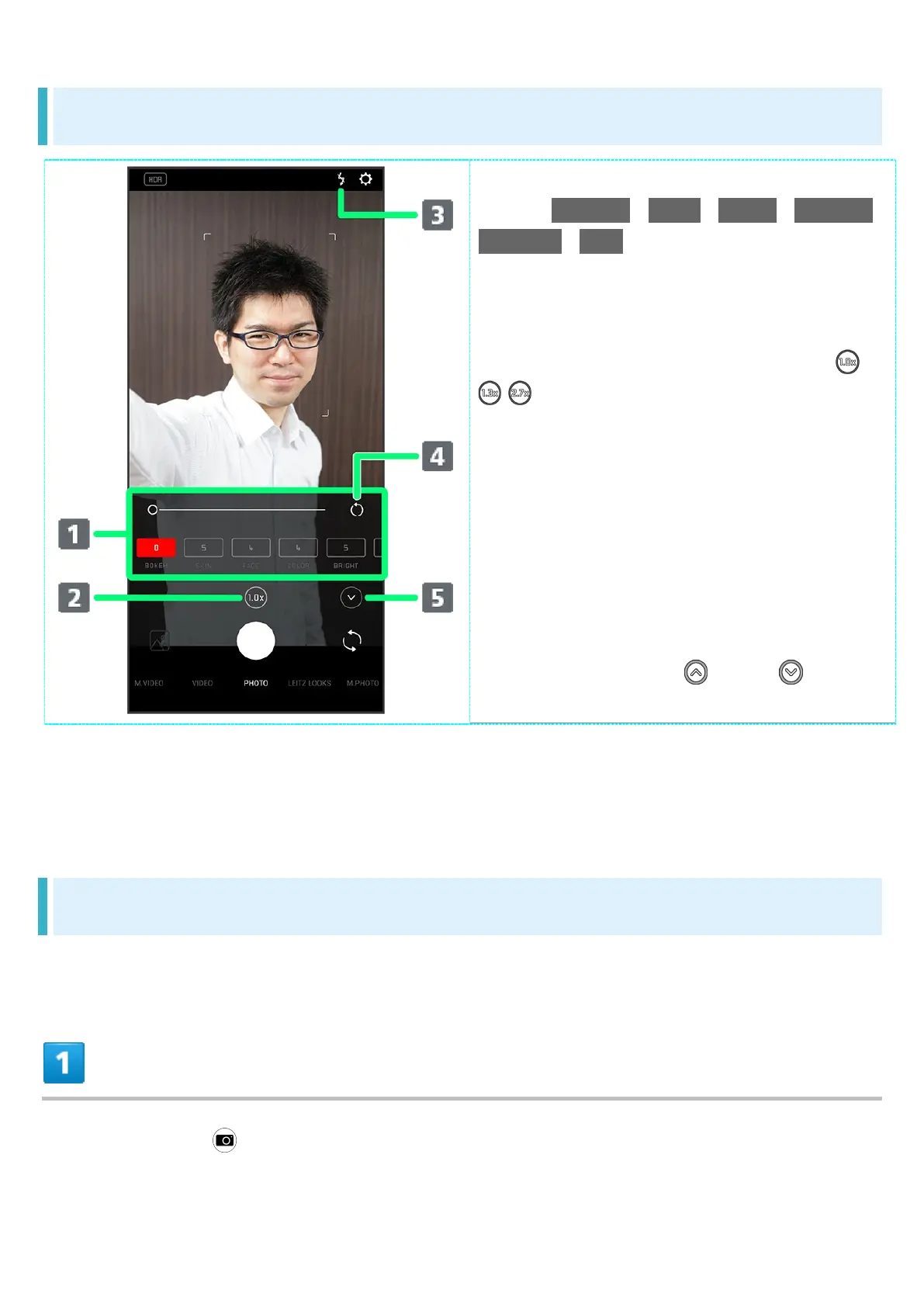
Photo Viewfinder (Front Camera) Layout
Beauty Correction settings area
1
Adjust BOKEH / SKIN / FACE / COLOR /
BRIGHT / EYE (large eyes).
Tap setting values for adjustment bar.
Adjust manually.
Zoom magnification
Tap to toggle zoom magnification ( /
/ ).
Touch & Hold for adjustment bar. Drag
left/right to adjust
2
zoom magnification.
Selfie Flash
Enable so entire screen fires in place
of a flash; people appear bright in
selfies taken at night.
Reset icon
Reset manual adjustments.
Toggle to show ( )/hide ( )
Beauty Correction settings area
1 Drag left/right to show hidden settings.
2 Alternatively, in Photo Viewfinder, Pinch/Spread.
Indicators shown in Viewfinder and available functions/settings vary depending on Camera type
and shooting mode.
Recording Videos
Operation in landscape orientation is described as an example.
In Home Screen, (Camera)



 To Next Page