6/14
Camera
A A finger or cover near the lens can reflect light from Mobile Light and cause
captured images to appear whitish.
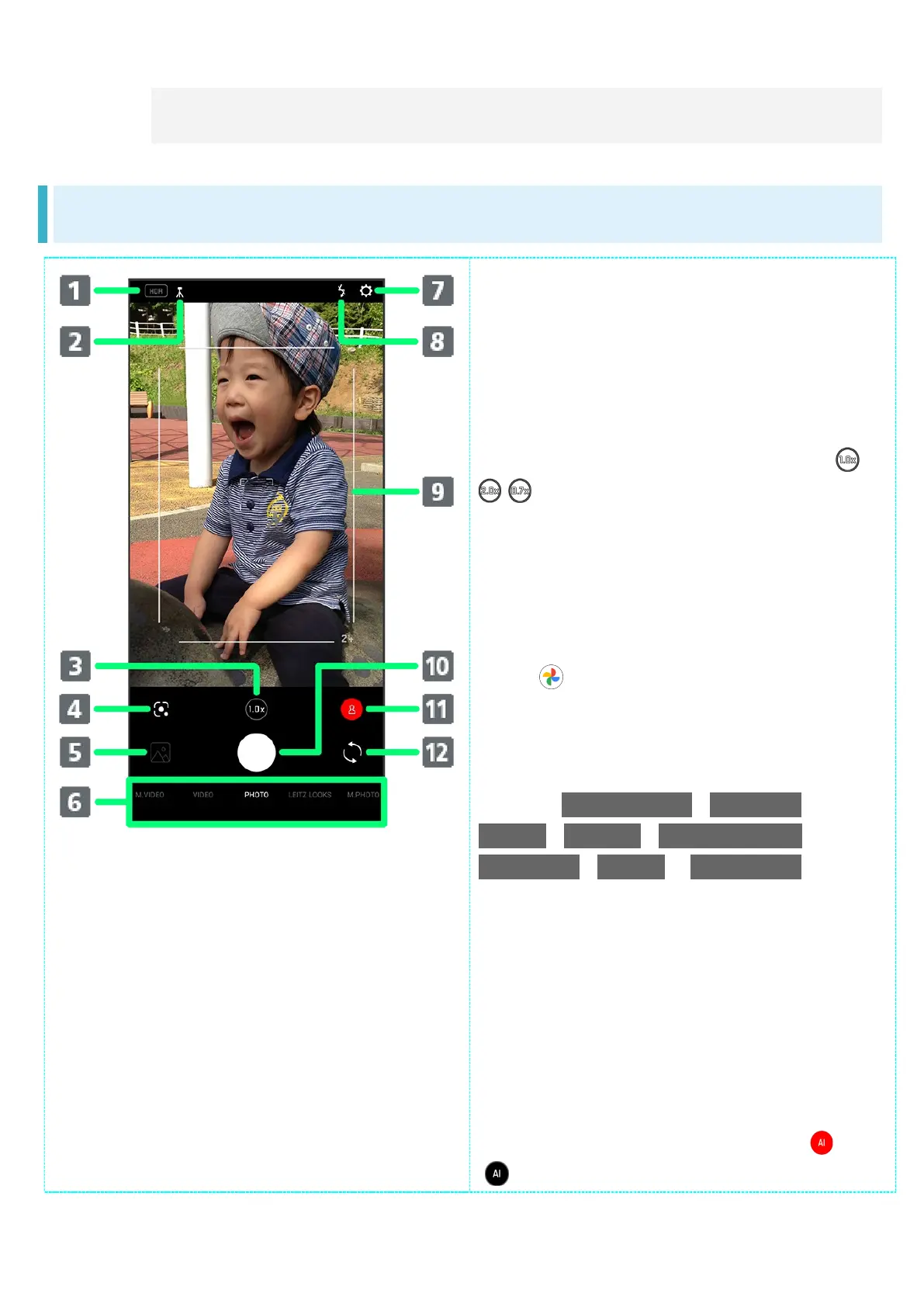
Photo Viewfinder (Back Camera) Layout
HDR indicator
1
Appears when HDR function activates
for capture.
Handset stable indicator
Appears when handset is stabilized.
Zoom magnification
2
Tap to toggle zoom magnification ( /
/ )
3
.
Google Lens™
Use Google Lens to copy text captured
with Camera and to search for
products.
Photos™/thumbnail
Open (Photos), or view immediately
captured photo/video.
Shooting mode
Drag left/right to change shooting
modes (TIME LAPSE / M.VIDEO /
VIDEO / PHOTO / LEITZ LOOKS /
M.PHOTO / NIGHT
4
/ PORTRAIT).
Shooting menu
Change shooting scene.
Mobile Light
Change Mobile Light setting.
Bright Frame
5
Check actual capturing range.
Capture photo
Recognition icon
6
Tap to toggle AI recognition on ( )/off



 To Next Page