Device description
Leuze electronic GmbH + Co. KG BPS 348i 14
3.2.3
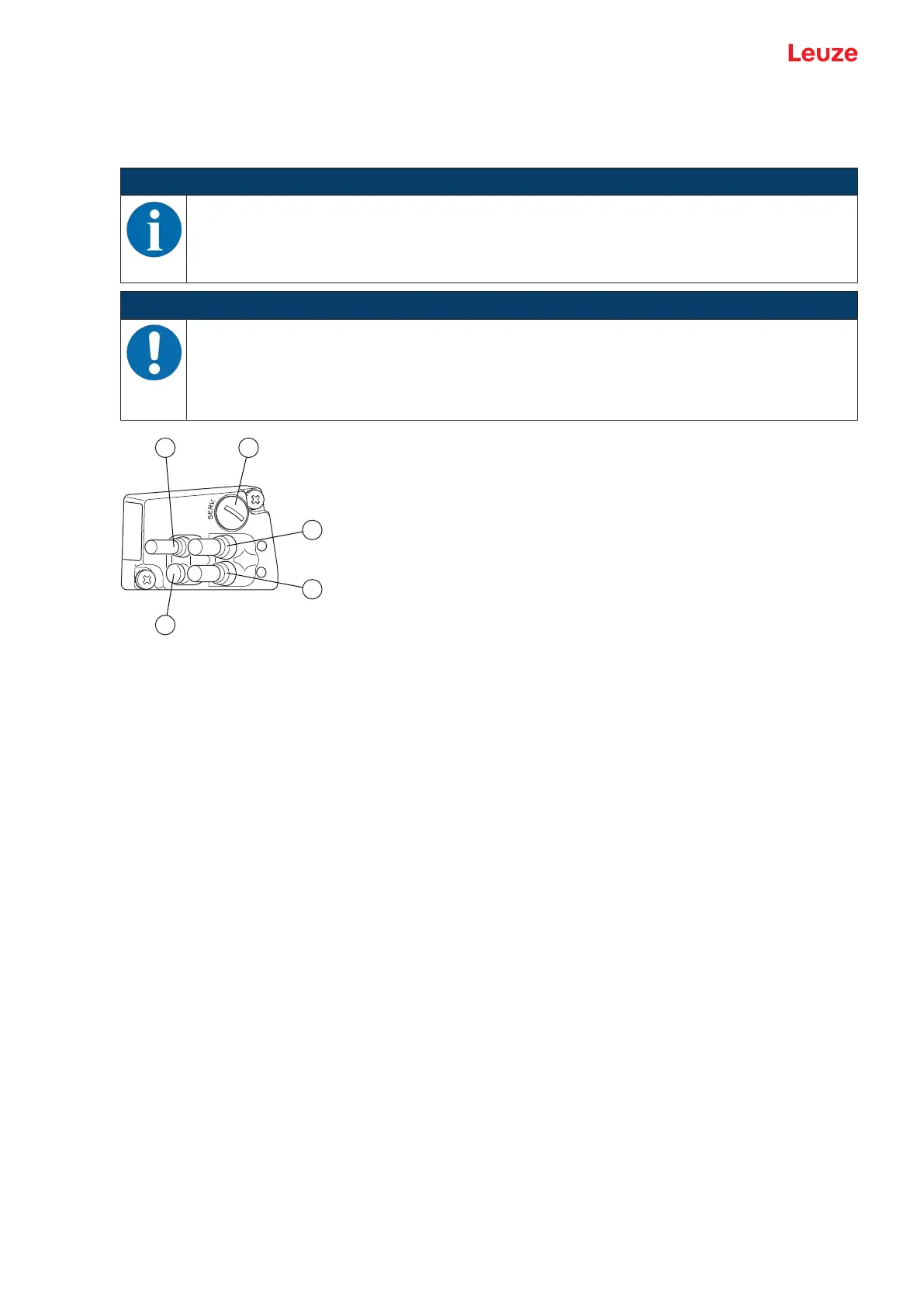
ME348103 connection hood with cables with M12 connector
The ME348103 connection hood features three connection cables with M12 connector plugs and a Mini-B
type USB socket as a service interface for configuration and diagnostics of the BPS.
NOTICE
The integrated parameter memory for the simple replacement of the BPS is located in the
ME348103.
In the integrated parameter memory, both the settings and the PROFINET name are saved.
Upon device exchange, they are automatically transmitted to the new device.
NOTICE
Network interruption with EtherCAT in a linear topology!
Ä In the event of a device exchange, the EtherCAT network is interrupted at this location.
Ä The EtherCAT network is interrupted if the BPS is unplugged from the connection hood.
Ä If there is no voltage supply for the BPS, the EtherCAT network is interrupted.
1 PWR/SW IN/OUT: Connection cable with M12 plug (A-coded)
2 SERVICE: Mini-B USB socket (behind protective cap)
3 BUS OUT: Connection cable with M12 socket (D-coded), Ethernet1
4 HOST/BUSIN: Connection cable with M12 socket (D-coded), Ethernet0
5 Protection cap (no connection)
Fig.3.5: ME 348 103 connection hood, connections
3.3 Display elements
The BPS is available optionally with display, two control buttons and LEDs or with only two LEDs as indica-
tors on the device housing.
Located in the connection hood (MS348, MK348 or ME348103) are two, split, two-colored LEDs as sta-
tus display for PROFINET connections HOST/BUSIN and BUSOUT.
3.3.1
LED indicators
The device housing features the following multicolor LED indicators as primary display element:
• PWR
• BUS


 To Next Page