A-6 MAX TNT Hardware Installation Guide
Slot Card Specifications and Connection Information
DS3-ATM2 card
Connecting the DS3-ATM2 card to the WAN
Use two 75-ohm coaxial cables (RG 59/U) to connect the T3 line to the DS3-ATM2 card
RX-BYP and TX-BYP ports.
Inform your service provider that the equipment is connected, so the provider can activate the
line.
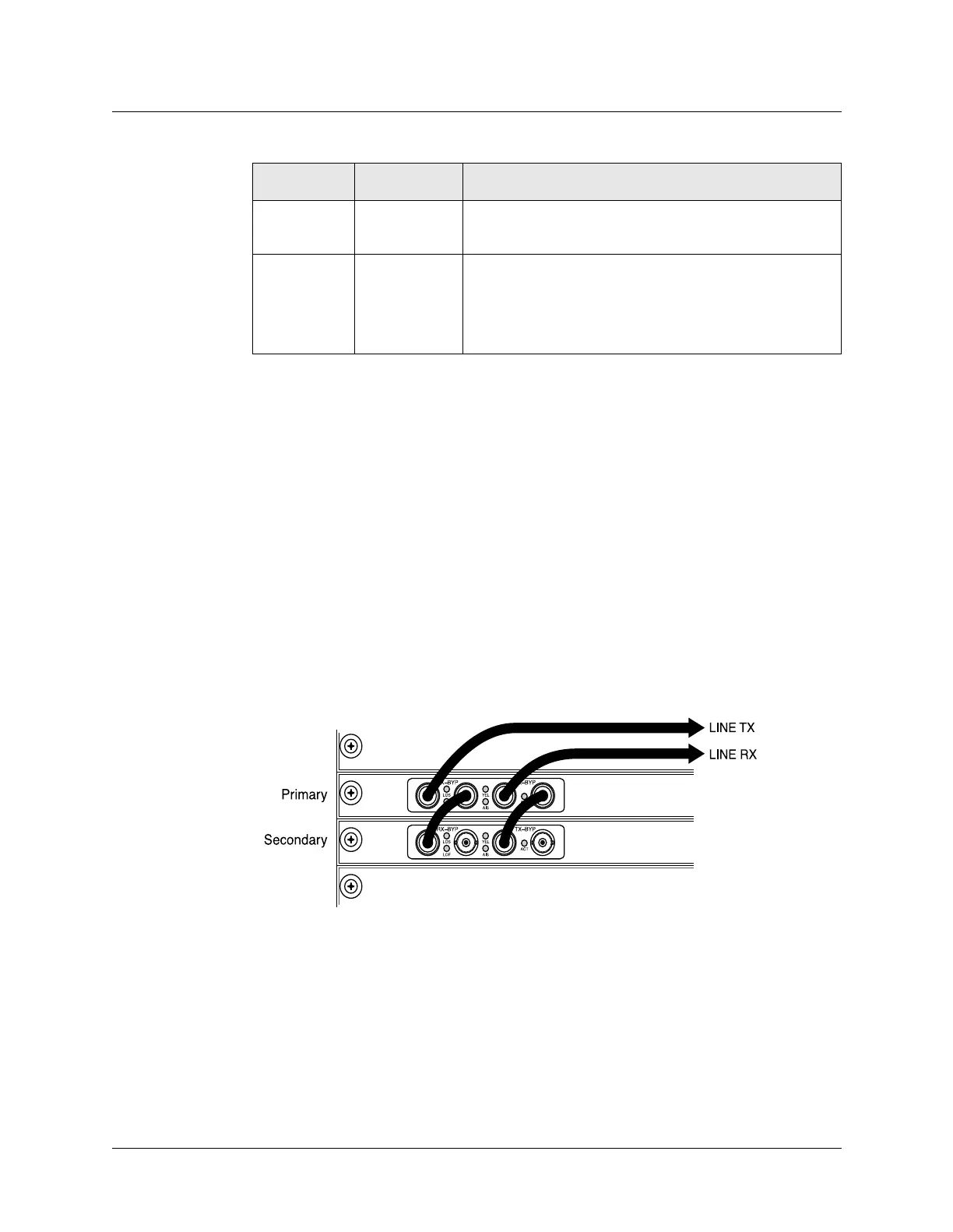
Connecting redundant DS3-ATM2 cards
You can install two DS3-ATM2 cards to provide redundancy. If the primary card fails, either
because of a failure to boot up or because the card is in a fault state, the secondary card takes
over. For information about configuring a redundant connection, see the
APX 8000/MAX TNT/DSLTNT Physical Interface Configuration Guide.
Figure A-4 shows a redundant connection.
Figure A-4. DS3-ATM2 redundant connection.
AIS Yellow On indicates that the DS3-ATM2 card is receiving an
Alarm Indication Signal (AIS).
FAULT Yellow Behaves as follows:
• Illuminates when you restart the unit.
• Goes out after the unit passes POST and is running.
• Blinks if a fatal error has occurred.
Table A-3. DS3-ATM2 status lights (continued)
Light Color Description



 To Next Page