OPERATOR’S STATION
Form 169469/169470/169471 46 Revision C
5.18.5 CAB DISPLAY MODULE (CDM)
PROGRAMMING
The monitoring system requires programming
for each header and the header must be
attached to the windrower so that the CDM
recognizes the type of header. Programming
the system may be accomplished with or without
the engine running. If the engine is running, the
transmission must be in neutral. If the engine is
not running, the ignition must be on. Exit
programming mode at any time by pressing the
PROGRAM switch or by turning off the ignition.
The system only needs to be programmed once
for each header. The operator may make
changes later on to a particular setting to suit
windrowing conditions or modifications to the
machine. Refer to paragraph 5.18.6 Setting
Guidelines for recommended settings. Most
functions have been pre-programmed at the
factory but can be changed by the operator if
required.
NOTE
Contact your dealer for information
regarding software updates to the
electronic modules. Your dealer will have
the necessary interface tools and access
to the latest software upgrades.
Proceed as follows to program the CDM:
IMPORTANT
Header must be attached to the windrower
so that the CDM can detect the type of
header (Header ID) and adjust the
programming mode accordingly.
a. Turn ignition key to RUN, or start the engine.
Refer to paragraph 6.3.5 Engine Operation.
b. Press PROGRAM and SELECT on CDM to
enter programming mode. Header ID code is
displayed.
c. Press SELECT. TRACTOR SETUP? is
displayed on upper line.
d. Press . SET KNIFE SPEED? is displayed
e. Press or to change value on lower
line.
f. Press SELECT. KNIFE OVERLOAD SPD? is
displayed.
g. Press or to change value on lower
line.
h. Press SELECT. KNIFE OVERLOAD SPD? is
displayed.
i. Press or to change value on lower
line.
j. Press SELECT to advance to the next L1 item
and press arrow keys to change values. Refer
to Detailed Programming Instructions on
following pages.
k. Press PROGRAM to exit programming mode
when finished entering desired values.
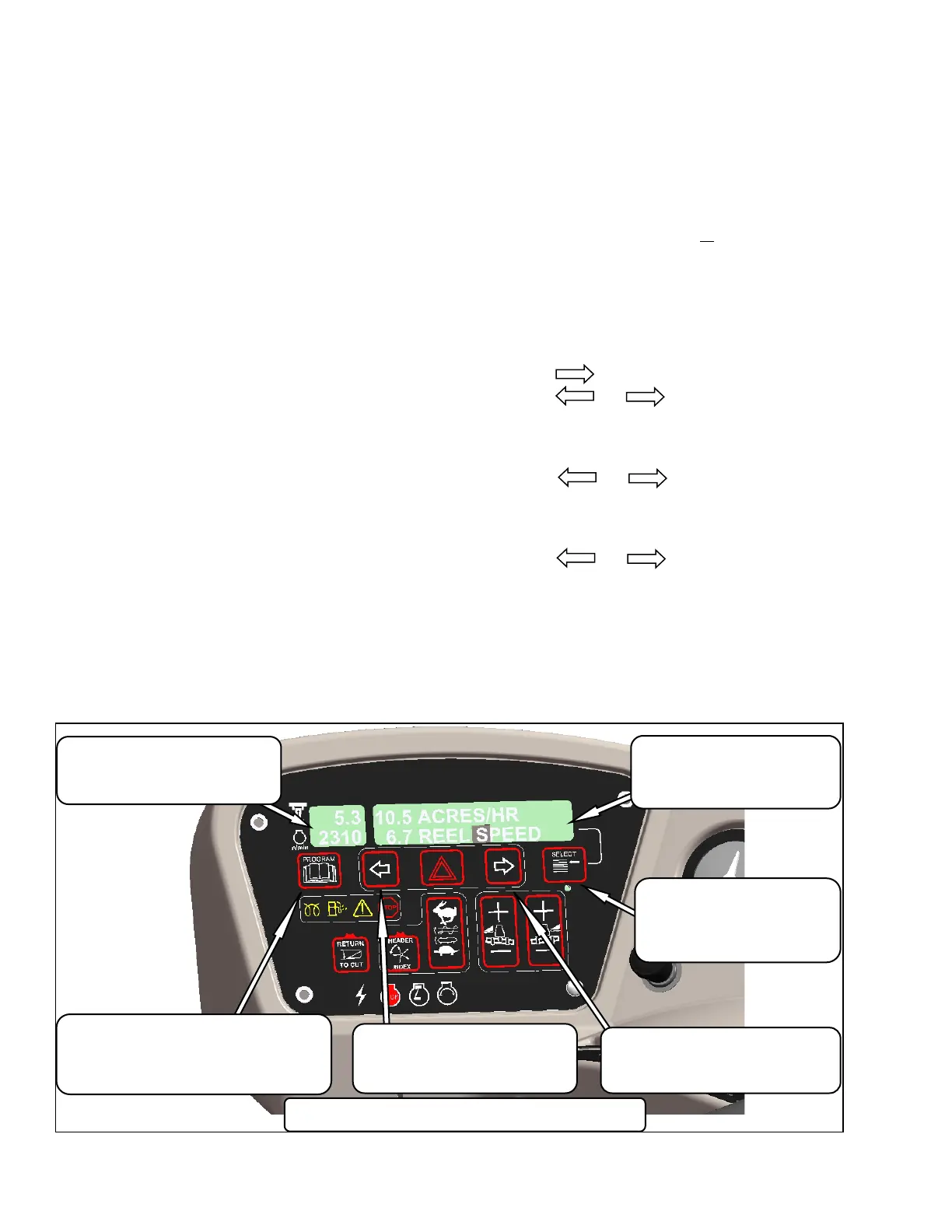
MENU ITEM SCROLL BACKWARD
Displays Value under Menu Item
Push To Scroll Backward.
Keep Depressed For Fast Scroll. *
Displays Value under Menu Item
Push To Scroll Forward.
Keep Depressed For Fast Scroll. *
Displays Menu Item and Selection
Upper Line – Menu Item
Lower Line - Selection
Places Monitor into Program
Mode with PROGRAM SWITCH
Press to Accept Menu Item and
Advance to Next Item.
Displays Software Revision Status
Upper Line – C### (CDM)
Lower Line – X### (WCM)
Places Monitor into Program Mode
Press While Depressing SELECT Switch
Press to Exit Program Mode.
* Fast scroll applies only when changing
KNIFE SPEED, OVERLOAD PRESSURE, and TIRE SIZE.



 To Next Page