BA053101-en
Pos: 334 /Te chnis che D okum ent ati on/A lle G eräte/ Übers chrifte n/Über schrif ten 1.1.1/ F/Über schr ift 1.1.1 : Fahrz eugda ten @ 1 3\mod _123 48607 5706 0_75.d ocx @ 3 40739 @ 3 @ 1
Pos: 335 /Te chnis che D okum ent ati on/ Leis tun gsm esst ech nik/ POWE R DYN O/0 523 01 LPS 3 000 R10 0/B A/I nhal t: 052 3 Fahr ze ugda ten/ Las tsimula tio n @ 2 3\mod_1297435784778_75.docx @ 975319 @ @ 1
1 Call up the menu DATABASE and then the
menu point VEHICLE DATA
The database browser appears:
2 Select a dataset with the cursor key or the
mouse.
3 Open the dataset by double clicking or press
the <ENTER> key.
The screen for the load simulation model
appears:
4 Define the load simulation model.
5 Use the button <F8 CONTINUE>.
The vehicle data screen appears.
6 Select the vehicle data.
7 Use <F8 STORE> to store the data.
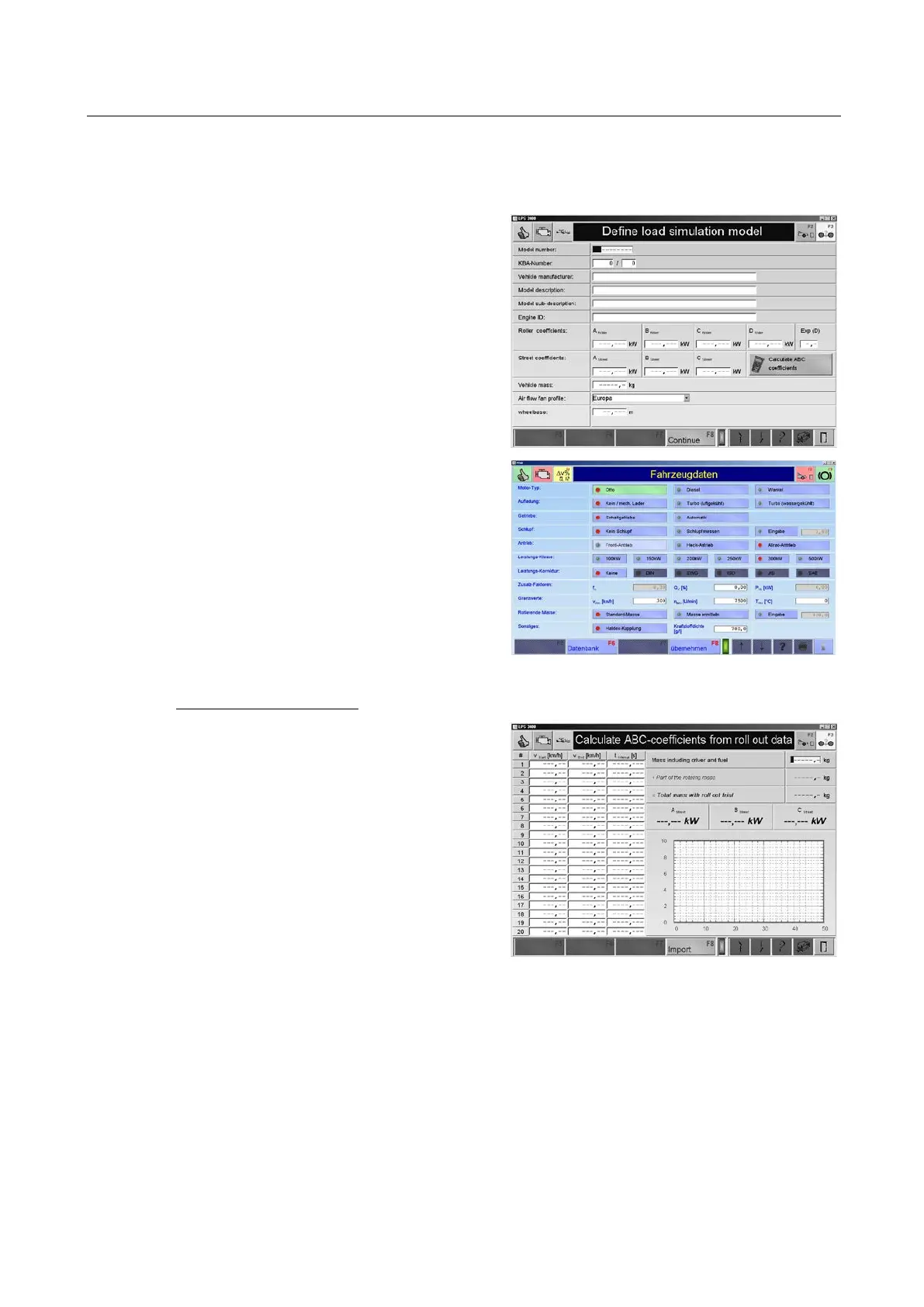
Calculate ABC-coefficients:
1 Use the button <CALCULATE ABC-
COEFFICIENTS >
Following screen appears.
2 Enter mass including driver and fuel and
confirm with <ENTER>.
The total mass at roll out trial and the share
of the rotating mass are calculated and dis-
played.
3 Enter the start and end speed as well as the
time interval.
4 Store the info with <F8 IMPORT>.
Pos: 336 /-----F ormat- ----/MA NUELLE R UMBR UCH Seitenum bruch @ 0\mod_1134403577687_0.docx @ 1277 @ @ 1

 To Next Page
 Loading...