S
ection
2
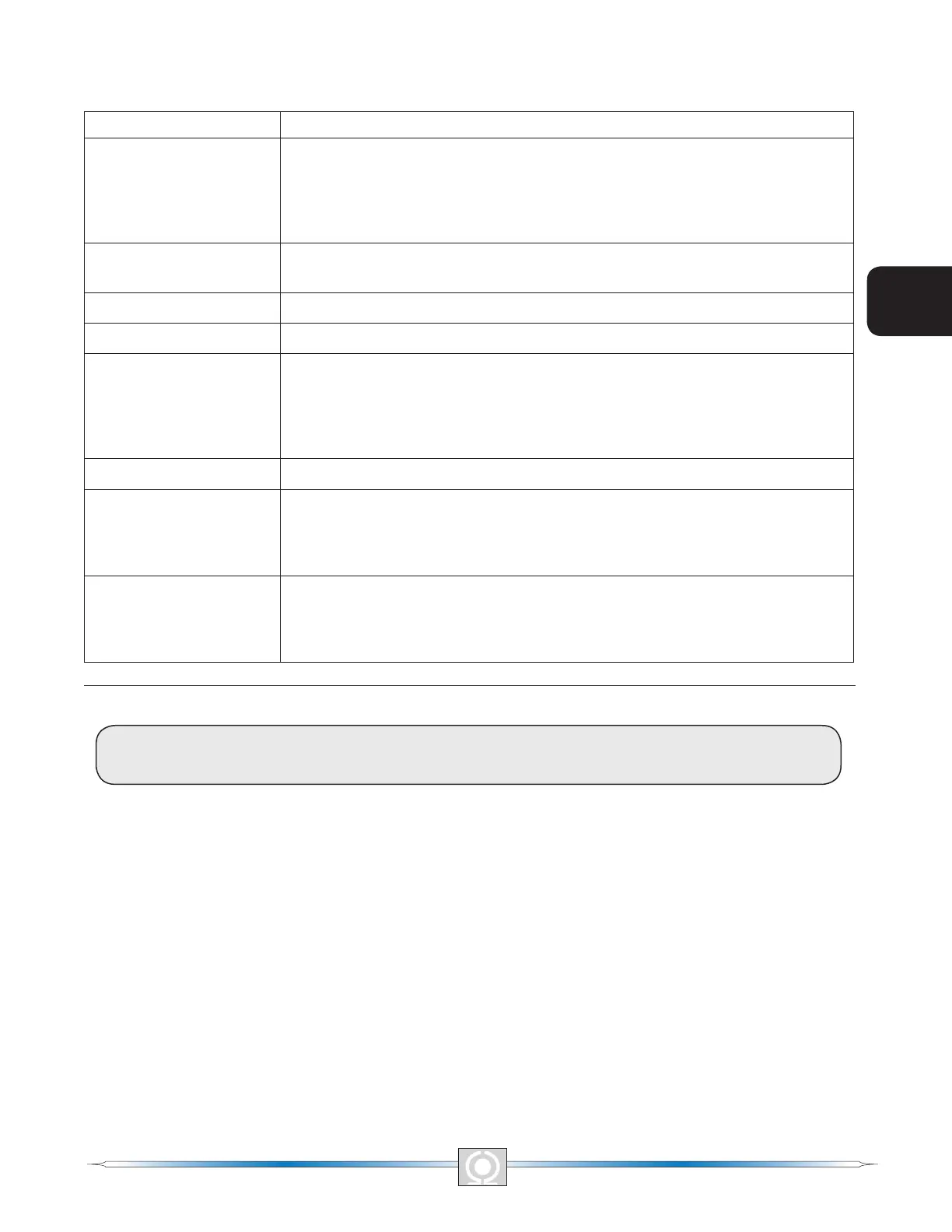
Table 2-2. DVR2000E Front Panel Mode Status Indicator Descriptions
Indicator Description
Over Excitation LED #12
This LED blinks rapidly when the Overexcitation Protection feature is enabled
and the eld voltage exceeds the setpoint (80 V default) for 15 seconds. The
DVR2000E will shut down when an overexcitation condition is detected. The Over
Excitation LED blinks for 5 seconds when the DVR2000E is powered up following
an overexcitation condition.
Over Temperature LED
#11
This LED blinks rapidly when the internal temperature of the DVR2000E has
exceeded its limit and causes the unit to shut down.
Under Frequency LED #7 This LED blinks rapidly during an under frequency condition.
Var/PF Active LED #5 This LED blinks rapidly when operating in Var or Power Factor mode.
If – Limit LED #4
This LED blinks rapidly when the eld current exceeds the programmed
overexcitation limit. It will continue to ash until the overexcitation condition
ceases or the overexcitation time delay expires and the DVR2000E shuts down.
The Overexcitation Limiting LED ashes for 5 seconds when the DVR2000E is
powered up following an overexcitation limiting condition.
Manual Mode LED #3 This LED blinks rapidly when operating in Manual mode.
Loss of Sensing LED #2
This LED blinks rapidly when a loss of generator sensing voltage is detected.
The DVR2000E will shut down. The Loss of (Generator) Sensing LED ashes
for 5 seconds when the DVR2000E is powered up following shutdown for loss of
generator sensing condition.
Over Voltage LED #1
This LED blinks rapidly when the generator output voltage exceeds the setpoint
for 0.75 seconds. The DVR2000E will shut down when a generator overvoltage
condition is detected. The (Generator) Overvoltage LED ashes for 5 seconds
when the DVR2000E is powered up following a generator overvoltage condition.
INITIAL ADJUSTMENTS
CAUTION
Read and understand the operation of the individual adjustments before attempting any initial adjustments.
Before starting the generator, the procedures in the following paragraphs should be performed.
Remove the 5 ampere fuse before starting the generator for the rst time. Perform all preliminary engine governor
adjustments without the regulator energized.
After initial governor adjustments are complete, reinstall the 5 ampere fuse and connect only the power input
leads or PMG leads to the regulator. Remove all other regulator connections that may be present and temporarily
insulate them.
Start and run the generator at rated speed. The regulator will perform the self-test and enter a shutdown mode. At
this time, initial adjustments can be made. To do this, step through each adjustment using the “SELECT” button.
For each adjustment, press the “UP” or “DOWN” button to obtain the desired level on the LED bar graph.
After the initial adjustments are made, shut down the generator and connect the remaining regulator leads. The
generator may be started and nal adjustments may be performed on the regulator.
8
5
Section 2 Index
3
Main Index
9
3
Main Index
5
Section 2 Index



 To Next Page