S
ection
5
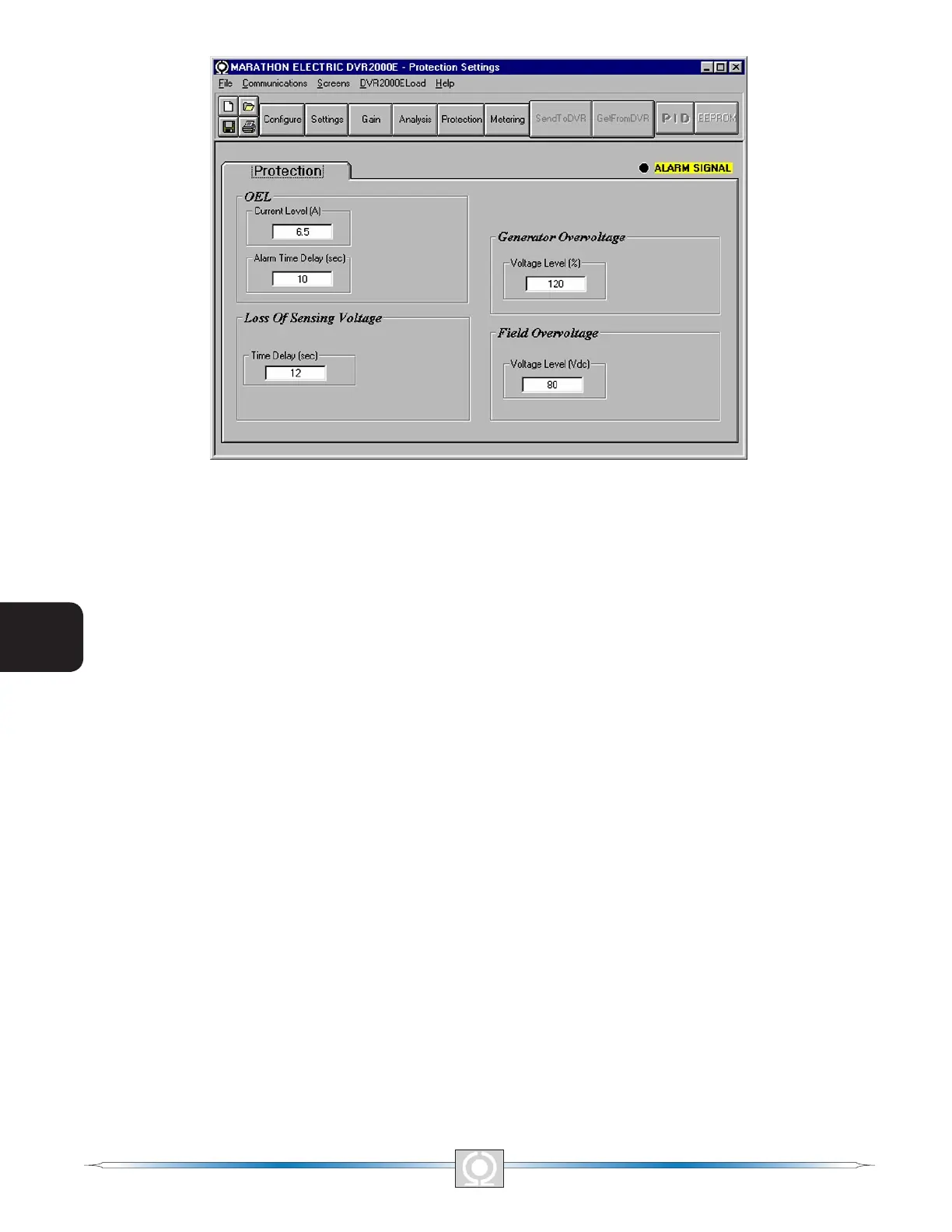
Figure 5-21. Protection Settings Screen Remove
OEL - Current Level (A). The value of current in this eld determines the excitation level that will cause the
DVR2000E to issue an overexcitation limit alarm. A current level of 0 to 7.5 A may be entered in 0.001 increments.
When the level of eld current increases above the value of this eld, the OVEREXCITATION SHUTDOWN LED
on the front panel lights and the OEL time delay starts timing down.
OEL - Alarm Time Delay (sec). The value of this eld determines the time delay between when the DVR2000E
recognizes an overexcitation condition and the DVR2000E Alarm output (terminals AL1, AL2) closes. A time delay
of 0 to 10 seconds may be entered in 1 second increments.
Field Overvoltage - Voltage Level (Vdc). The voltage value in this eld determines the eld voltage level that will
cause the DVR2000E to issue an overexcitation limit alarm. When the eld voltage increases above the value of
this eld, the OVEREXCITATION SHUTDOWN LED on the front panel lights. If the alarm condition exists for more
than 15 seconds, the DVR2000E Alarm output (terminals AL1, AL2) closes.
Loss of Sensing Voltage - Time Delay (sec). The value of this eld determines the time delay between when a loss
of sensing voltage is recognized and the DVR2000E responds according to the Hardware Shutdown and LOS
Option options selected. A time delay of 0 to 25 seconds may be entered in 1 second increments.
Generator Overvoltage - Voltage Level (%). The value of this eld is expressed as a percentage and determines
the level of generator voltage required to initiate a generator overvoltage condition. An overvoltage percentage
value of 105 to 120 percent may be entered in 1 percent increments. A generator overvoltage condition lights the
GENERATOR OVERVOLTAGE LED on the front panel and closes the Alarm output at DVR2000E terminals AL1
and AL2 after a delay of .75 seconds.
Metering, Operation and Alarms
The Metering, Operation and Alarms screen is viewed by clicking the Metering button or by clicking Screens on
the Menu bar and clicking Metering/Operation. Information displayed on the Metering, Operation and Alarms
screen can be frozen by clicking the Metering button while viewing the screen or by clicking Metering on the
Menu bar and clicking Disable Metering. Metering can be resumed by clicking the Metering button or by clicking
Metering on the Menu bar and clicking Enable Metering. The Metering, Operation and Alarms screen consists of
two tabs: Operation and Alarm/Status.
56
3
Main Index
5
Section 5 Index
57
3
Main Index
5
Section 5 Index



 To Next Page