S
ection
4
CONNECTIONS
DVR2000E connections are dependent on the application. Incorrect wiring may damage the unit.
NOTE
Be sure that the DVR2000E is hard-wired to earth ground with no smaller than 12 AWG copper
wire attached to the ground terminal on the rear of the unit case. When the unit is congured in
a system with other devices, it is recommended to use a separate lead to the ground bus from
each device.
DVR2000E Terminations
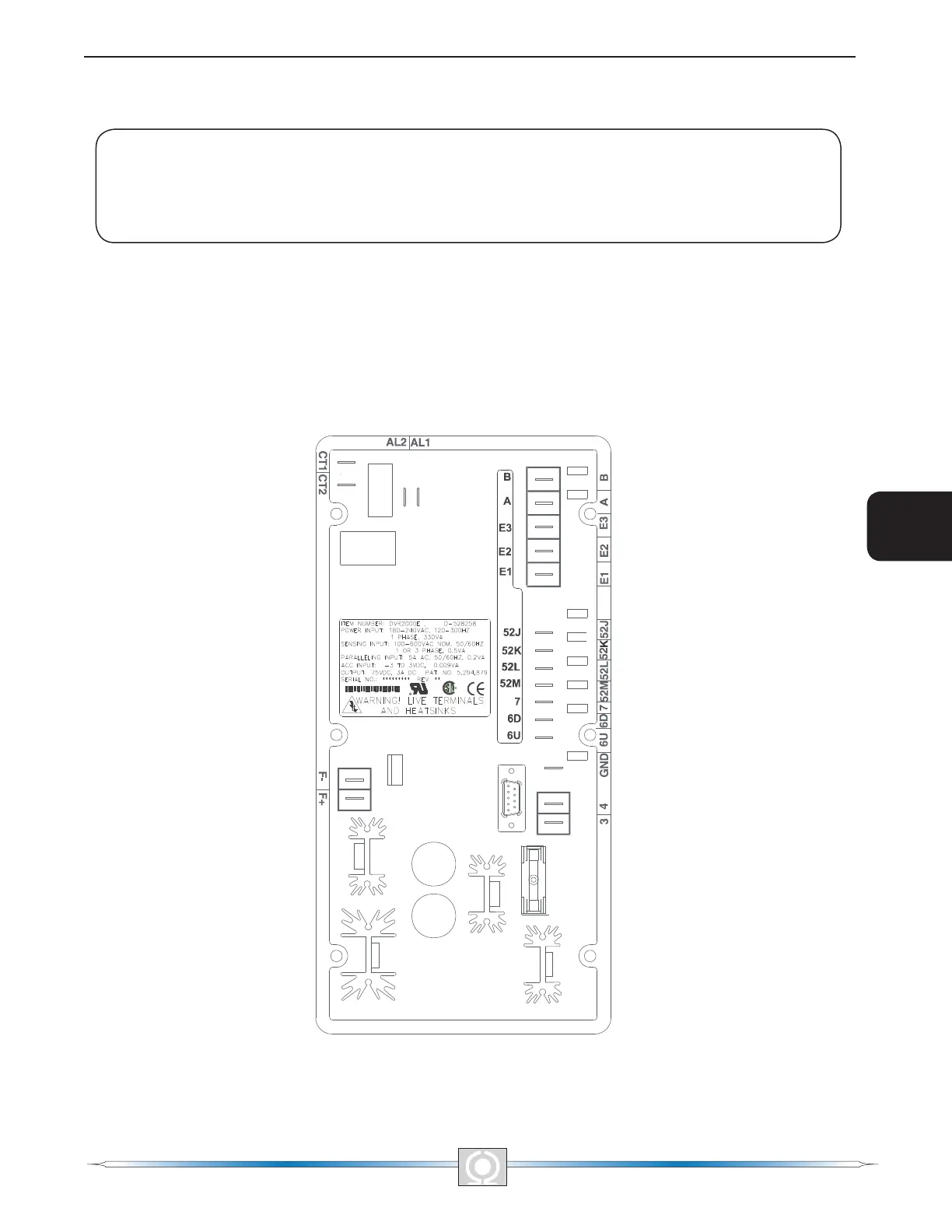
DVR2000E units have two types of interface terminals (Figure 4-3). One type is quarter-inch, quick-connect
terminals and the other is a 9-pin DB9 connector. All terminals are located on the rear of the unit. The quarter-inch,
quick-connect terminal labels are located on the rear of the case. Wires performing common functions, such as
voltage sensing leads, should be grouped together. The 9-pin DB-9 type connector is used for temporary interface
with both IBM compatible PCs and hand-held computers.
Figure 4-3 shows the terminal connections located on the rear panel of the DVR2000E. Except as noted above,
connections should be made with minimum wire size of 14 AWG.
Figure 4-3. DVR2000E Rear Panel Terminals
28
3
Main Index
5
Section 4 Index
29
3
Main Index
5
Section 4 Index



 To Next Page