Installing & Configuring PhotoPRINT Server Configuring the Software
Sprinter User's Manual 13-7
Adding the 200 or 400dpi Setup
! To install the 200 or 400dpi Setup:
1. From the main screen, click S
ETUP and then ADD SETUP.
The A
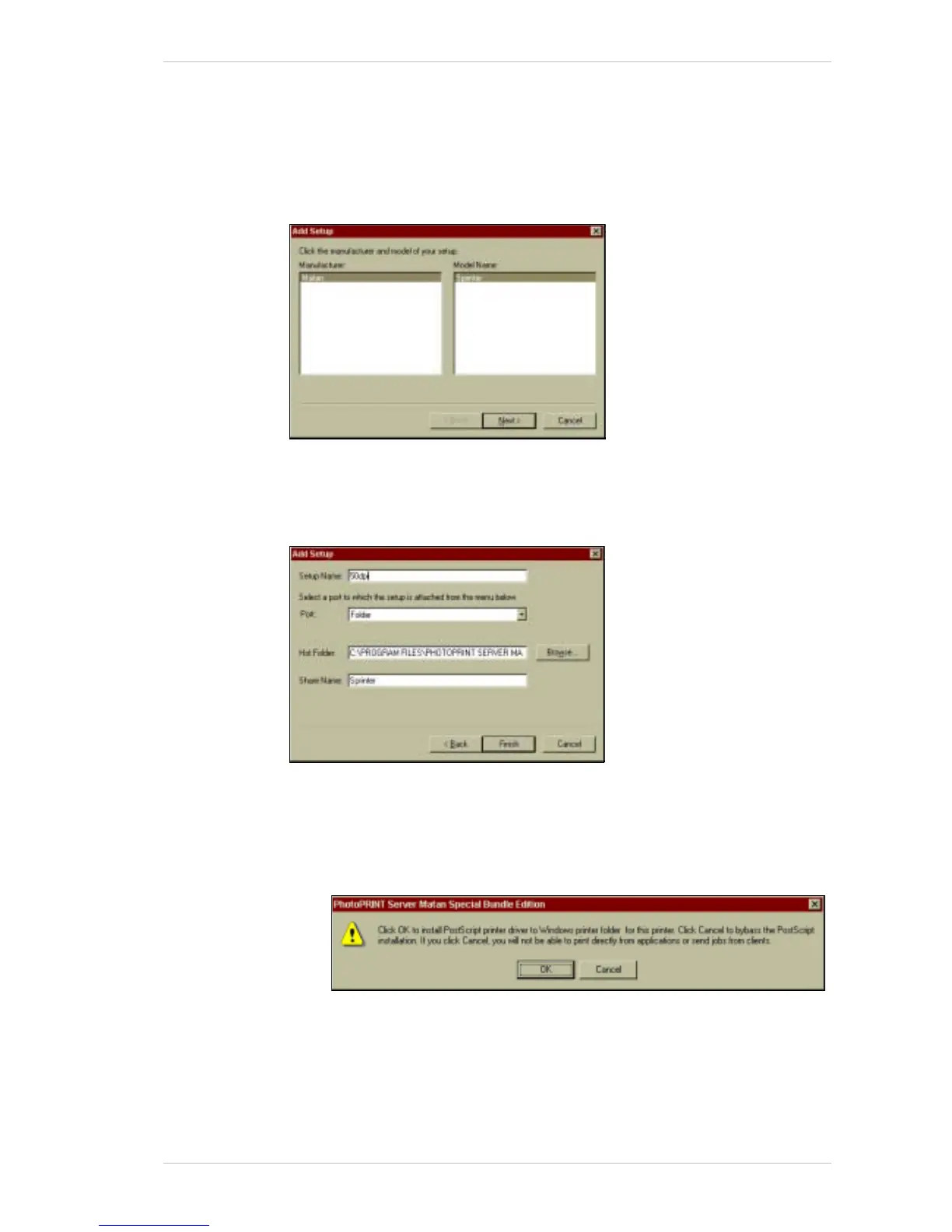
DD SETUP window appears (Figure 13-9).
Figure 13-9: The Add Setup Window
2. Click NEXT.
The A
DD SETUP dialog box appears (Figure 13-10)
Figure 13-10: The Add Setup Dialog Box
3. In the SETUP NAME text box, type 200dpi or 400dpi as required.
4. Click F
INISH.
The following window appears:
5. Click C
ANCEL, unless you wish to install postscript printer drivers for
your printer. In which case, click OK and install them in the usual
manner.
The P
HOTOPRINT SERVER MATAN SPECIAL EDITION main screen appears,
showing (in the followingis example,) that the 50dpi and 400dpi setup
is installed (Figure 13-11, page 13-8).



 To Next Page