34
BASIC OPERATION
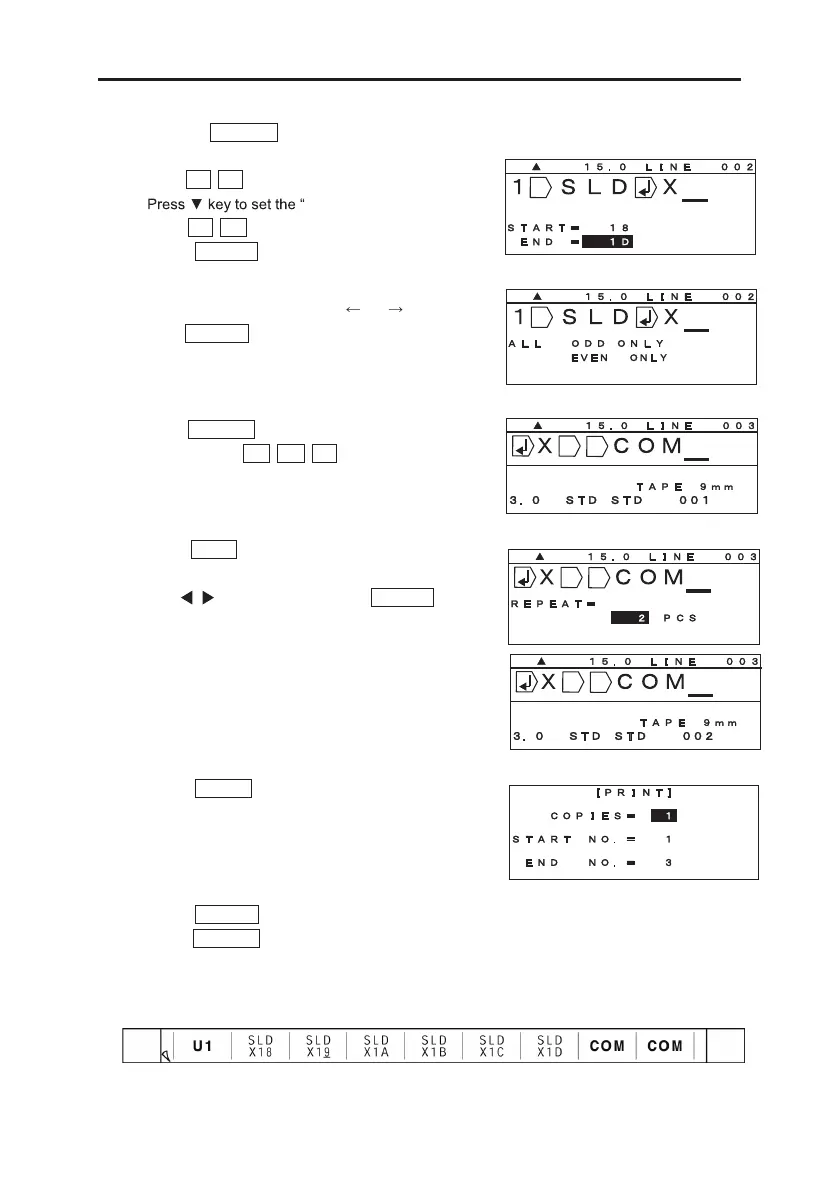
7. Pressing ENTER . Set the “START NUMBER”
and “END NUMBER.”
Input 1 8 in the “START.”
END NUMBER.”
Input 1 D in the “END.”
Press ENTER .
8. Select print range by pressing or .
Press ENTER .
9. Press BLOCK to create a new block,
and then input C O M .
10.Press RPT to set “REPEAT.”
(See 8-7: REPEAT)
Press / key to set “2.” Press ENTER .
Note: It is also possible to input the value directly with
Ten key.
11. Press PRINT . (See 9: PRINTING)
[PRINTING RANGE setting screen] appears.
12. Press ENTER . [PRINTING LENGTH ALIGHNMENT screen] appears.
Press ENTER again to start printing.
13. The printed result is as shown below.


 To Next Page
 Loading...


