56
FUNCTIONS
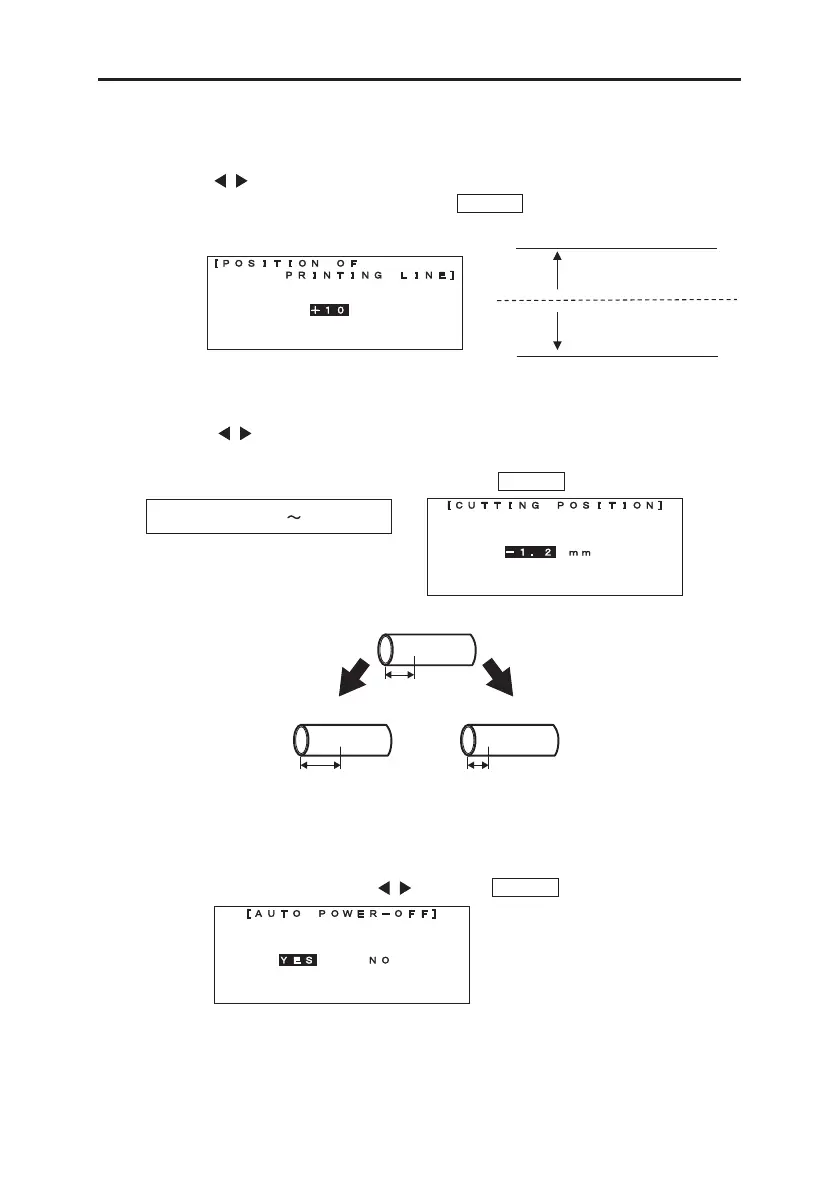
8-14-5 POSITION OF PRINTING LINE
Adjusting the “POSITION OF PRINTING LINE.”
By pressing / key, changing the vertical position of printing line.
Increment : higher. Decrement : lower. Press ENTER to register the setting.
8-14-6 CUTTING POSITION
Adjusting the “CUTTING POSITION.”
By pressing / key, changing
When the print position is off center
Print moves to the right Print moves to the left
the cutting position.
Increment : margin at right side getting bigger.
Decrement : margin at left side getting bigger. Press ENTER to register the setting.
Setting range: -2.0 +2.0mm
A b c
COM
COM
-
0.1
~ -
2.0mm
COM
+
0.1
~ +
2.0mm
8-14-7 AUTO POWER-OFF
Setting the “AUTO POWER- OFF”.
After selecting the item by pressing / key, press ENTER to register the setting.
Note: When “YES” is selected, if no key is pressed for about 5 minutes, the machine turns off
automatically.



 To Next Page
 Loading...

