13
BEFORE USE
4-4 NAME OF KEYS AND THEIR FUNCTIONS
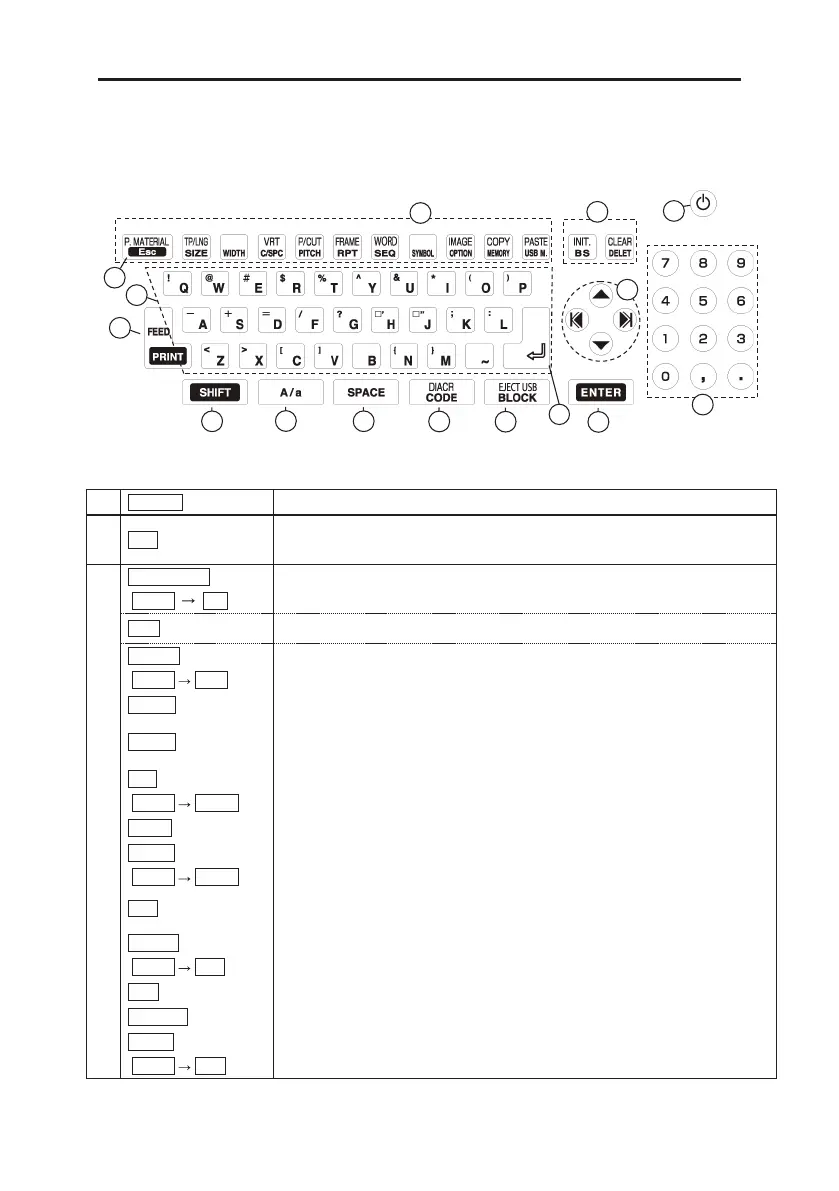
<1> Keyboard layout
<2> Keys and their functions
1 ON/OFF Press this key to turn ON/OFF power.
2 ESC
Press this key to return to the previous menu and not to make any changes.
When printing or displaying an “IMAGE,“ cancel the operation.
3
P.MATERIAL
(SHIFT Esc)
Press these key to set the “PRINTED MATERIAL” when changing material
without turning off power. (See 6:BASIC OPERATION)
SIZE
Press this key to set the “SIZE” of characters. (See 8-1: SIZE)
TP/LNG
(SHIFT SIZE)
Press these keys to set the “PRINTING LENGTH” and the “MARGIN” for the
[NORMAL PRINT MODE]. (See 8-5: NORMAL PRINT)
WIDTH
Press this key to set the “WIDTH” of characters. (See 8-2: WIDTH)
C /SPC
Press this key to set the “CHARACTER SPACE” and “ LINE SPACE.”
(See 8-3: CHARACTER / LINE SPACE)
VRT
(SHIFT C/SPC)
Press these keys to set the “VERTICAL PRINTING.” (See 8-6: VERTICAL)
PITCH
Press this key to set the “PITCH LENGTH.” (See 8-4: PITCH PRINT)
P /CUT
(SHIFT PITCH)
Press these keys to set the way of “PITCH CUTTING.”
(See 8-4: PITCH PRINT)
RPT
Press this key to set the repeating times and underline.
(See 8-7: REPEAT)
(See 8-8 :UNDERLINE)
FRAME
(SHIFT RPT)
Press these keys to set the “FRAME.” (See 8-10: FRAME)
SEQ
Press this key to set the sequential numbers. (See 8-9: SEQUENCE)
SYMBOL
Press this key to operate the “SYMBOL” function. (See 8-11: SYMBOL)
WORD
(SHIFT SEQ)
Press these keys to operate the “MEMORY OF WORD” function.
(See 8-12: MEMORY OF WORD)


 To Next Page
 Loading...


