58
FUNCTIONS
8-14-11 PRINTING STYLE OF “RPT” & “SEQ”
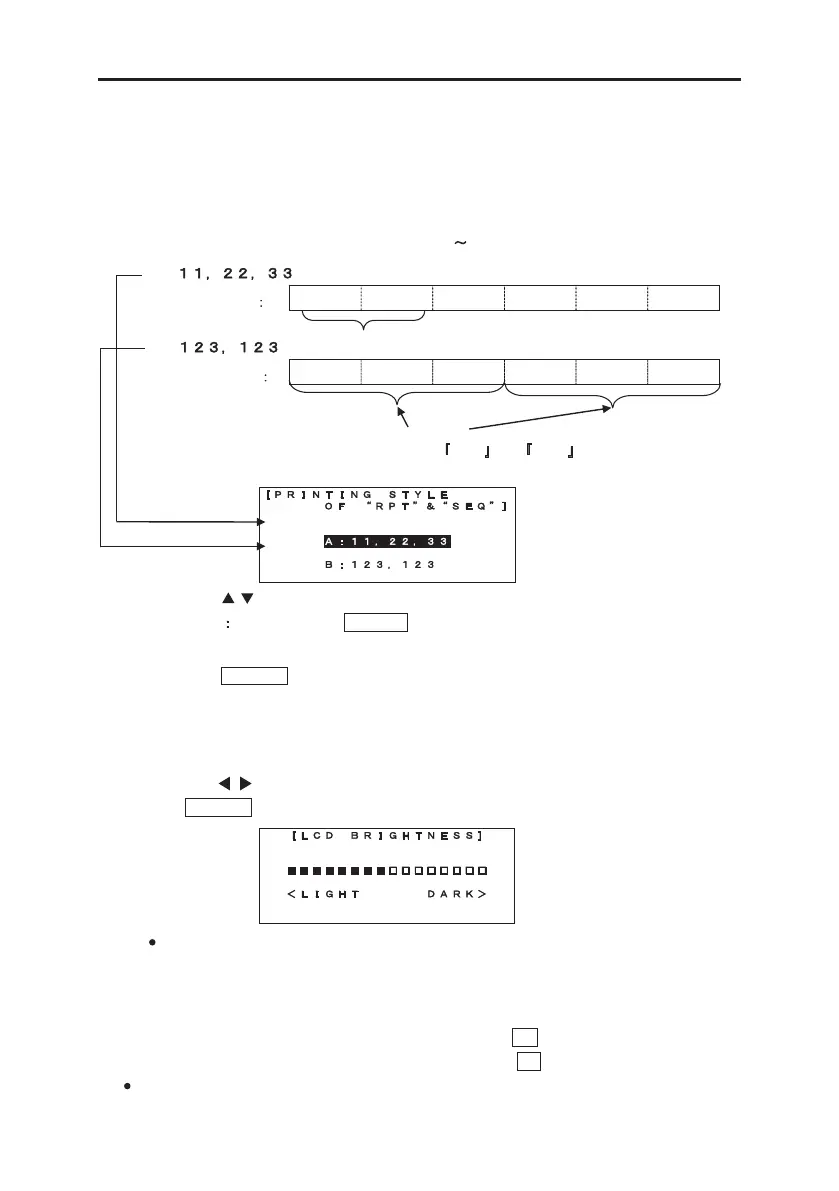
Selecting the printing style for the “REPEAT an d SEQUENCE”.
The default value of the “PRINTIN G STYLE” is “A : 11, 22, 33” at our factory.
When you use the “REPEAT and SEQUENCE” function at the same time, you can select the
printing style from “A : 11, 22, 33” or. “B : 123, 123.”
Example: REPEAT :2 pcs. SEQUENCE : 01
03
(A :
)
(B :
)
1. Select the “PRINTING STYLE OF
RPT & SEQ ” in the “ADVANCED
SETTINGS” menu.
2. Press
/ to select the printing style.
Note
If you press the DELET key, the selection is initialized to the
factory default.
3. Press ENTER key to register the new selection.
( 2 pcs.)
8-14-12 LCD BRIGHTNESS
Adjusting the “LCD BRIGHTNESS.” When the screen is not visible enough, adjust the
“LCD BRIGHTNESS” level.
By pressing / key, increase or decrease the “LCD BRIGHTNESS” level.
Press ENTER to register the “LCD BRIGHTNESS” level.
Note: Without entering the ADVANCED SETTINGS menu, the adjustment of the “LCD
BRIGHTNESS” is also available by following way.
1. Turn on the power.
2. In the [PRINTED MATERIAL setting screen],
To increase the “LCD BRIGHTNESS,” press P key.
To decrease the “LCD BRIGHTNESS,” press L key.
Depending on the temperature, “LCD BRIGHTNESS” adjustment might improve the visibility
of the screen.


 To Next Page
 Loading...


