152
Controls in detail
Lighting
Maybach 62 with electrotransparent roof*
(vehicles
with rear center seat*
in storage
compartment/drawer)
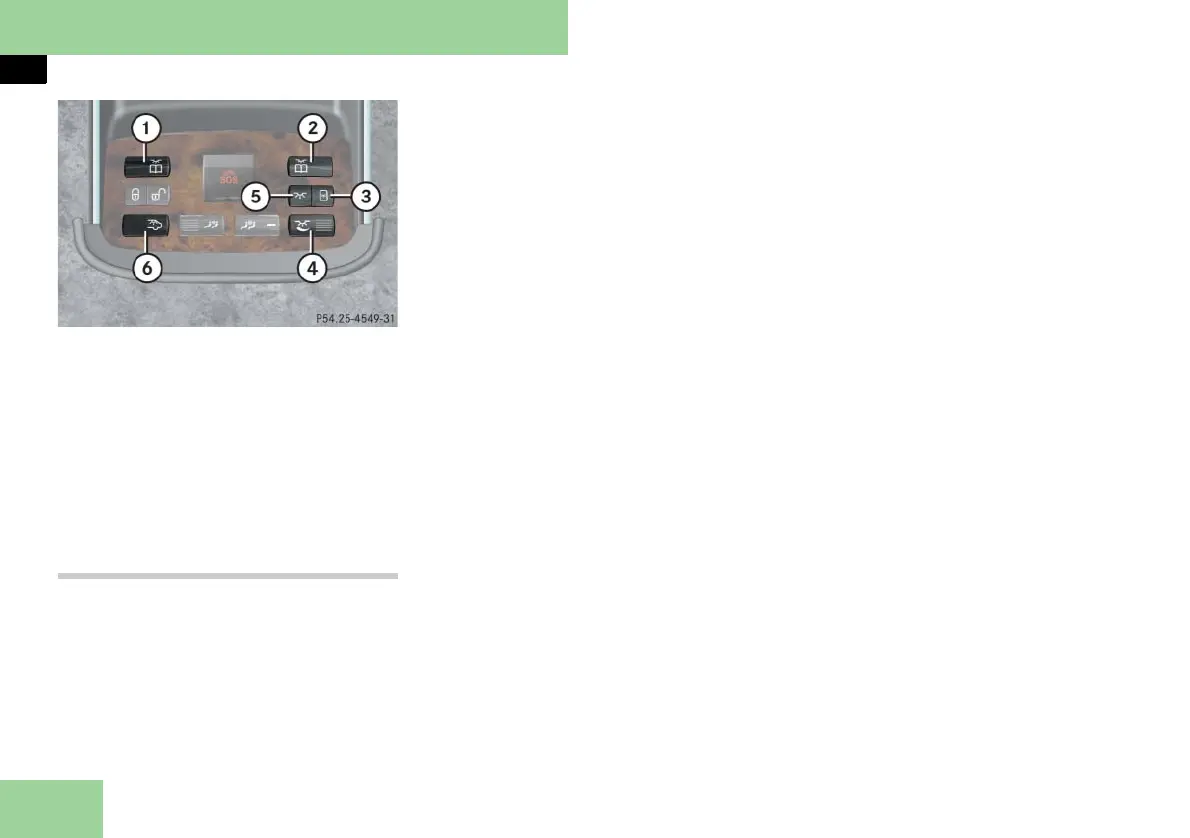
1 Left rear reading lamp on/off
2 Right rear reading lamp on/off
3 Roof lighting on/off
4 Thumbwheel for dimming ambient
lighting/roof lighting
5 Ambient lighting on/off
6 Rear interior lighting on/off
Manual control
Rear interior lighting
왘 Press the switch at the ò symbol to
switch the rear interior lighting on.
왘 Press the switch at the ò symbol
again to switch the rear interior light-
ing off.
Rear reading lamps
왘 Press respective switch 1 or 2
at X symbol to switch the corre-
sponding rear reading lamps on.
왘 Press respective switch 1 or 2
at X symbol again to switch the
corresponding rear reading lamps
off.
Ambient lighting
The ambient lighting switches on and off
automatically depending on the bright-
ness of the ambient light.
You can switch on or off ambient light-
ing manually.
왘 Press the switch at the ð symbol to
switch the ambient lighting on.
왘 Press the switch at the ð symbol to
switch the ambient lighting off.
Dimming ambient lighting, headliner
lamps and roof lighting*
왘 Turn thumbwheel 4 until the cur-
rent ambient lighting has reached
the desired intensity.
Headliner lamps
In Maybach 62 with tilt/sliding sunroof,
the headliner lamps can be illuminated.
왘 Press switch 3 to switch the headlin-
er lamps on.
왘 Press switch 3 to switch the headlin-
er lamps off.
Electrotransparent roof lighting*
In Maybach 62 with an electrotranspar-
ent roof, the roof lining can be illuminat-
ed when the screen is closed.
왘 Press switch 3 to switch the roof
lighting on.
왘 Press switch 3 to switch the roof
lighting off.



 To Next Page