215
Controls in detail
Power tilt/sliding sunroof
Operating from the cockpit
The switch for the tilt/sliding sunroof is
on the overhead control panel.
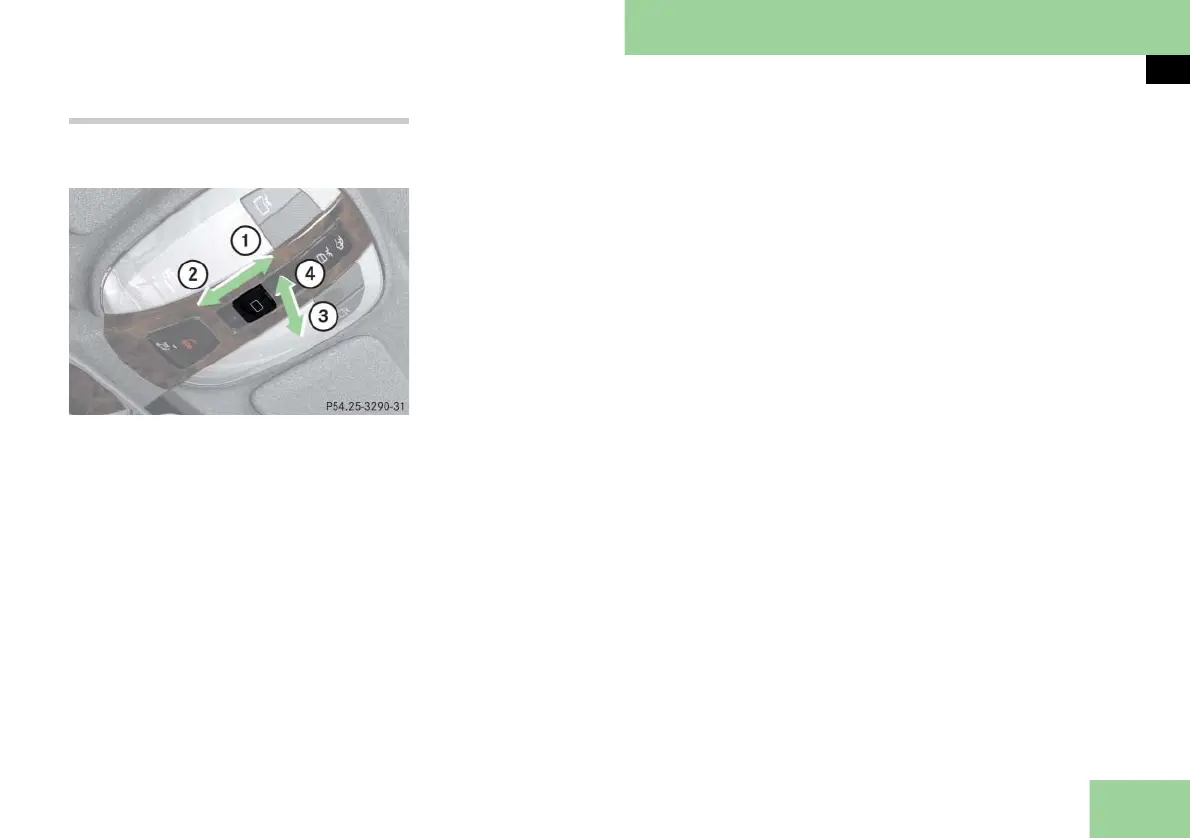
Sunroof switch, front
1 Push back to slide screen or sunroof
open
2 Push forward to slide screen or sun-
roof closed
3 Pull down to lower sunroof at rear
4 Push up to raise sunroof at rear
i If the screen is closed, the screen opens
first when you push the sunroof switch in di-
rection of arrow 1.
Push the sunroof switch again in direction of
arrow 1 to open the tilt/sliding sunroof.
The screen only operates with the tilt/sliding
sunroof closed.
Opening and closing the screen
왘 To open or close the screen, move the
sunroof switch to the resistance point
in the required direction of arrow 1
or 2.
Release the sunroof switch when the
screen has reached the desired posi-
tion.
Opening and closing the power tilt/slid-
ing sunroof
왘 Open the screen if it is closed.
왘 To open, close, raise, or lower the tilt/
sliding sunroof, move the sunroof
switch to resistance point in the re-
quired direction of arrows 1 to 4.
왘 Release the sunroof switch when the
tilt/sliding sunroof has reached the
desired position.
Fully opening (Express-open) and clos-
ing (Express-close) the power tilt/sliding
sunroof
왘 Open the screen if it is closed.
왘 To open, close, raise, or lower the tilt/
sliding sunroof, move the sunroof
switch past the resistance point in the
required direction of arrows 1 to 4
and release.
The tilt/sliding sunroof opens or clos-
es completely.
Stopping the power tilt/sliding sunroof
during Express-operation
왘 Move the switch in any direction.
i If the movement of the tilt/sliding sunroof
is blocked during the closing procedure, the
tilt/sliding sunroof will stop and reopen slight-
ly.



 To Next Page