405
Practical hints
Replacing SmartKey batteries
If the batteries in the SmartKey or
SmartKey with KEYLESS-GO** are dis-
charged, the vehicle can only be locked
or unlocked using the mechanical key
(
컄 page 401). It is recommended to have
the batteries replaced at an authorized
Maybach Studio.
Batteries contain materials that can
harm the environment if disposed of im-
properly. Recycling of batteries is the
preferred method of disposal. Many
states require sellers of batteries to ac-
cept old batteries for recycling.
i When inserting the batteries, make sure
they are clean and free of lint.
i When replacing batteries, always replace
both batteries.
The required replacement batteries are avail-
able at any Maybach Studio.
Replacement batteries: Lithium, type
CR 2025 or equivalent.
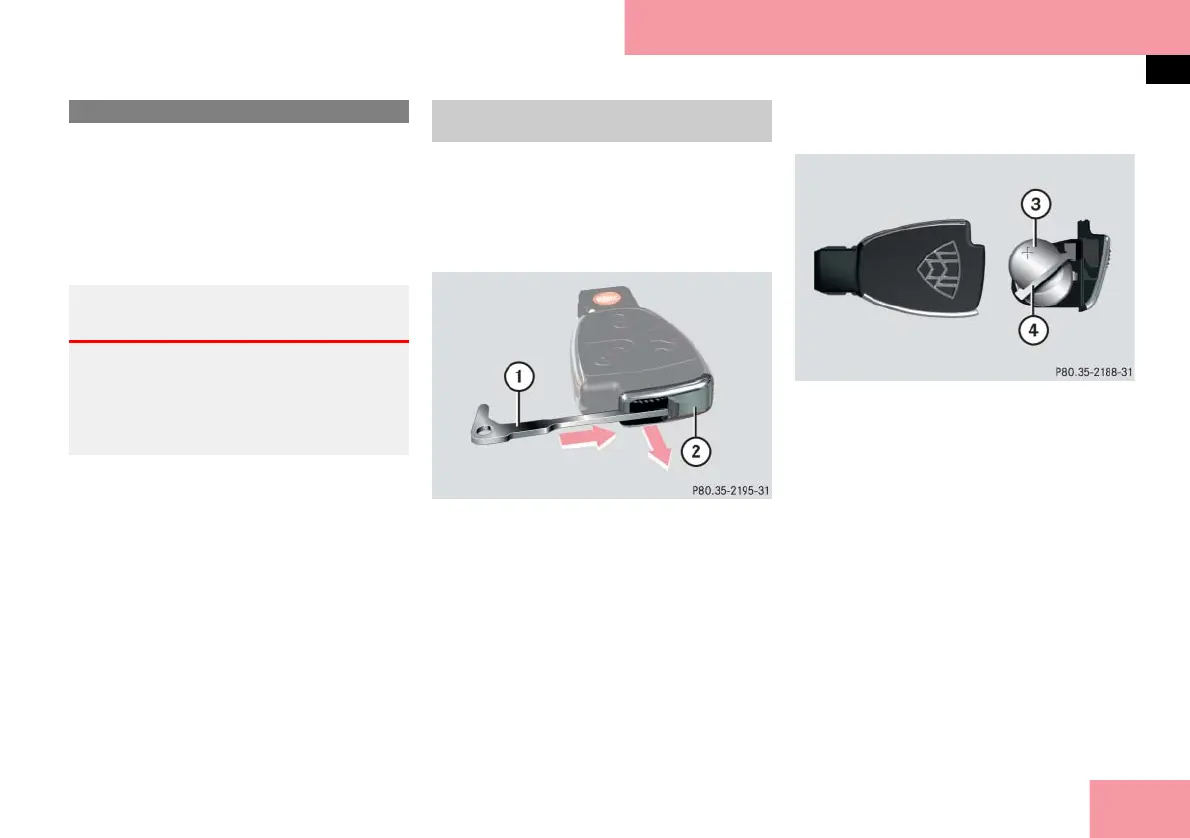
왘 Remove the mechanical key out of
the SmartKey/SmartKey with
KEYLESS-GO** (
컄 page 401).
1 Mechanical key
2 Battery compartment
왘 Insert mechanical key 1 in direction
of arrow in side opening.
왘 Using mechanical key 1, push the
gray slide to unlatch battery compart-
ment 2.
왘 Pull battery compartment 2 out of
the housing in direction of arrow.
3 Battery
4 Contact spring
왘 Remove the batteries 3.
왘 Using a lint-free cloth, insert new
batteries 3 under the contact
spring 4 with the plus (+) side facing
up.
왘 Return battery compartment 2 into
the housing until it locks into place.
왘 Slide mechanical key 1 back into the
SmartKey/SmartKey with
KEYLESS-GO** (
컄 page 401).
왘 Check the operation of the SmartKey/
SmartKey with KEYLESS-GO**.
Replacing SmartKey batteries
Warning! G
Batteries contain poisonous and corrosive
substances. Therefore keep the batteries
out of reach of children.
If a battery is swallowed, seek medical help
immediately.
SmartKey/SmartKey with
KEYLESS-GO**



 To Next Page