219
Controls in detail
Electrotransparent roof*
Opening the screen
왘 Slide the switch to the resistance
point in direction of arrow 2.
왘 Release the switch when the screen
has reached the desired position.
Closing the screen
왘 Move the switch to the resistance
point in direction of arrow 1.
왘 Release the switch when the screen
has reached the desired position.
Fully opening the screen (Express-open)
왘 Move the switch past the resistance
point in direction of arrow 2 and re-
lease.
The screen opens completely.
Fully closing the screen (Express-close)
왘 Move the switch past the resistance
point in direction of arrow 1 and re-
lease.
The electrotransparent roof turns
opaque and the screen closes com-
pletely.
Stopping the screen during
Express-operation
왘 Move the switch in any direction.
Making the electrotransparent roof
transparent
The screen must be completely open.
왘 Push the switch in direction of
arrow 4.
Making the electrotransparent roof
opaque
The screen must be completely open.
왘 Pull the switch in direction of
arrow 3.
Switching on roof lighting
The screen must be completely closed.
왘 Press the switch in direction of
arrow 4.
Switching off roof lighting
왘 Pull the switch in direction of
arrow 3.
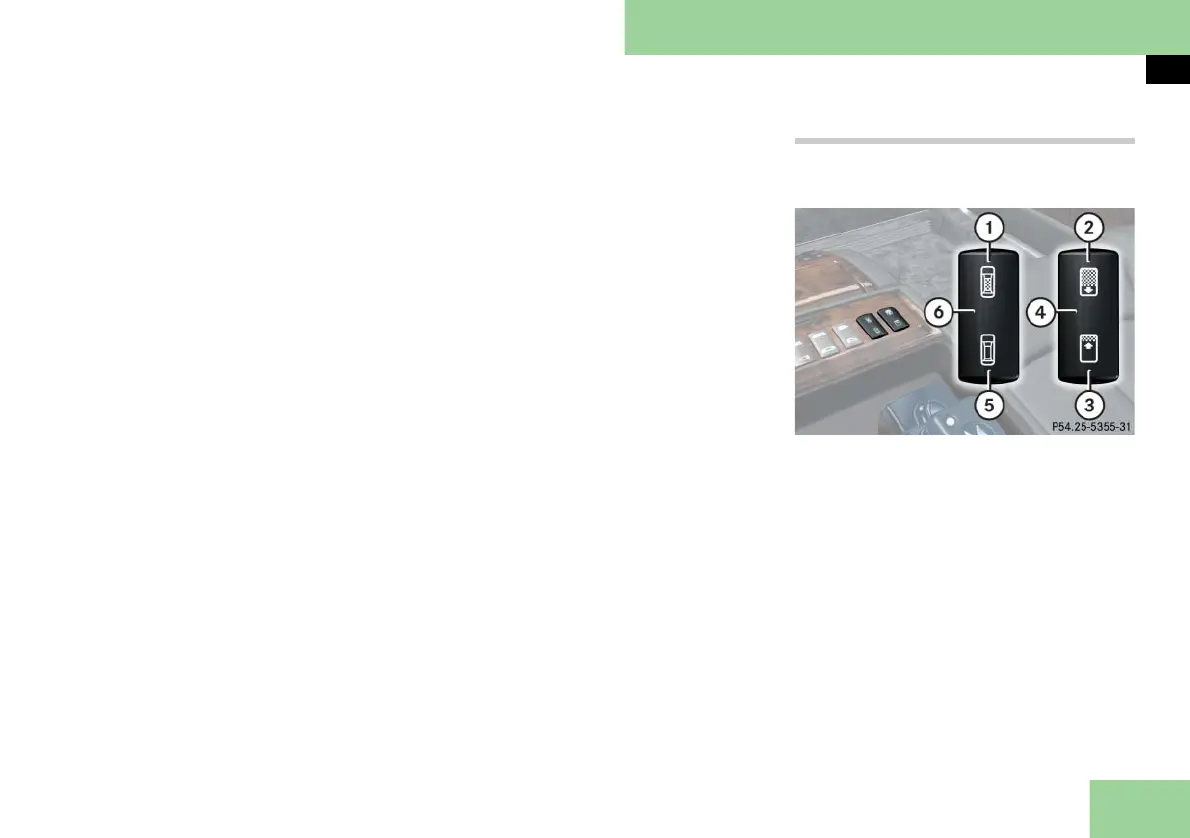
Operating from the rear passenger com-
partment
The switches are in the storage compart-
ment under the rear center armrest.
Electrotransparent roof switches, rear
1 Press to make roof opaque
2 Press to slide screen closed
3 Press to slide screen open
4 Switch for screen
5 Press to make roof transparent
6 Switch for electrotransparent roof



 To Next Page