230
Controls in detail
Driving systems
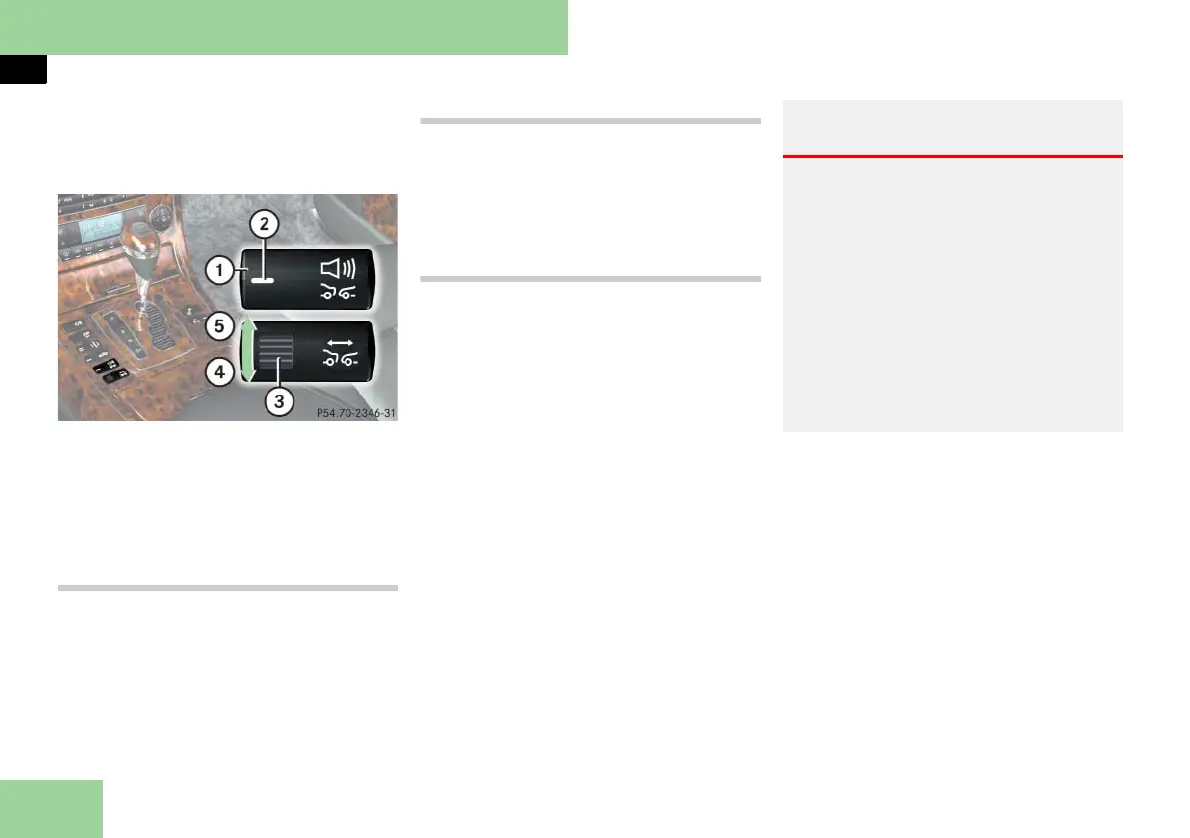
The distance warning function on/off
button and thumbwheel for setting dis-
tance are located on the lower part of
the front center console.
1 Distance warning function on/off
button
2 Indicator lamp
3 Thumbwheel for setting distance
4 Increasing distance
5 Decreasing distance
Increasing distance
Increasing the distance setting tells Dis-
tronic to maintain a greater following
distance to the vehicle ahead.
왘 Turn thumbwheel 3 in direction of
arrow 4.
Decreasing distance
Decreasing the distance setting tells Dis-
tronic to maintain a shorter following
distance to the vehicle ahead.
왘 Turn thumbwheel 3 in direction of
arrow 5.
Distance warning function
When Distronic is deactivated, this func-
tion will continue to warn you when rec-
ognizing a slower vehicle moving in the
vehicle’s path and the danger of a colli-
sion exists:
앫 The distance warning lamp l in
the instrument cluster comes on.
앫 An intermittent warning sounds.
If these warnings are issued, you must
brake manually to maintain a safe dis-
tance and avoid a collision with the vehi-
cle ahead.
When pressing the brake pedal, the
warning sound stops. The warning sound
also stops when the distance to the vehi-
cle ahead is sufficient again without ap-
plying the brake pedal. In this case the
distance warning lamp l also extin-
guishes.
i Complex driving situations are not always
fully recognized by Distronic. This could result
in wrong or missing distance warnings.
Activating
왘 Press button 1 {.
Indicator lamp 2 comes on. A loud-
speaker symbol appears in the multi-
function display (
컄 page 227).
Warning! G
If the distance warning lamp l in the
instrument cluster comes on while driving
and/or an intermittent warning sounds,
immediate attention on the part of the
driver is required.
As required by the traffic situation, apply
the brakes and navigate around a possible
obstacle. However, do not drive by relying
on the distance warning function, as this
will result in an emergency braking appli-
cation. Especially depending on road sur-
face conditions and driver reaction, this
will not always enable you to avoid a colli-
sion.



 To Next Page