250
Controls in detail
Useful features
Storage compartment in the glove box
A storage compartment for pens, a flash-
light and a coin holder is located in the
cover of the glove box.
Opening
왘 Lightly touch cover plate.
The cover opens automatically.
Closing
왘 Lightly push the cover plate up until
it engages in lock.
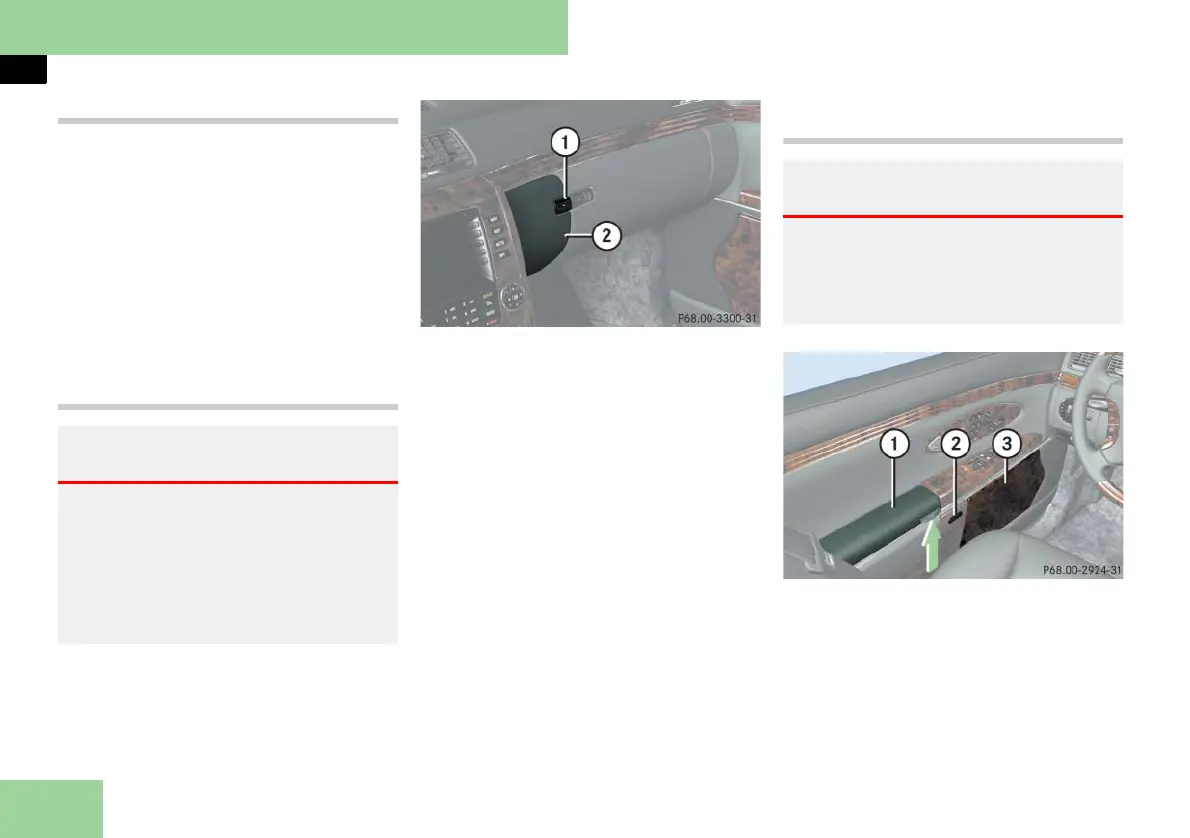
Compartment for the front telephone
1 Compartment lid release button
2 Compartment for telephone
Opening
왘 Press release button 1.
The compartment lid opens down-
ward. The telephone handset swings
out.
Closing
왘 Press button 1 to close.
! To prevent any damage, the telephone
flap must be folded down before closing the
telephone compartment.
i The Roadside Assistance button • and
the Information button ¡ (컄 page 285) are
located in the compartment for the front tele-
phone.
Storage compartments in the front
doors
1 Storage compartment
2 Opening button
3 Storage compartment with storage
space for change and CDs
Warning! G
Always keep the compartment for the
front telephone closed while driving. The
protruding telephone could otherwise
cause injury to you and others during
앫 braking
앫 vehicle maneuvers or
앫 an accident.
Warning! G
Always keep the door storage compart-
ments closed while the vehicle is in motion.
Failure to do so may cause the seat belt to
catch at the rear and prevent proper posi-
tioning of the seat belt.



 To Next Page