252
Controls in detail
Useful features
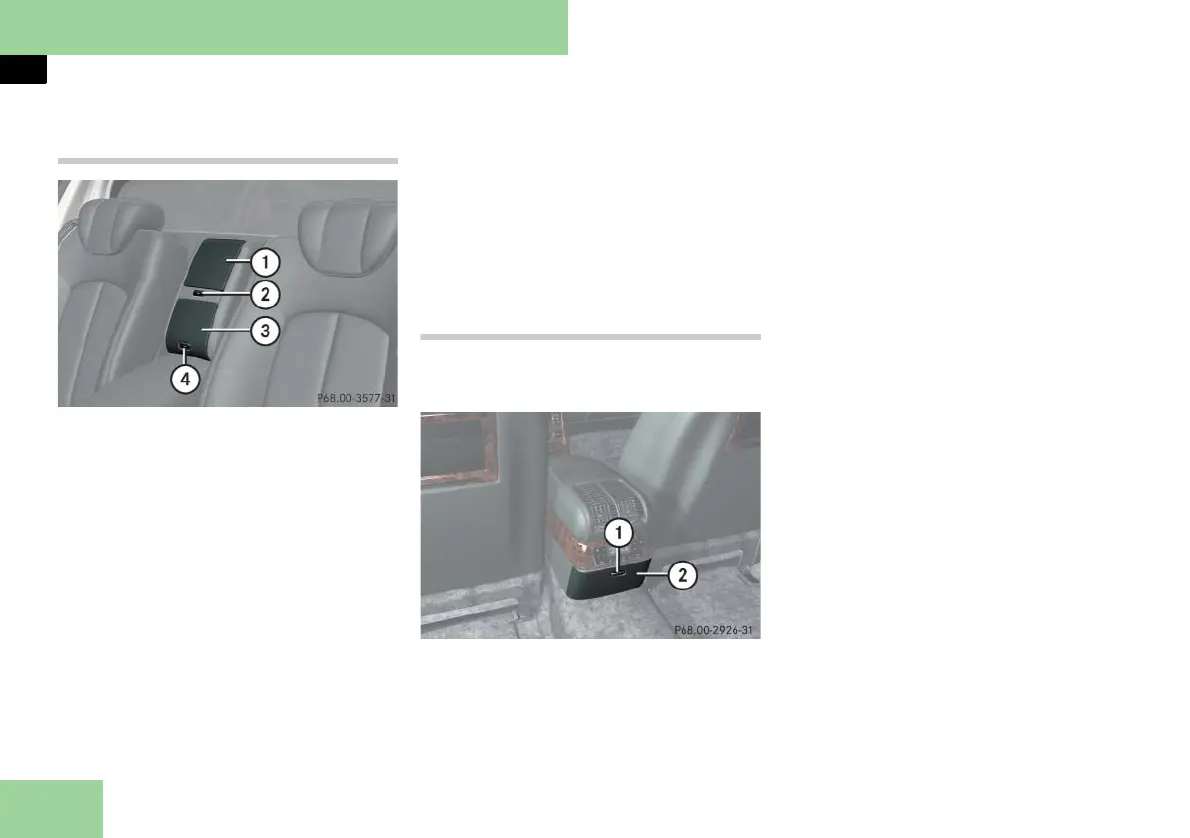
Storage compartment and storage com-
partment/drawer between the front
seats (Maybach 62 with partition*)
1 Storage compartment
2 Opening button for storage compart-
ment
3 Storage compartment/drawer
4 Opening button for storage compart-
ment/drawer
Opening storage compartment
왘 Press button 2 briefly.
The storage compartment 1 opens
upward.
Closing storage compartment
왘 Push storage compartment 1 down-
ward until it engages in the lock.
Opening storage compartment/drawer
왘 Press button 4 briefly.
The storage compartment/drawer 3
opens.
Closing storage compartment/drawer
왘 Push storage compartment/
drawer 3 until it engages in the lock.
Storage compartments in rear center
console
Opening/closing the storage compart-
ment/drawer in rear center console
Example illustration from Maybach 57
1 Opening button for storage compart-
ment/drawer
2 Storage compartment/drawer
i The remote control for the rear-cabin au-
diovisual system (see the separate COMAND
and Rear-Cabin Audiovisual System operating
instructions) is located in the storage compart-
ment/drawer.
i Maybach 62 with rear center seat*:
In the storage compartment/drawer is the rear
center console (컄 page 49).
Maybach 57:
왘 To open, press button 1.
The storage compartment/drawer 2
opens.
왘 To close, push storage compartment/
drawer 2 in until it engages in the
lock.
i There is no storage compartment/drawer
in Maybach 57 with rear center seat* if your
vehicle configuration has the control panel
for the rear functions* on the lower rear enter
console.
Maybach 62:
왘 To open, press button 1.
The storage compartment/drawer 2
opens slightly.
If necessary:
왘 Close the champagne flute/bottle
holder (
컄 page 259).
or



 To Next Page