264
Controls in detail
Useful features
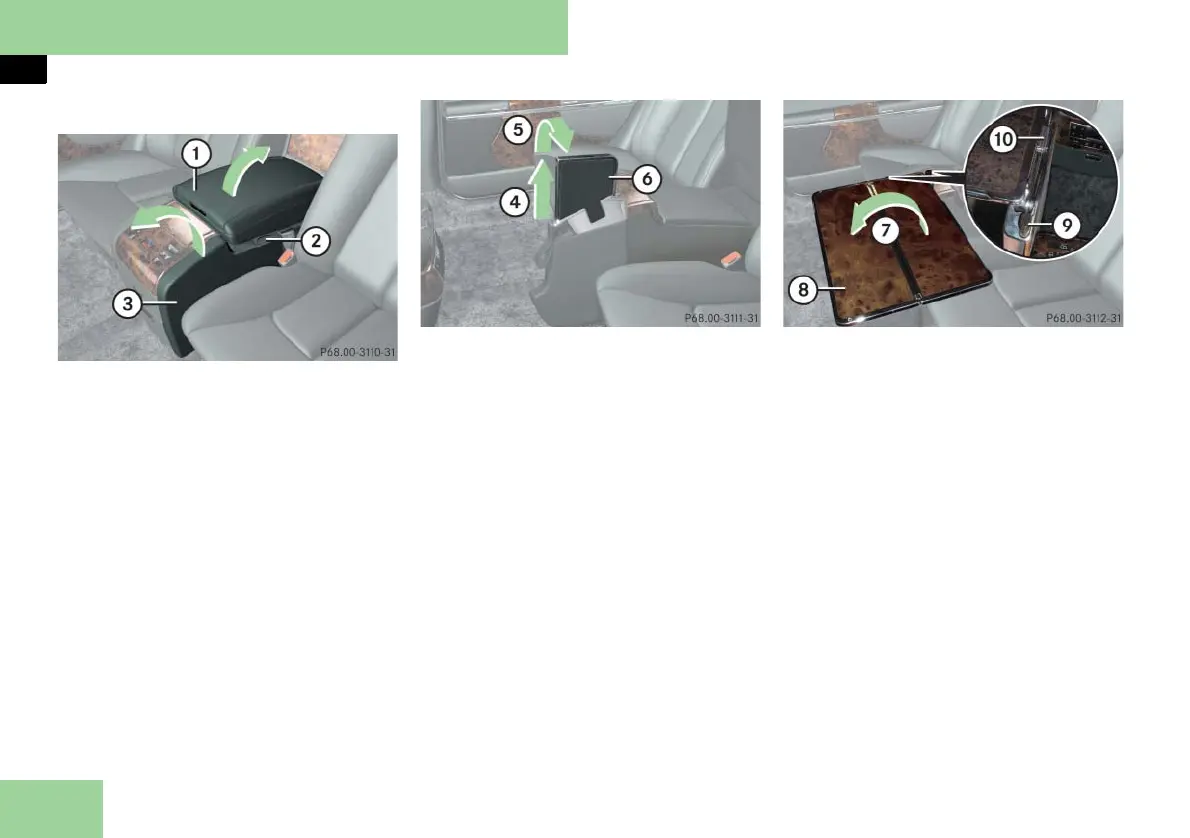
Opening the folding table
1 To raise the armrest
2 Loop
3 Folding table
왘 Lift up armrest 1.
왘 Pull up folding table 3 vertically, us-
ing loop 2.
4 To pull out the table
5 To swing the table to the side
6 Table
왘 Pull table 6 out vertically 4.
왘 Swing the table to the side 5.
왘 Lower armrest 1.
7 Fold out table half
8 Table half
9 Move table surface fore and aft
a Tilt table surface
왘 Fold out table half 8 from 7.
왘 Press button 9 and adjust the table
fore or aft to the desired position.
왘 Press button a to adjust the table
surface tilt. When you have obtained
the desired tilt, release the button.



 To Next Page