49
o p e r a t i n g t h e a n a l y z e r
r
s
s
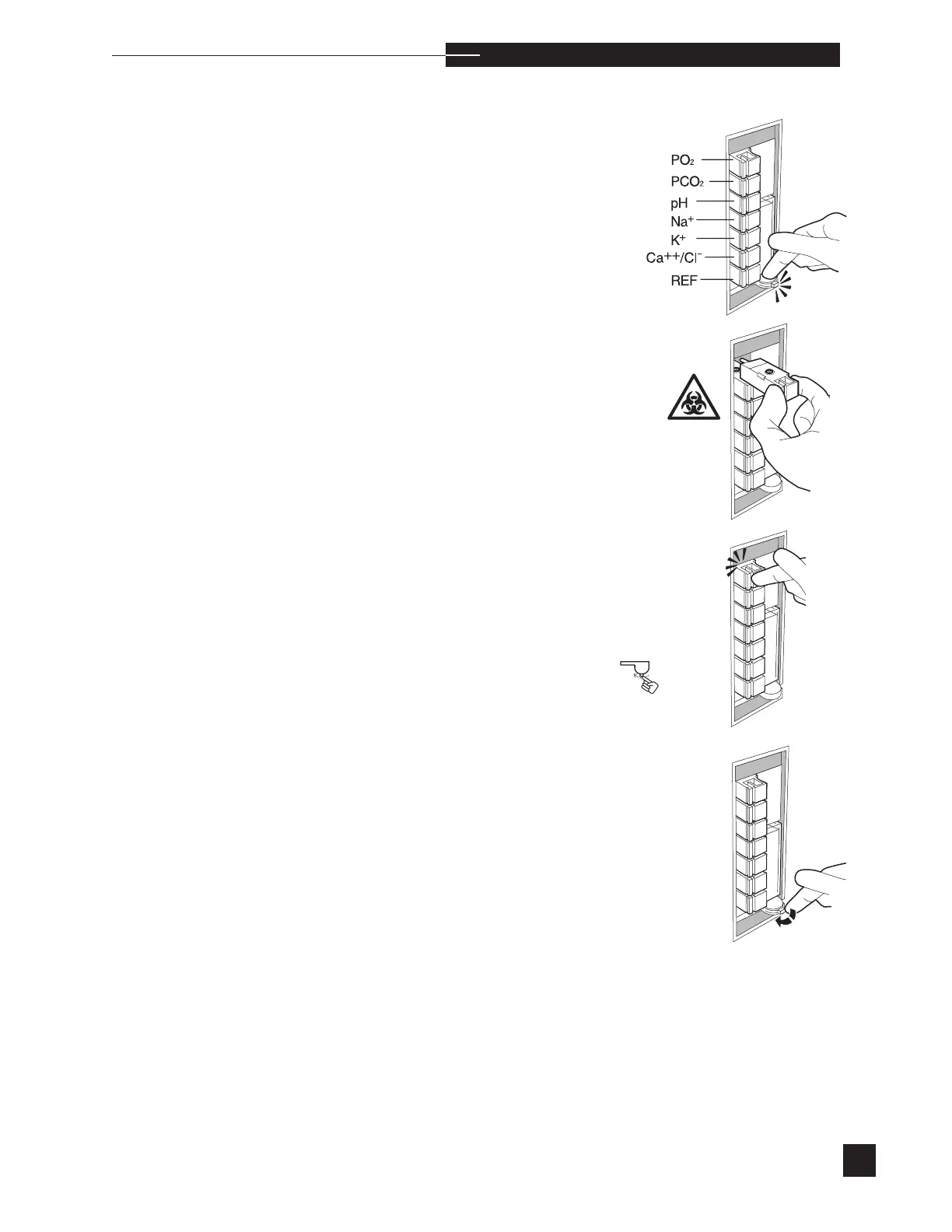
To remove an electrode, push the compression plate down until
the
latch locks into the open position.
Grip the desired electrode handle, squeeze, and pull it straight out
from the sensor module.
To install a new electrode, push the electrode into its designated
position. The handle snaps into the sensor module. Each electrode
is keyed to assure correct placement. DO NOT FORCE. Refer to the
illustration and the access door label for correct electrode order and
location.
Release the compression plate to compress the electrodes within the
sensor module.
Press YES to REPLACEMENT COMPLETED?. Reagents are auto-
matically primed from the reagent module. When priming is complete,
the display indicates the detection of each fluid with PASS, then auto-
matically returns to the REPLACE COMPONENTS screen.
A WARMING UP message may appear for up to 30 minutes. During
this time, the EasyStat will not calibrate or analyze samples.
New electrodes require a short stabilization period to prevent drift
errors. This stabilization is minimized by the analyzer, which performs
calibrations every hour for 8 hours. After this stabilization period,
the analyzer will calibrate at the calibration frequency selected under
CAL FREQUENCY in the CONFIGURATION section of the
SETUP MENU.



 To Next Page