Managing Calls
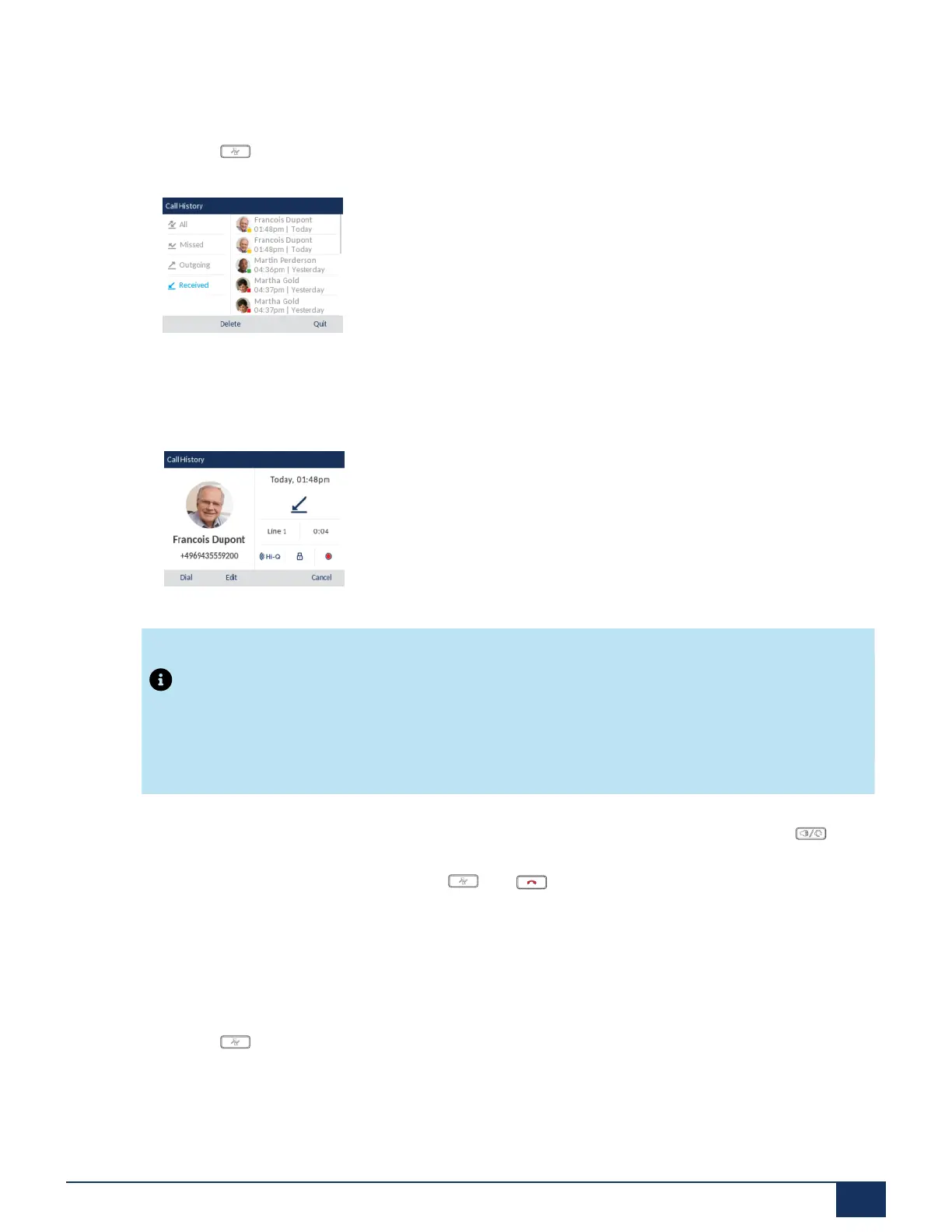
Accessing and Using the Received Callers List
1.
Press the key.
2. With Received highlighted press the right navigation key to move to entry column.
3. Use the up and down navigation keys to scroll through the entries in the Received Callers List.
4. Press right navigation key to see more detailed information about the Received Callers List entry.
Note:
The detailed view screen contains the picture ID of the caller (if available), the date and time of the
incoming call, the line on which the call was received, call duration (if the call was answered), any
applicable call feature indicators, and the caller ID details.
5.
To dial the displayed number while in the Received Callers List, press the select button, press , lift
the handset, or press any of the line keys.
6.
To exit the Received Callers List, press the key, key, or the Quit softkey.
Editing Entries in the Received Callers List
In the Received Callers List, pressing the Edit softkey allows you to edit the entry’s name and/or number
prior to dialing out or copying to the Local Directory.
1.
Press the key.
2. With Received highlighted press the right navigation key to move to entry column.
3. Use the up and down navigation keys to scroll through the entries in the Received Callers List.
4. Press the right navigation key to see more detailed information about the Received Callers List entry.
Version 1.0
User Guide 148



 To Next Page