.
.
.-.
I.
-.
-.
:
SECTION
MITL91
05/911
O-096-350-NA
TABLE 4-1 (CONT’D)
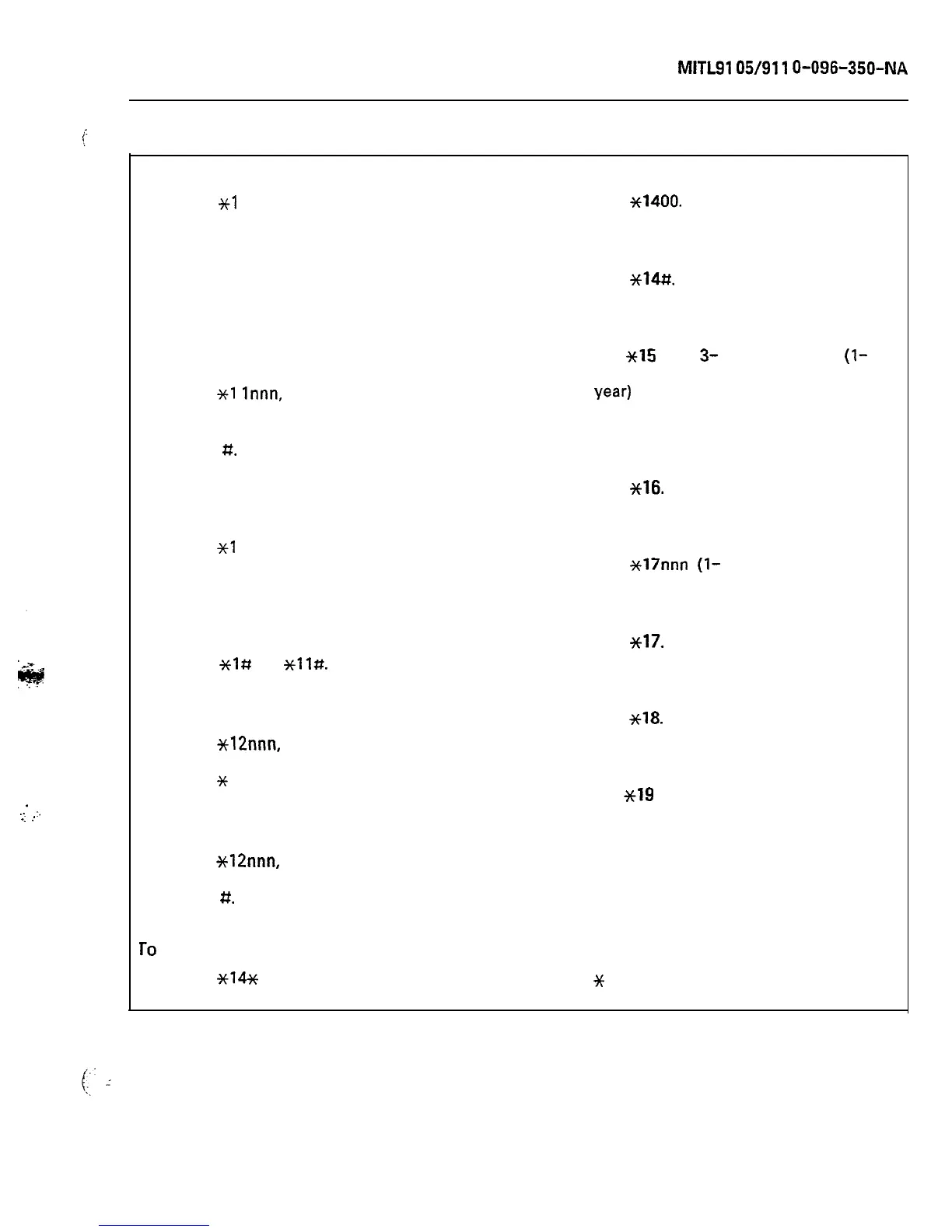
SUPERVISOR FUNCTION ACCESS CODES
To set up call forwarding:
(a) Dial
Xl
Innn, where nnn is the
extension number of the forwarding
extension.
(b) Dial call forwarding code (l-4).
(c) Dial mmm, where mmm is the number
to which the calls are to be
forwarded.
(d) Press RELEASE button.
To cancel call forwarding for an extension:
(a) Dial
Xl
lnnn,
where nnn is the
extension number of the forwarding
extension.
(b) Dial
I#.
(c) Press RELEASE button.
To display call forwarding set for an
extension:
To purge and ignore the printer (Note 3):
(a) Dial
~1400.
(b) Press RELEASE button.
To enable the printer (Note 3):
(a) Dial
++14#.
(b) Press RELEASE button.
To change the date:
(a) Dial
~15
and
3-
or 4-digit date
(l-
or
2-digit month, 2-digit day., 2-digit
year)
(b) Press RELEASE button.
To print the room register audit (Notes 2
and 3):
(a) Dial
~16.
(b) Press RELEASE button.
(a) Dial
~1
lnnn, where nnn is the
extension number of the forwarding
extension.
(b) Press RELEASE button.
To cancel all call forwarding:
(a) Dial
~1s
or
*ll#.
(b) Press RELEASE button.
To busy out an extension (Note 3):
(a) Dial
Xl2nnn,
where nnn is the number
of the extension to be busied-out.
(b) Dial
*
.
(c) Press RELEASE button.
To debusy an extension (Note 3):
(a) Dial
*12nnn,
where nnn is the number
of the extension to be debusied.
(b) Dial
#.
(c) Press RELEASE button.
To
suspend the printer (Note 3):
(a) Dial
~14%
.
b) Press RELEASE button.
To change the system identity (Note 3):
(a) Dial
Xl7nnn
(l-
to 3-digit ID, o-999).
(b) Press RELEASE button.
To display current system identity:
(a) Dial
~17.
(b) Press RELEASE button.
To print the ‘room status” audit (Note 2):
(a) Dial
~18.
(b) Press RELEASE button.
To print stored customer data (Note 4):
(a) Dial
SC19
+ n, where n is:
0 A complete print (Note 5)
1
System Options, Feature Access
Codes, Classes of Service, Hunt
Groups and Extensions
2 Trunk and Trunk Group Data
3 Special Set Data
4 Toll Control Data
5 Speed Call Data
6 Automatic Route Selection Data
JC
Systemwide Data (Note 6).
(b) Press RELEASE button.
Page 33











 To Next Page