Chapter Six: Remote Operation Di
ital Lo
ic Control
93
Digital Functions
Most digital input functions are activated by pulling the input to a TTL low level
(0 to 0.8 Volts) for a minimum of 50 milliseconds. If a higher priority function has not already
been selected, the requested function will be activated. When the input is brought high (+2.4 to
+5 Volts), any lower priority functions that have been selected will now be activated. If no lower
priority functions have been selected, the function most recently requested remains in effect.
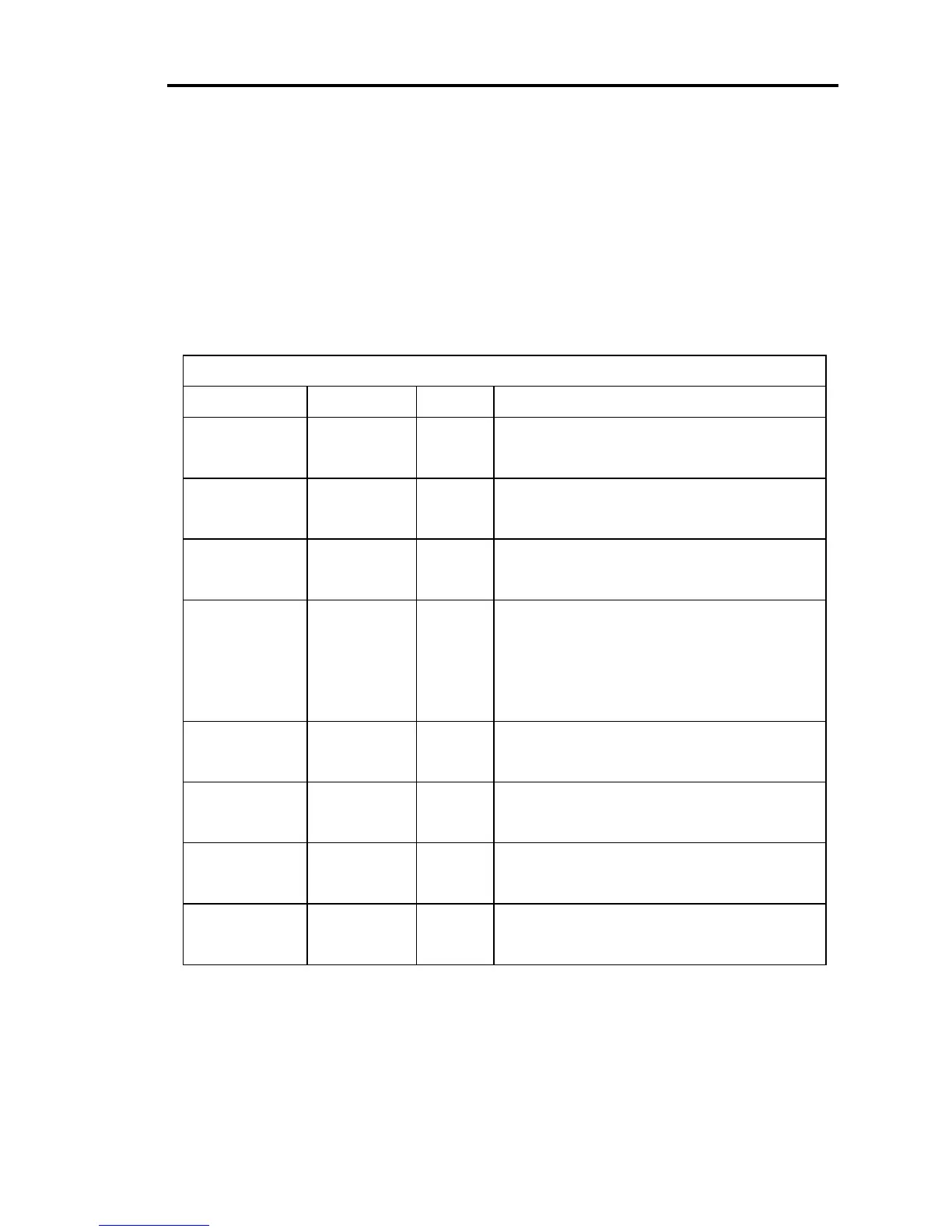
Table 17 lists the specific function of each digital input. Table 18, page 95, lists the specific
function of each digital output. The first column in each table lists the I/O port number
assignment.
Digital Input Functions
I/O Port No. I/O Pin No. State Digital Input Function
127Low
High
Open the valve
No function
28Low
High
Close the valve
No function
326Low
High
Stop the valve
No function
47Low
High
Softstart is
active
for selected command
function
Softstart is
inactive
for selected command
function (used in conjunction with another
valve control function)
525Low
High
Performs the
remote zero
function
No function
66Low
High
Analog set point to
position
Analog set point to
pressure
724Low
High
No function
No function
85Low
High
Performs the
learn
system function
No function
Table 17: Digital Input Functions
(Continued on next page)


 To Next Page