USER MANUAL NOVAplus
MRU GmbH, D-74172 Neckarsulm 62 / 95
Deleting sites
You can delete sites individually or delete all sites simultaneously
Deleting sites individually
You can delete sites individually or delete all sites simultaneously
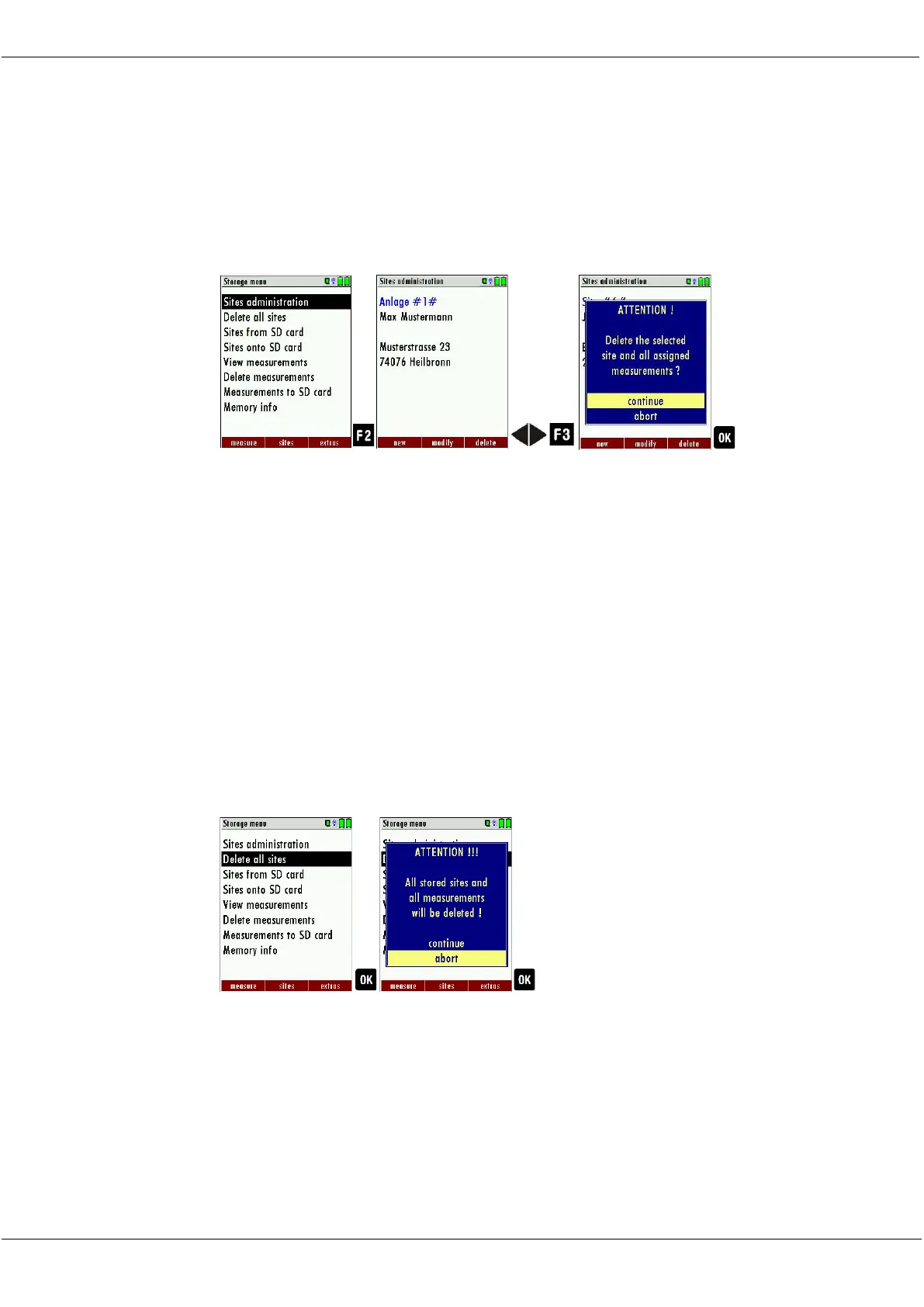
► Go to the Storage menu.
► Select Sites administration.
► Press F2.
The menu Sites administration appears.
► Select the site you want to delete.
► Press F3.
A message appears.
► Select continue to delete the site
► Select abort to retain the site.
► Press OK.
Depending on the selection, the site is deleted or retained
Deleting all sites
► Go to the Storage menu
► Select Delete all sites.
► Press OK.
A message appears.
► Select continue to delete all sites.
► Select abort to retain all sites.
► Press OK.
Depending on the selection, the site is deleted or retained



 To Next Page