2. INSTALLATION MECHANICAL
2-3
2.1.3
INSTALLATION
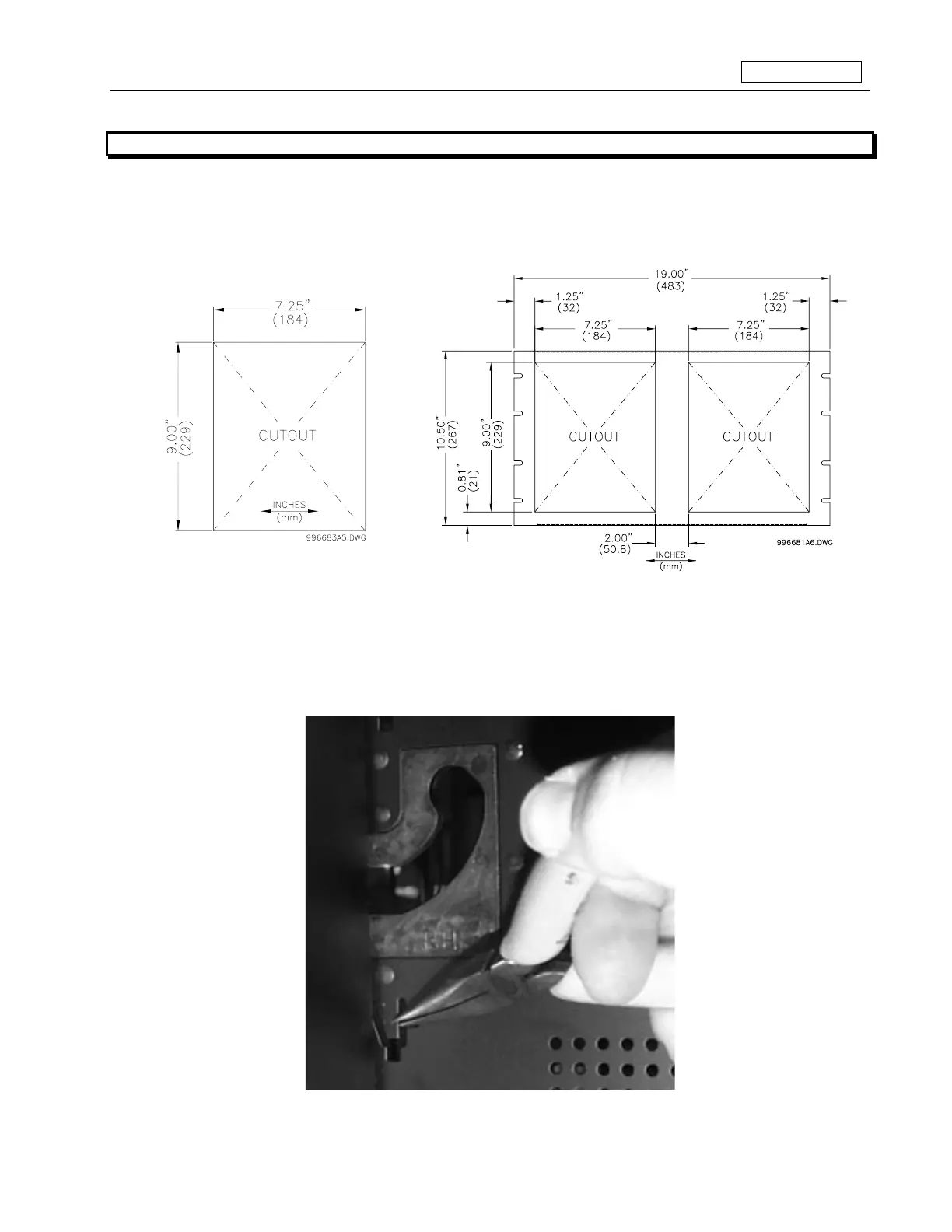
The SR469 case, alone or adjacent to another SR-series unit, can be installed in the panel of a standard 19 inch rack. (See Figure 2-5 and
Figure 2-6 for panel cutout dimensions.) When mounting, provision must be made for the front door to swing open without interference to, or
from, adjacent equipment. Normally the SR469 unit is mounted in its case when shipped from the factory, and should be removed before
mounting the case in the supporting panel. Unit withdrawal is described in section 2.1.4.
Figure 2-5 SINGLE SR469 CUTOUT PANEL
Figure 2-6 DOUBLE SR469 CUTOUT PANEL
After the mounting hole in the panel has been prepared, slide the SR469 case into the panel from the front. Applying firm pressure on the
front to ensure the front bezel fits snugly against the front of the panel, bend out the pair of retaining tabs (to a horizontal position) from each
side of the case, as shown in Figure 2-7. The case is now securely mounted, ready for panel wiring. If additional support is desired the SR
optional mounting kit may be ordered.
Figure 2-7 BEND UP MOUNTING TABS



 To Next Page