PHASORS 8. 469PC PROGRAM
8-14
8.11 PHASORS
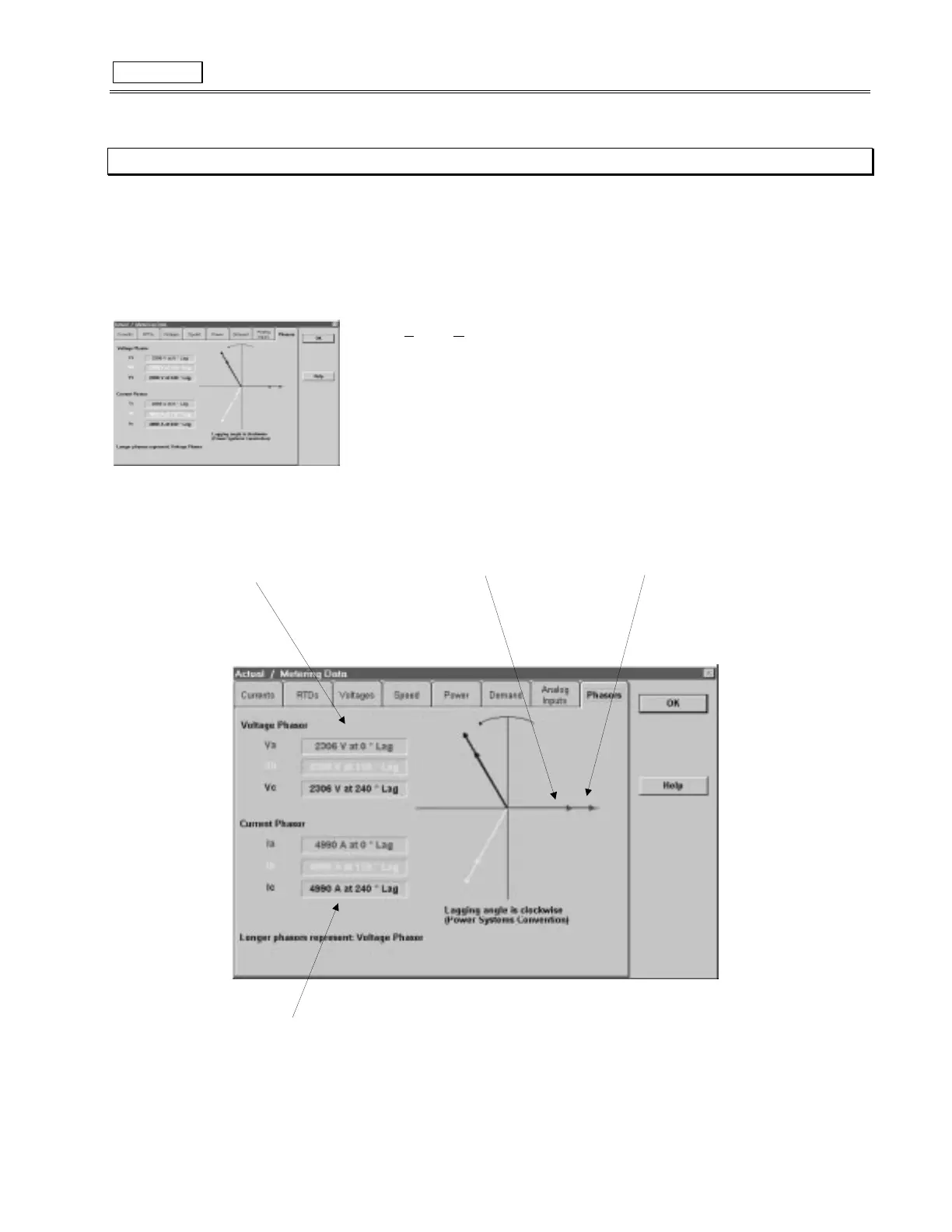
The 469PC program can be used to view the phasor diagram of three phase currents and voltages.
The phasors are for:
Phase Voltages A, B & C
Phase Currents A, B & C
1. To use the
Phasor Metering
function, run the 469PC program and establish communications with a connected SR469 Relay.
2. Select
Actual
,
M
etering Data
from the main menu, then click on the
Phasors
tab on the
Metering Data
Window. The phasor diagram and the values of voltage phasors, and current
phasors are displayed.
Note: Longer arrows are the voltage phasors, shorter arrows are the current phasors.
Va and Ia are the references (i.e. zero degree phase).
Lagging angle is clockwise.
3. More information for
Phasors
can be found under
Help
.
Figure 8-12 PHASORS
9ROWDJH#/HYHO
'LVSOD\V#WKH#YDOXH#DQG#WKH#DQJOH
RI#9ROWDJH#3KDVRUV
&XUUHQW#3KDVRU
6KRUW#$UURZ
9ROWDJH#3KDVRU
/RQJ#$UURZ
&XUUHQW#/HYHO
'LVSOD\V#WKH#YDOXH#DQG#WKH#DQJOH
RI#&XUUHQW#3KDVRUV



 To Next Page