© Munters AB, 2018 25
o
You can edit the number, but any assigned number must be different from an existing
number of that device type (for example, you cannot assign two relays to be
Heater #2).
o
Similar relay, analog output, and TRIAC devices must have different numbers.
o
If no relay is available (for example, if you try to define three relays as curtains), an
error message appears.
4. Define each device as Normally Open (NO) or Normally Close (NC). Default: NO.
o
NC connections are open when the controller instructs that device to operate or if the
controller loses power.
o
NO connections are closed when the controller instructs the device to operate.
5. On the front panel, place the toggle switch in the required position (On, Off, Automatic).
NOTE To uninstall a device, define it as None.
5.2.4 E
LEMENT TO
O
UTPUTS
/I
NPUTS
•
Analog Output / Digital Input Wiring
•
Configuring the Analog Output Devices
•
Configuring the Digital Sensors
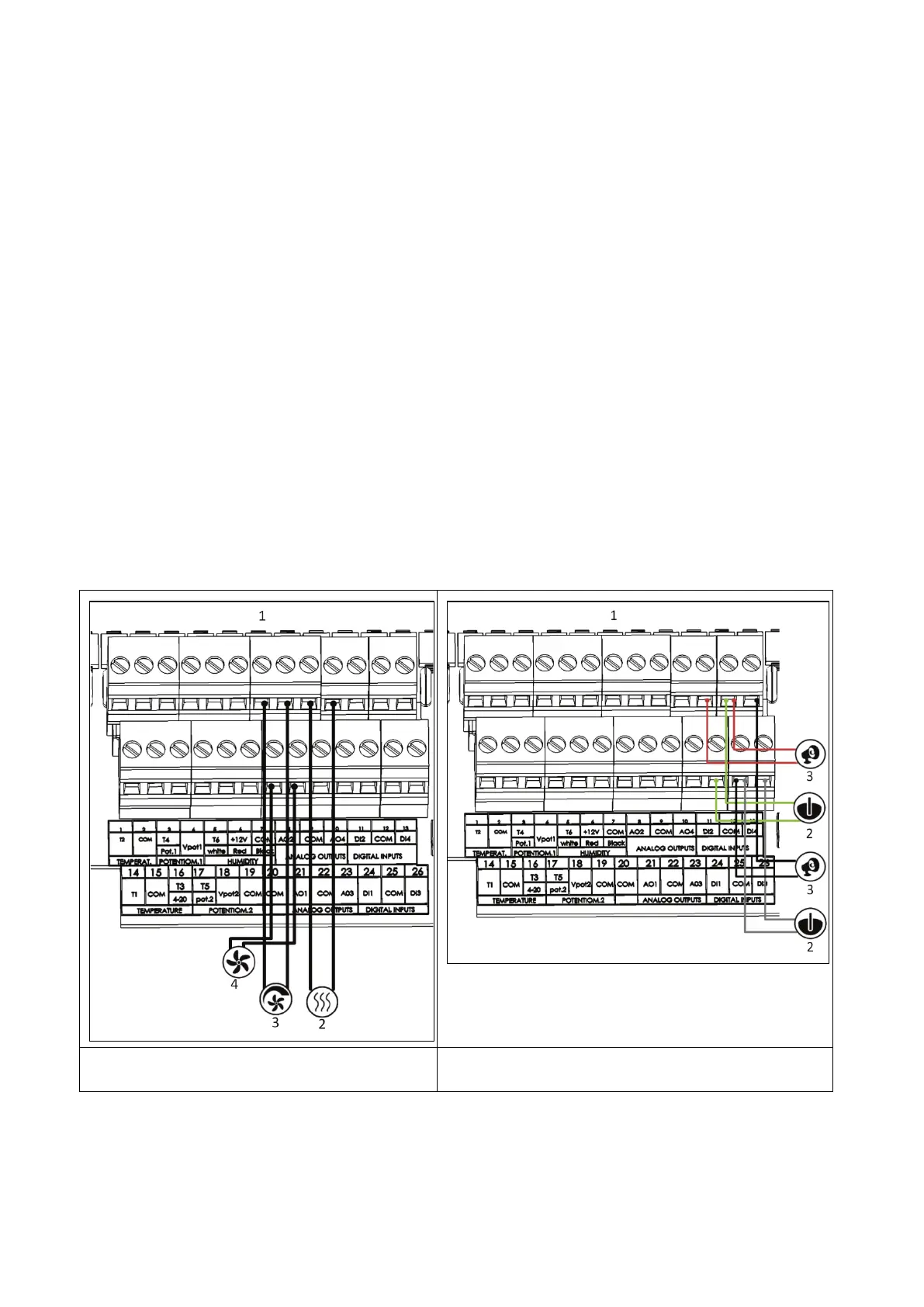
5.2.4.1 Analog Output / Digital Input Wiring
Figure 11: Analog Output Wiring Figure 12: Digital Input Wiring



 To Next Page