© Munters AB, 2018 51
10.2.3 C
ONFIGURING THE
L
EVELS OF
V
ENTILATION
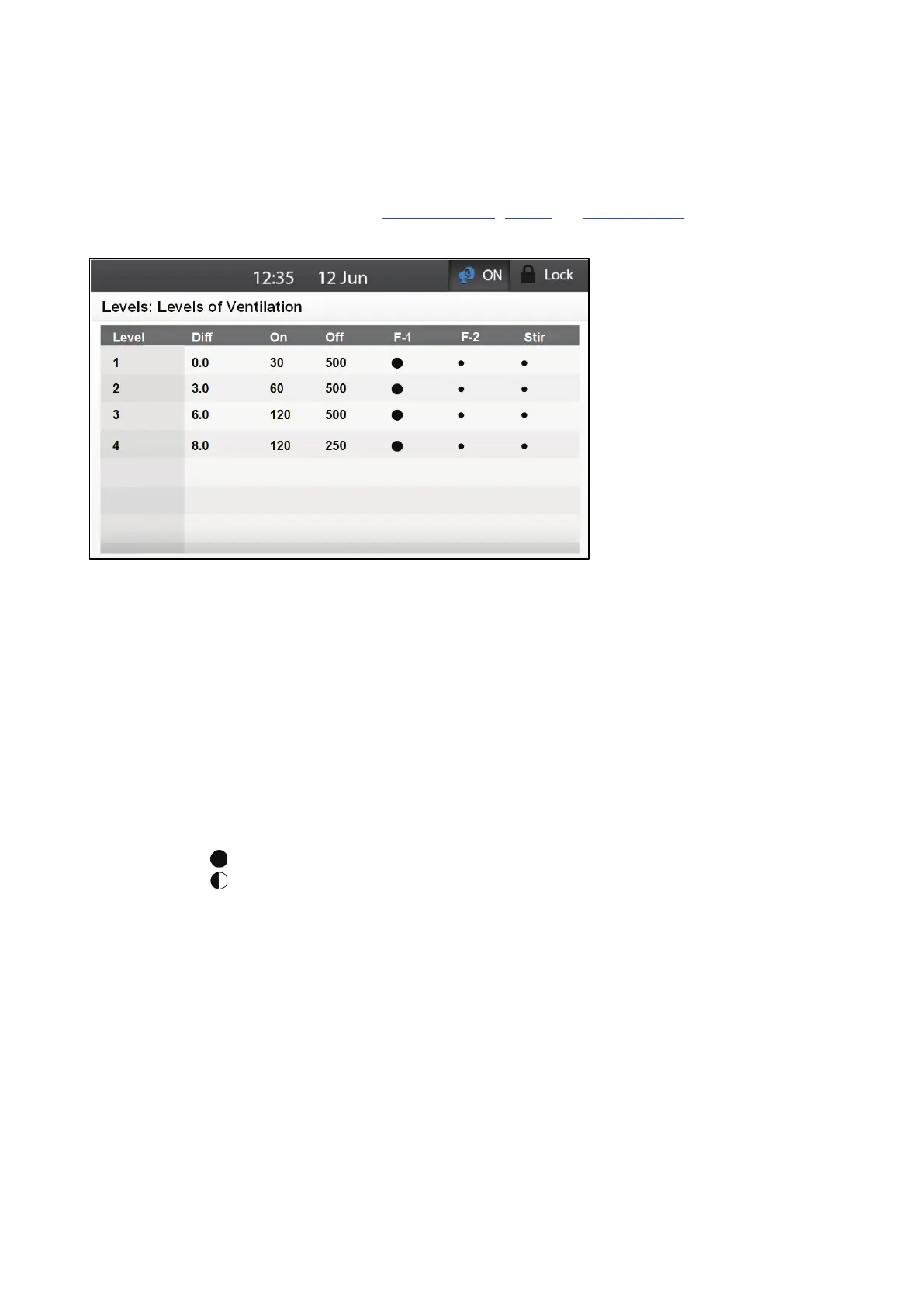
This screen defines how fans operate (how long, in which mode, and which fans) at each ventilation
level.
Define up to eight fans in the Analog Output, TRIAC, or Relay Layout screens.
1. Go to System > Levels of Ventilation > Ventilation Levels.
2. Define the following parameters:
o
Level: This displays the ventilation level. The numbers are read-only.
o
Diff: Define the temperature difference from the target temperature for that ventilation
level. Range: 0-15°C Default 0
o
On/Off: Define the fans' on and off times. Range: 0-999 seconds. Default: 0.
If a level's diff is defined as 0, ventilation will still continue to rise as the
temperature rises above the target temperature.
If a level does not have a defined diff parameter, the previous level having a
defined parameter will apply.
NOTE If either the On or Off time is defined as 0, the fan runs in continuous mode.
o
Fan Mode: Under F-1 to F-8, define each fans mode:
: Continuous
: Cycle
●: Off
3. If required, go to System > Levels > Levels of Ventilation > Set.



 To Next Page