© Munters AB, 2018 34
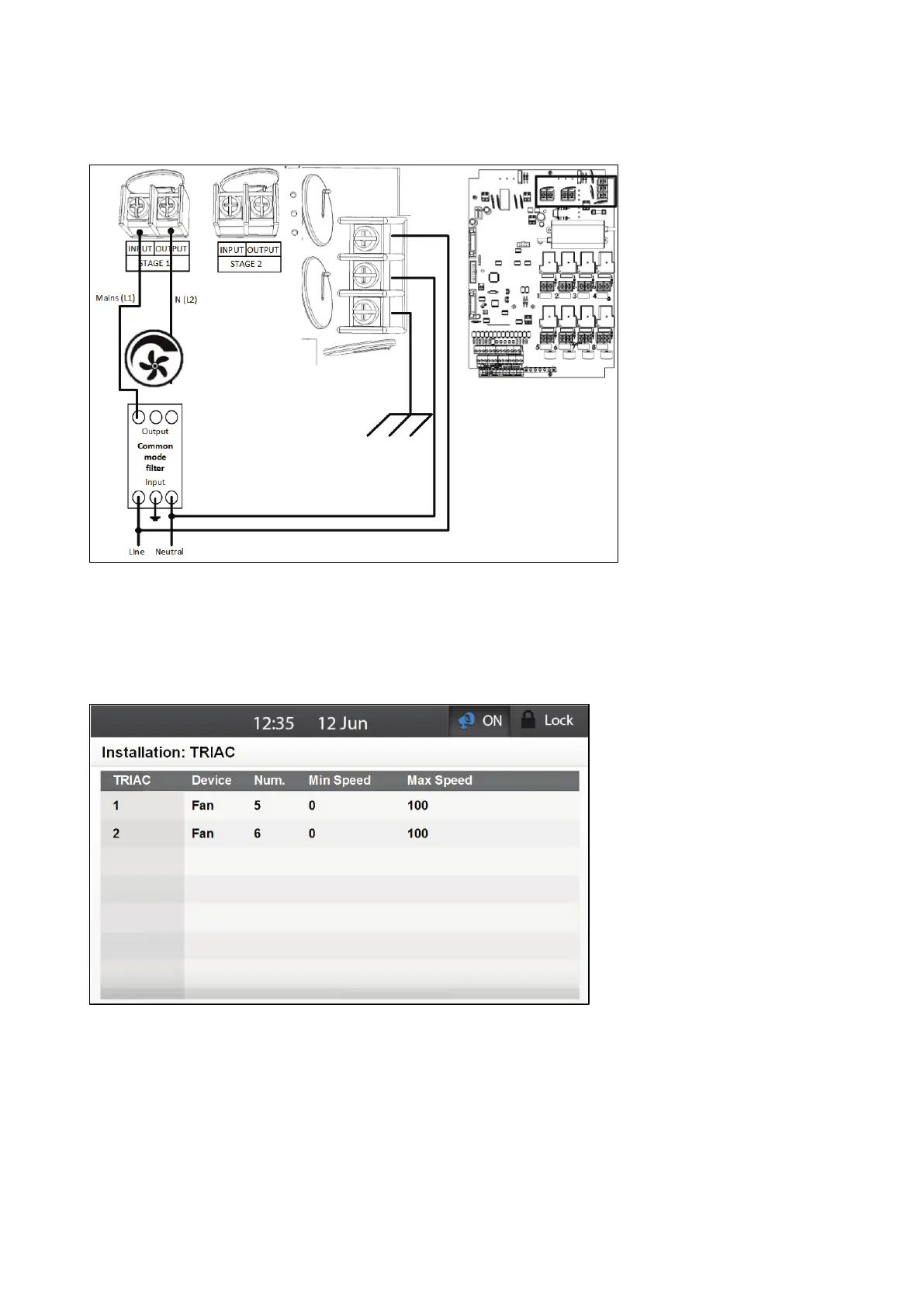
To ensure compliance with EMC 61000-6-3, install an appropriate filter; for example a Munters' filter
(P/N: P-EMI), TDK-RSHN-2016 L or similar devices.
Figure 20: Wiring Diagram of Main Voltage Section Showing Filtering
5.2.6.2 Configuring the TRIAC Variable Speed Fans
Wire the TRIAC devices to the Element relays as shown in Figure 18.
1.
Go to System > Installation > TRIAC.
2. Scroll to each TRIAC output.
3. From the drop down list, select the device wired to that TRIAC.
o
Element automatically assigns the relay a number, according to the device type. The
number of devices supports varies according to the device type.
Fan: 2
Stir Fan:2
o
You can edit the number, but any assigned number must be different from an existing
number of that device type (for example, you cannot assign two relays to be Fan #2).



 To Next Page