© Munters AB, 2018 45
9 Temperature Settings
•
What is the Temperature Curve
•
Configuring the Temperature Curve
NOTE Temperature setting should be configured by a person familiar with the pigs' growth cycle and
temperature requirements.
9.1 What is the Temperature Curve
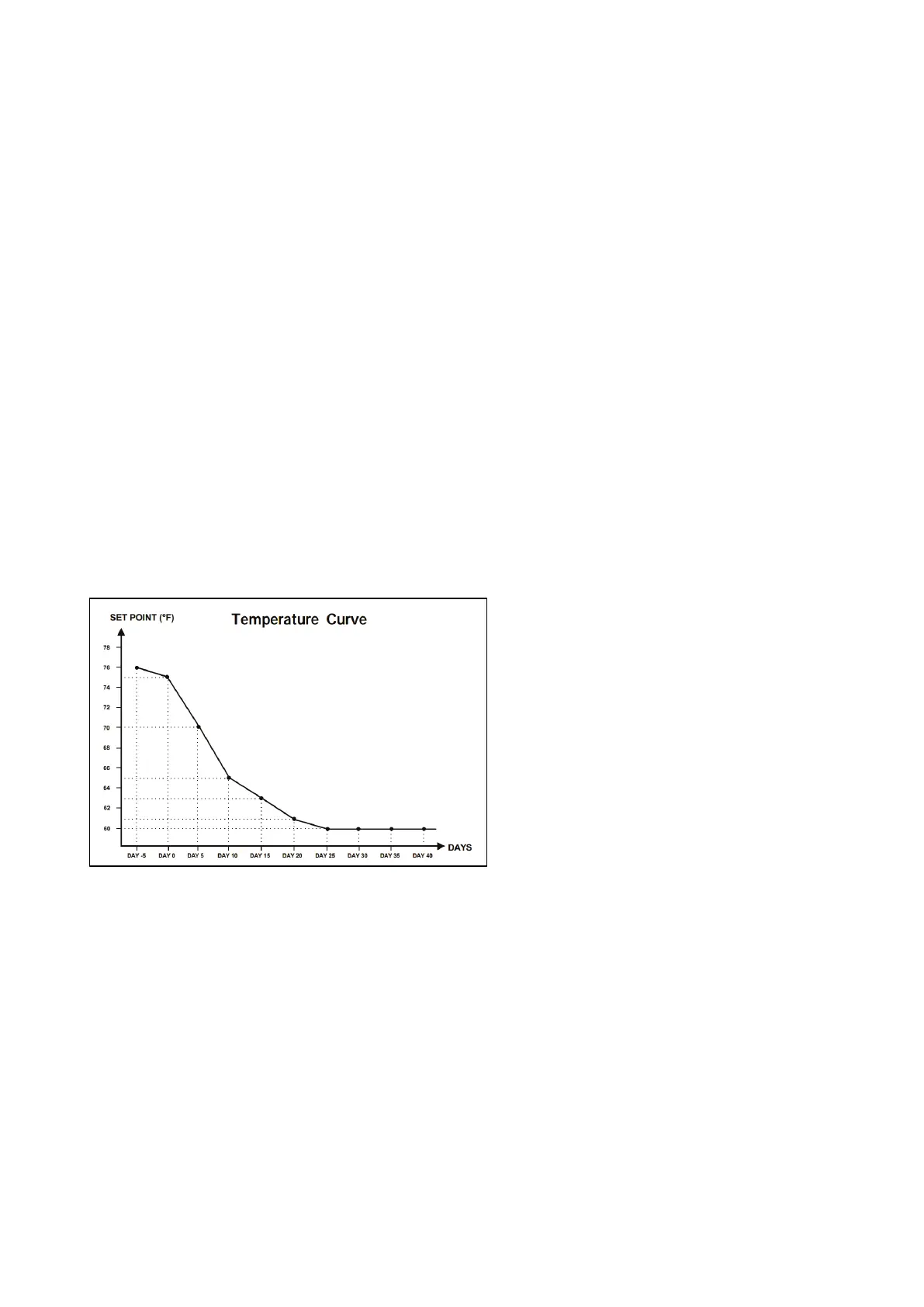
As animals grow, the required air temperature changes. Element enables setting up a temperature chart
in which you set the target temperatures for (up to) 10 days in the growth cycle. Target temperature is
the ideal temperature for pigs at that growth day. After defining the target temperatures and growth
days, Element creates a curve in which the target temperature automatically, gradually adjusts itself. As
the growth days increase, the target temperature gradually decreases to the next setting.
For example, if on day 1 the target temperature is 95° F and on day 5 the target temperature is 86° F,
Element adjusts the target temperature on days 2 to 4 so that it approaches the day 5 setting.
Figure 24: Temperature Curve Example
In addition the Temperature Curve has secondary functions:
•
Defines when heating begins in cases where the actual temperature drops below the target
temperature (Heat).
•
Defines when heating turns off.
•
Defines when an alarm is sent when temperatures are too low (Low Alarm)
•
Defines when an alarm is sent when temperatures are too high (High Alarm)



 To Next Page