© Munters AB, 2018 57
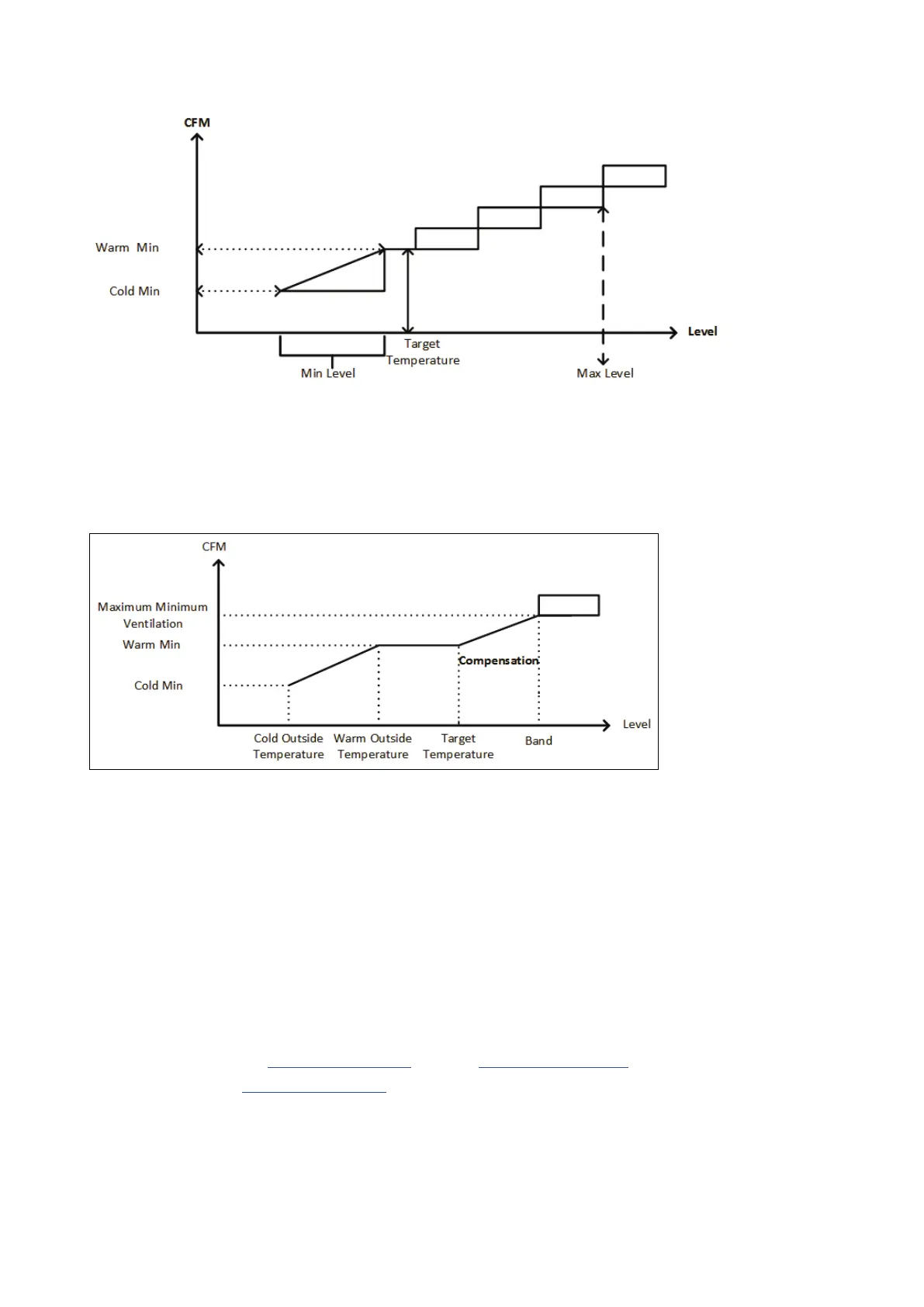
Figure 31: Ventilation by Weight Example
It is important to note that the Warm Minimum can be less than the Minimum Ventilation's output. In that
case, the controller will increase the ventilation before raising the ventilation level. This increase is called
"Compensation"(Figure 32). In the case where even with the compensation the fans do not supply
sufficient air, Element then goes to the next ventilation level.
Figure 32: Ventilation by Weight Compensation Example
•
When using cycle fans, each level has minimum and maximum on times, which determine the
minimum and maximum CFM. If the ventilation doesn't provide enough air for the pigs (based
on their numbers and weight) Element sends an alarm. You will need to redefine the minimum
level.
•
When using variable speed fans, the defined percentages determine the minimum and maximum
CFM. However, if a variable fan is set to run in a cycle, the cycle time determines the fan
operation, not the user-define fan speed.
•
Note that there is no curve between days.
11.3.2 C
ONFIGURING
V
ENTILATION BY
W
EIGHT
Configure the Temperature Curve and the Levels of Ventilation.
Define the number of animals in the herd.
1. Go to Control > Min Max Level > Set.



 To Next Page