© Munters AB, 2018 58
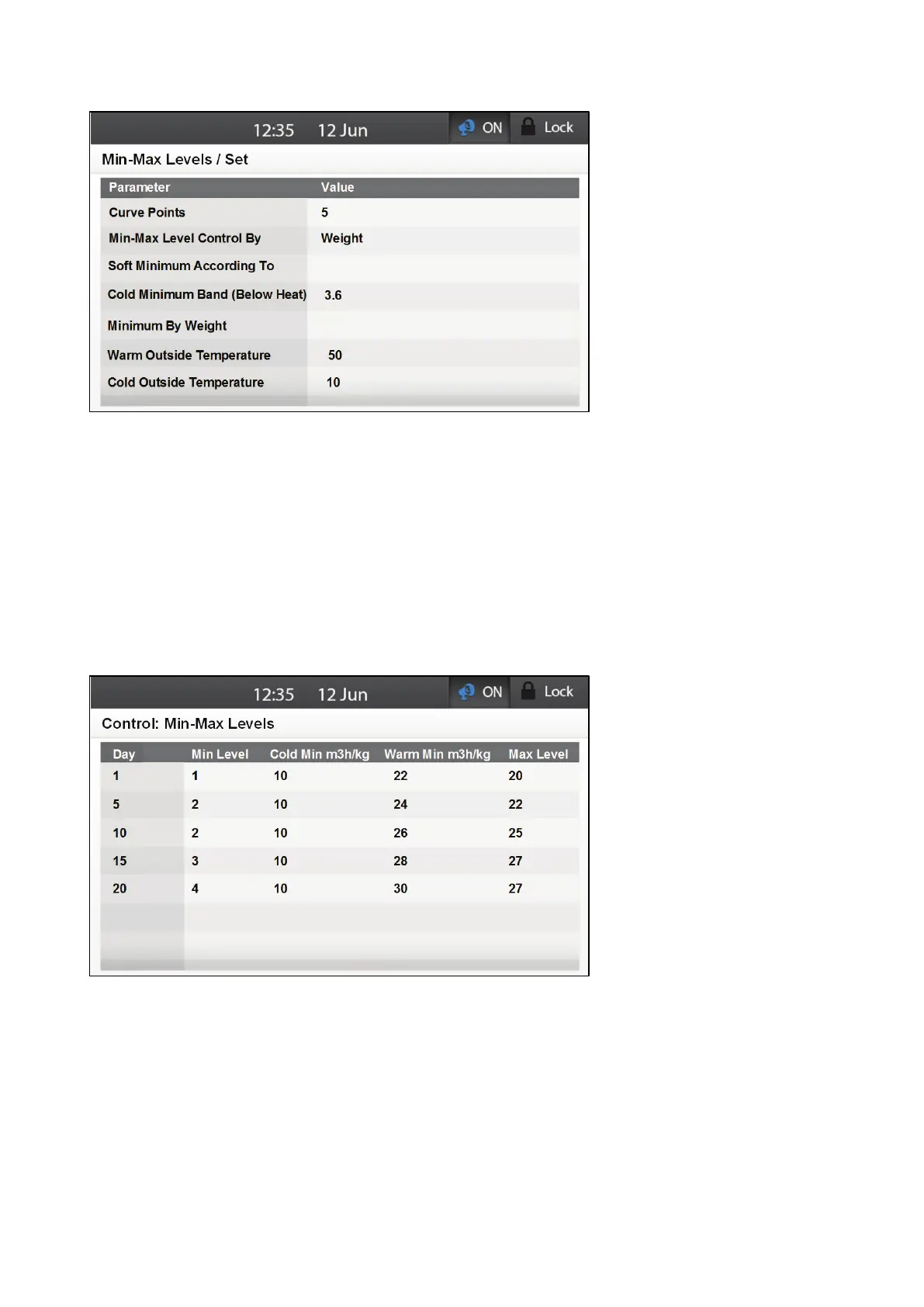
2. Define the following parameters:
o
Curve Points: Define the number of Min-Max levels. Range: 1 – 30. Default: 1
o
Min Max Level Control By: Set this parameter to By Weight.
o
Warm Outside Temperature: This temperature is used to define the largest amount of
air that minimal ventilation can provide.
o
Cold Outside Temperature: This temperature is used to define the smallest amount of
air that minimal ventilation can provide.
Between the Cold Outside Temperature and Warm Outside Temperature the ventilation curves;
see Figure 32.
3. Go to Control > Min Max Level.
4. Define the following parameters:
o Day: Define the growth day at which the ventilation levels change. Range 1 – 10.
Default: 0
o Minimum: Set the controller's minimum ventilation level starting at that day. Ventilation
is never less than this level.
o Cold Min: Define the amount of air provided when the outside temperature reaches
the Cold Outside Temperature defined in Set.
o Warm Min: Define the amount of air provided when the outside temperature reaches
the Cold Outside Temperature defined in Set.
o Maximum: Set the controller's maximum ventilation level starting at that day.
Ventilation is never higher than this level.



 To Next Page