© Munters AB, 2018 67
13 Cooling Functions
•
Cooling Principles
•
Configuring the Cool
13.1 Cooling Principles
Element supports controlling up to two cooling devices (foggers or cooling pads). The devices can run
separately or together.
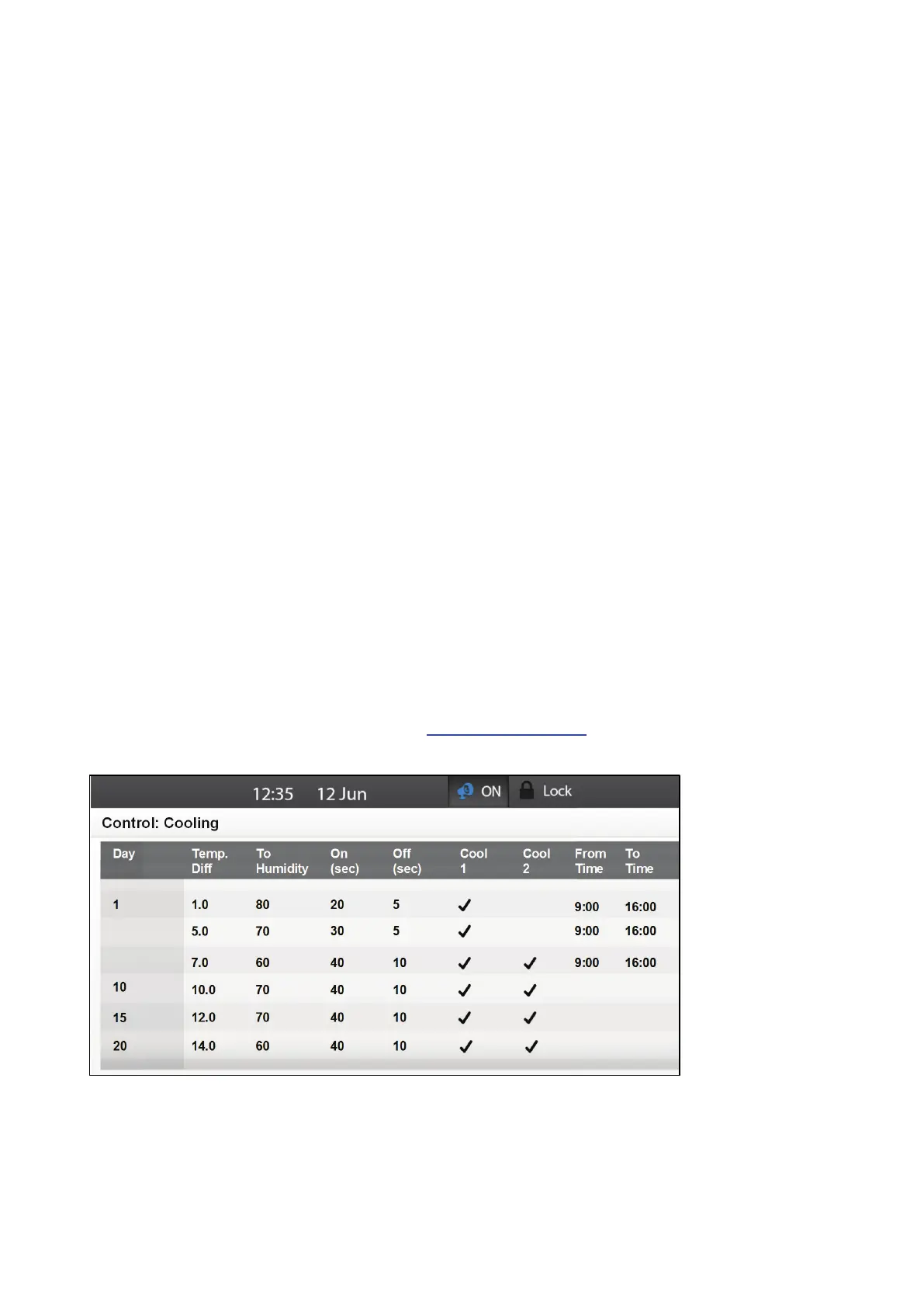
To avoid causing the animals undo heat stress during periods of high relative humidity, Element employs
the following rules:
•
When the temperature reaches the Target Temperature plus the Temperature Difference,
cooling begins and continues until the temperature falls below this point (minus the band)
(Figure 33).
•
If the humidity level rises above the To Humidity parameter (plus the Humidity Band ), cooling
ceases.
•
Cooling only takes place between the start and finish times.
13.2 Configuring the Cooling
Wire cooling devices to the relays as shown in Figure 7, page 21.
Define Centigrade or Fahrenheit in Measurement System.
1. Go to Control > Cooling.
2. Define the following parameters:
o
Day: Define the growth day (You can define up to 999 growth days, including multiple
lines for any individual day.) Default 0. These settings remain in effect until the next
defined day.



 To Next Page