© Munters AB, 2018 64
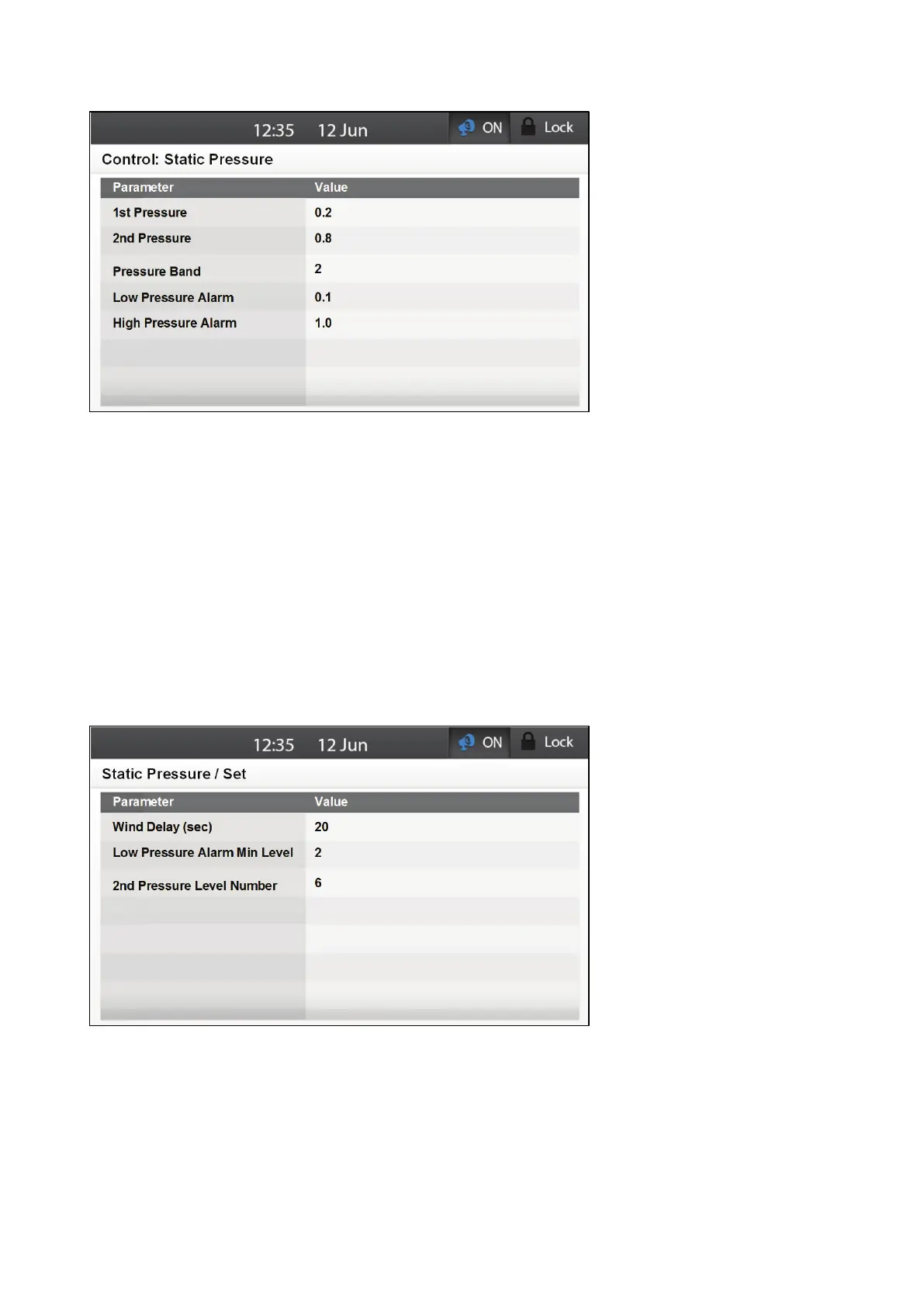
4. Define the following parameters:
o
1st Pressure: 1st static pressure target that the inlets need to maintain.
o
2nd Pressure: 2nd static pressure target that the inlets need to maintain.
o
Pressure Band: This defines the acceptable pressure range:
Below the band (Pressure – Band), Element closes the inlets.
Above the band (Pressure + Band), Element opens the inlets.
Inside the band, Element does nothing.
NOTE The number defined is the number used in making all calculations.
o
Low Pressure Alarm: When static pressure is below this level, Element sends an alarm.
o
High Pressure Alarm: When static pressure is above this level, Element sends an alarm.
5. Go to Control > Static Pressure > Set.
6. Define the following parameters.
o
Wind Delay (sec): The amount of time that the air pressure must be outside of the band
limit before Element adjusts the opening.
o
Low Pressure Alarm Min Level: Below this ventilation level, Element ceases to send an
alarm.
o
2nd Pressure Level Number: The minimum ventilation level required for Element to
enable the 2nd pressure point.



 To Next Page