Nozzle check and cleaning 41
[6]
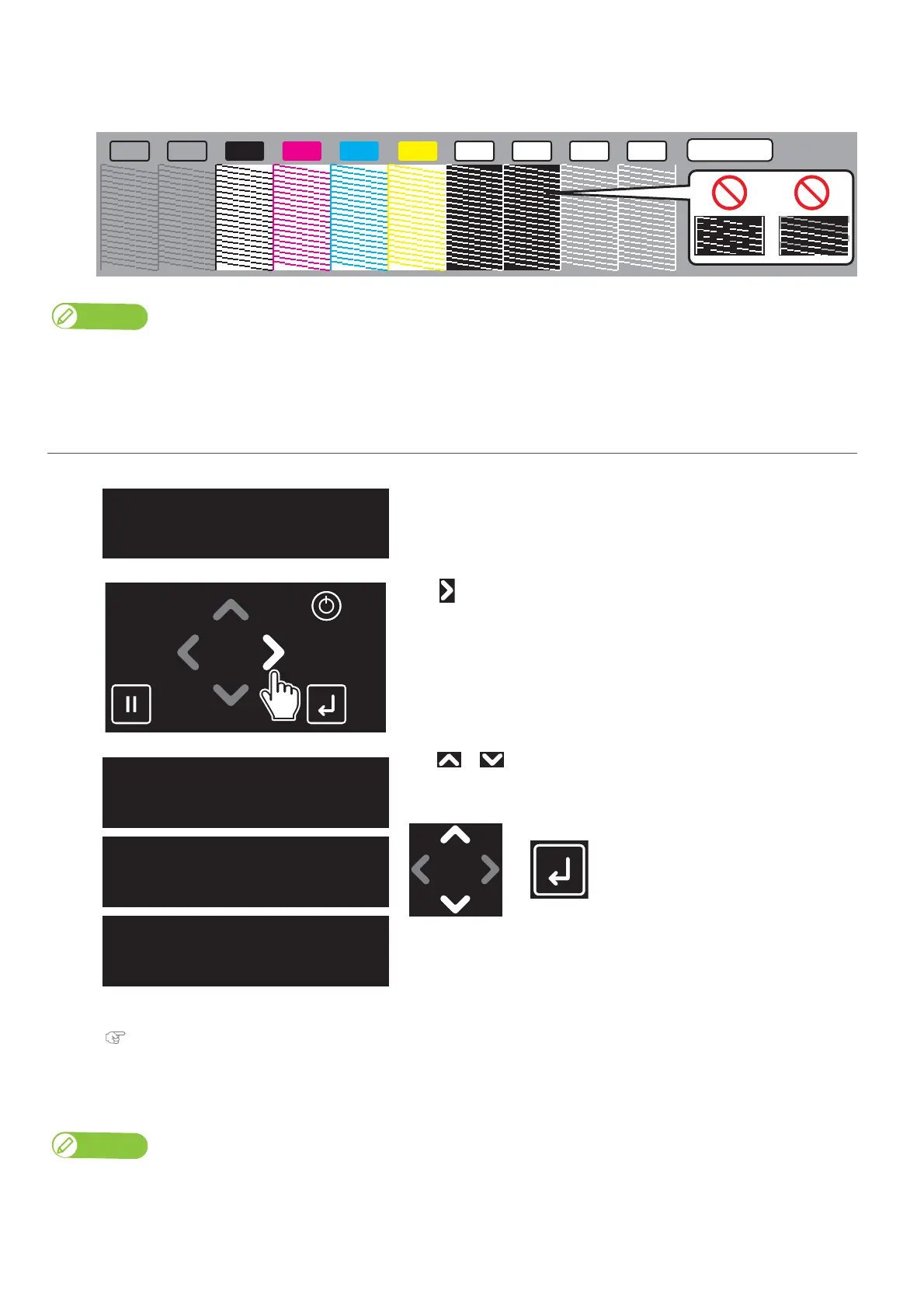
Look at the print.
• If you find missing or thin lines on the print, go to "Perform cleaning" P. 41.
• If all lines are clearly printed, you can start printing.
Note
• The figure above is an example of the Nozzle Check B pattern. In this example, non-colored background area is shown in gray.
• Printer information (Data and time printed, serial number, firmware version) is printed next to the pattern.
2. Perform cleaning
[1]
Check that the message on the left is displayed.
[2]
Tap .
[3]
Use or to choose the cleaning mode.
Tap [Enter].
• The printer will start cleaning.
[4]
Run a nozzle check print again.
"Run a nozzle check print" P. 39
• If the nozzles do not recover after several normal cleaning attempts, try "Long" or "Little Charge" cleaning.
For the details of cleaning, see "Head cleaning" P. 123.
Note
If "Long" or "Little Charge" cleaning does not help to recover the nozzles, go to "Advanced Settings 11: Select Nozzle" P. 81 to select the
nozzles that fire properly.
M CVA VA
K
WH WHY
6 Color
WH WH
PrintReady
Type1
CleanPrintHead?
Short
CleanPrintHead?
Normal
CleanPrintHead?
Long














 To Next Page