144 Replacing consumable parts
[7]
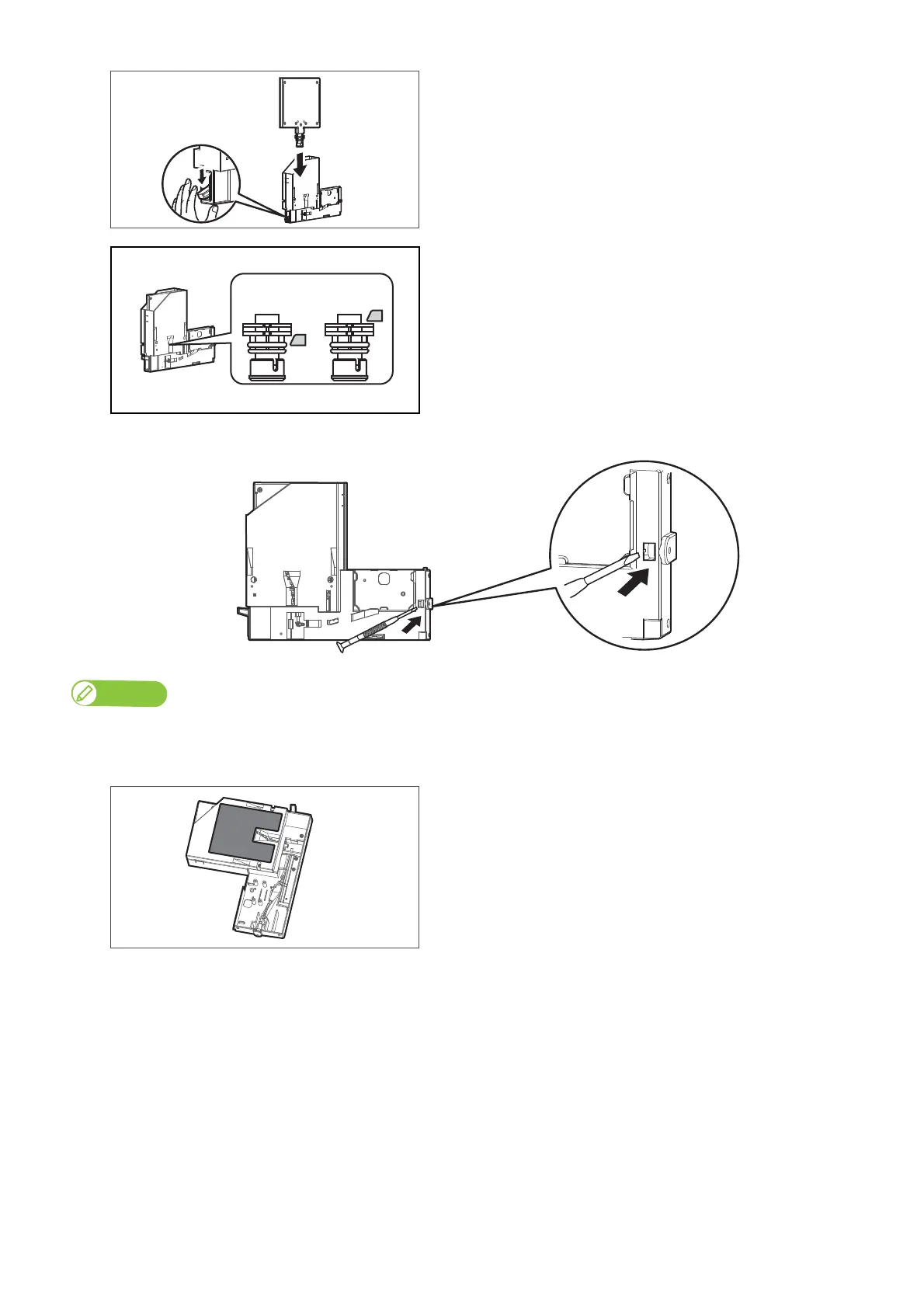
While lowering the lock lever of the high-capacity ink pack adapter,
insert the sealing jig.
• Make sure to fully insert the sealing jig into the high-capacity ink
pack adapter.
• Confirm the sealing jig is fully seated by checking the lock
mechanism is at the top of the ink delivery neck through the
observation window, see proper placement in image below.
[8]
Use a fine-tipped tool to push out the tube connector from the left gap of the high-capacity ink pack adapter.
Note
• When replacing the adapter’s plug, make sure that the sealing jig is properly inserted to the adapter. If not inserted, ink remained in the tube may spill out
from the connector.
• When pushing the tube connector, be careful not to damage it with the tool.
[9]
Lay the high-capacity ink pack adapter sideway gently with the
caution label side up.
NG OK



 To Next Page